Want followers to find the right product without asking you in the comments? This template helps each person pick, for themselves or as a gift, and sends them the one product that fits.

Kshitij Maheshwari


Comment QUIZ, answer two questions in the DM, get the right product: for me or a gift, best value or top quality. Copy this Instagram template.
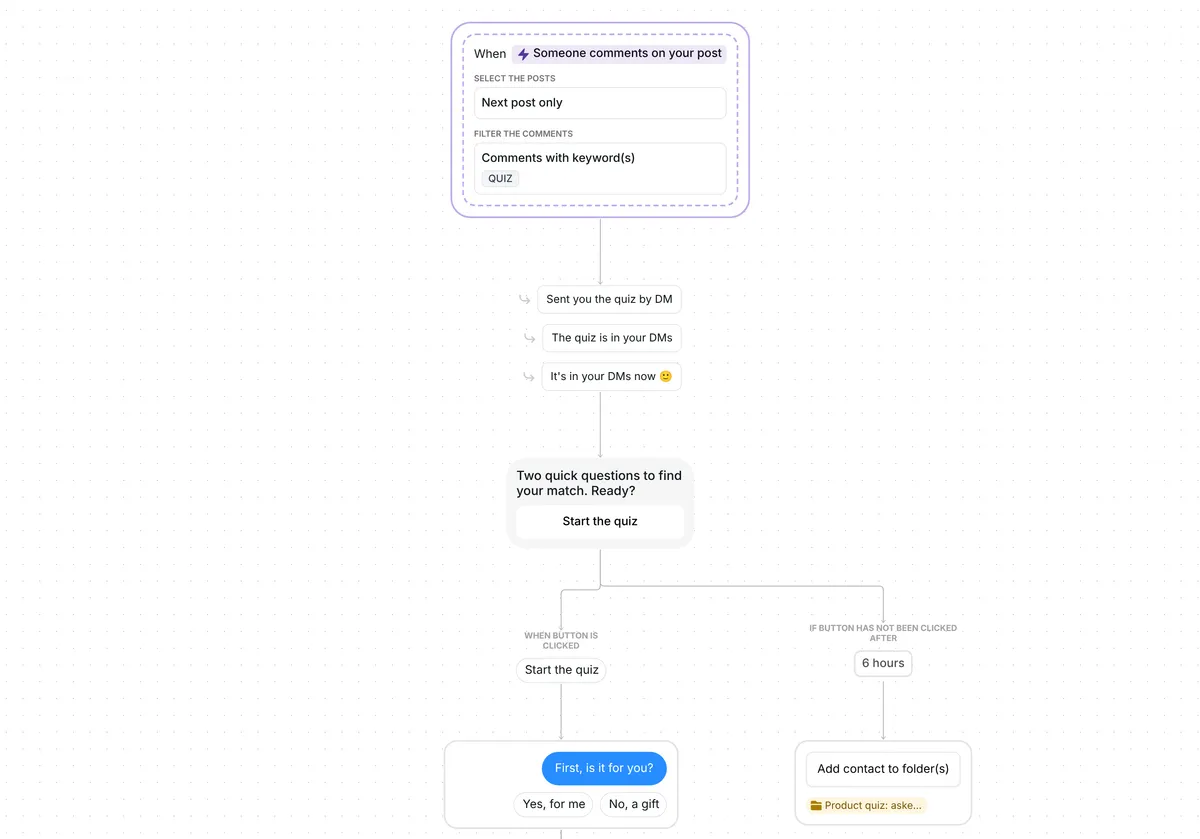
Ask people to comment QUIZ on your next post. Each gets a DM with a "Start the quiz" button, and a tap brings two questions: is it for them or a gift, and is price the main thing? Each pair of answers leads to its own product link. Anyone who stops is saved in one folder for a follow-up.

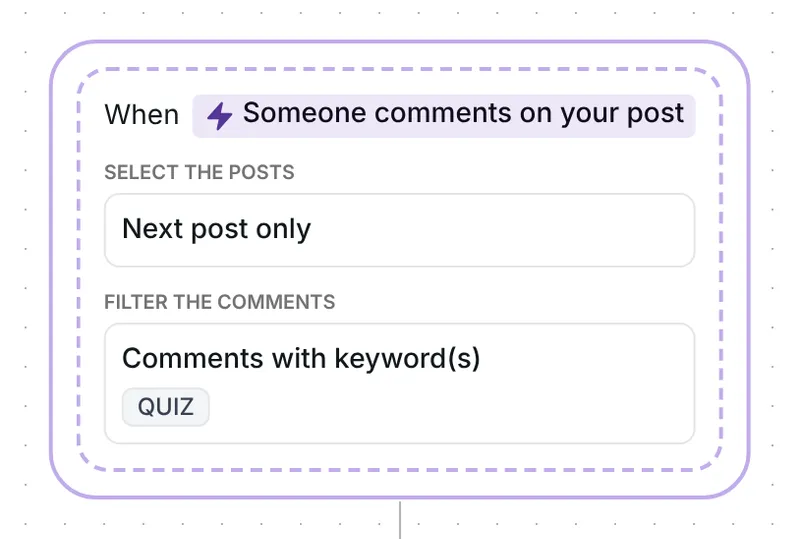
Any top-level comment with the word QUIZ starts the flow, in any case, so "quiz please" counts; replies to other comments do not. Through Inrō's comment to DM feature, the person gets the quiz in their DMs and their comment gets one of three public answers, picked at random: "Sent you the quiz by DM", "The quiz is in your DMs" or "It's in your DMs now 🙂". That answer goes up only after the DM is sent.
The trigger watches one post, the first you publish after the date it holds. Copying the template sets that date, so reset it just before the QUIZ post goes live (setup, check 1).
The opening message reads "Two quick questions to find your match. Ready?" It is a button message with a single button, "Start the quiz".
Why a tap first? Instagram lets a business send one private reply to a comment, within 7 days of it, and the conversation carries on only once the person responds (Meta for Developers, checked 22 October 2026). The tap on "Start the quiz" is that response, so the questions can follow. One button also keeps the choice easy: conversion was 32% with one button against 2% with three, in our DM Benchmark of 798,041 conversations.
After the tap, Inrō asks "First, is it for you?" in a question step with two answer buttons: "Yes, for me" and "No, a gift". A typed answer counts when it contains one of the answers as written, so "yes, for me please" works. An answer that matches neither gets one re-ask: "Just tap one of the two options below."
The second answer turns the flow into a gift finder quiz, a good fit for posts with gift ideas for the holidays.
Both branches then ask "And is price the main thing?", with "Yes, price first" and "No, quality first". Two questions with two answers each make four combinations, one product each.

Every combination ends on a link card with the button "Take a look":
A tap on any card puts the person in the folder "Product quiz: clicked". If 2 hours pass without a tap, Inrō sends one nudge: "Have you checked the link yet?"

The 2 hours only times the nudge; the link still opens after it. Inrō counts each tap on a card as a click, not a sale.
Three things send someone to the folder "Product quiz: asked": no tap on "Start the quiz" within 6 hours, no answer to a question within 20 hours, or a second answer that matches neither option. They get nothing more, and you get one list of people who started and did not finish.
The trigger comes ready: comments that contain QUIZ, on your next post, top-level comments only. Each person gets the quiz once; a second QUIZ comment from them gets nothing.
Check six things before you go live:
You can also rename the two folders and change the waits: 6 hours for the button, 20 hours for each answer, 2 hours before the nudge.
Copy this template from its share link, rename the four result cards after your products and paste their addresses. People comment QUIZ, answer two questions in your DMs and get the product that fits their answers.
Yes. Paste each Shopify product URL into a result card, and the click folder and the 2 hour nudge keep working. Inrō's Shopify link step (Pro plan, Shopify integration) can send a product card from your store instead, without the clicked and not-clicked branches.
An answer that matches neither button gets one re-ask. After a second miss, or 20 hours with no answer, the person goes into the folder "Product quiz: asked" and gets nothing more. That folder is your list of people to follow up with later.
Yes. In this template your reply does not stop the quiz, so a reminder can still go out after you write. To make your reply stop it for that person, turn on "Interrupt when you reply manually" in the scenario settings.
Not sure how it work?
Read posts about templates on our blog.
Become a creator
Submit your template to the Inrō template gallery and get featured – all in just a few clicks.

It clones straight into your account. Change the message to sound like you, then switch it on.