Want your shop link in front of people the moment they say they want to buy, without watching your inbox all day? This template answers buying messages in your DMs and points each buyer to your shop.


Kshitij Maheshwari


When someone DMs that they want to buy, AI spots it and sends your shop link, plus one nudge 2 hours later if they have not tapped. Copy the template.
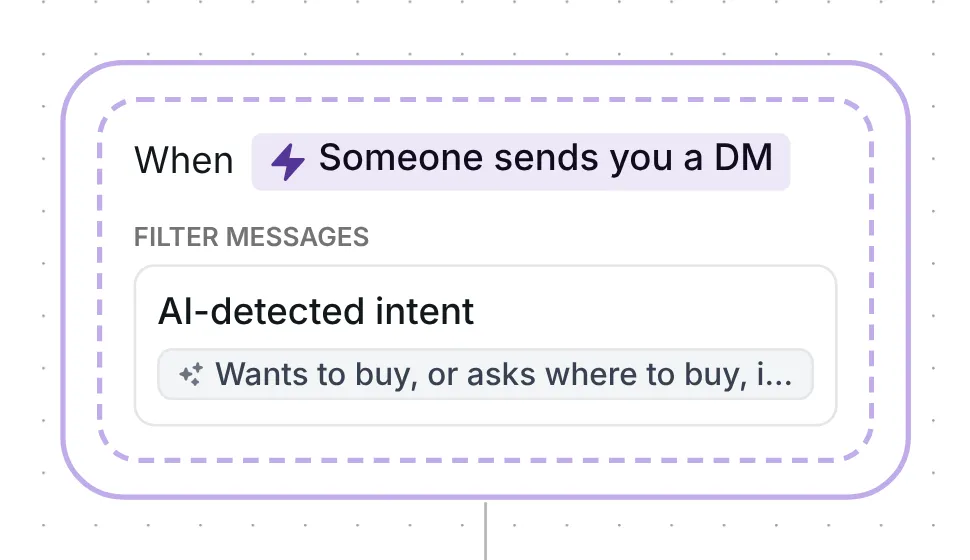
When someone DMs you that they want to buy, asks where to order or whether something is in stock, AI reads the message and decides whether it is a buying message. On a yes, Inrō replies with where to order and sends your shop link. If they have not tapped it 2 hours later, one nudge follows.

The flow checks every message someone sends you, at any point in the conversation. Its filter is AI-detected intent: the flow starts only when the AI says the message matches the intent written in the trigger, "Wants to buy, or asks where to buy, if it is in stock or how to order, in their own words. Not a button reply, a complaint, a return or a collab pitch."
Inrō waits until the person has been quiet for 5 seconds and reads what they sent as one message group. The AI then answers one question: does this match the intent? Only a yes starts the flow.
The words after "Not" tell the AI what to leave out. A tap on a button in another of your automations reaches Inrō as a message from the person, which is why the intent names button replies. "Where can I buy the blue one?" or "is the medium back in stock?" are the kind of message the intent describes; "my order hasn't arrived" or "do you do collabs?" are what it asks the AI to leave out.
On a yes, Inrō answers: "Here's where you can order. Any questions about sizes or delivery, just reply here." No button has to come first, because the person wrote to you: in Meta's words, "Conversations only begin when an Instagram user sends a message" (Meta for Developers, checked 22 October 2026).
The reply is 83 characters. Short first messages do better: across the 798,041 conversations in our DM Benchmark, conversion was 39% with a first message under 120 characters, against 22% for longer ones.
Next comes a link card, "Shop the collection", with the button "Shop now". It comes right after the reply, so the message tells them where to order and the card takes them there in one tap. Everyone who taps goes into the folder "Shop: clicked", even if the tap comes after the nudge.

If they have not tapped after 2 hours, Inrō sends one nudge: "No rush, the link is just above." The 2 hours is only the wait before the nudge: the link keeps working. Inrō records who taps it, not who buys.
The trigger comes set up: any DM, filtered by AI-detected buying intent, and the flow runs at most once a day for each person.
Check six things before you go live:
More flows for shops: Instagram DM automation for e-commerce brands. For price questions under your posts, use the comment for price template.
It reads what the person sent and answers yes or no: does it match the intent you wrote? Only a yes starts the flow. You write the intent in your own words, and intent detection explains the filter in more detail.
Only when the AI finds a match. Messages that do not match cost nothing, and testing an intent in the builder does not use them. With no credits left, the check does not run and the flow does not start.
The intent tells the AI to leave those out, so this flow sends nothing. You answer them, or your AI agent does if you use one.
No. This is a fixed flow with one AI decision, then your shop link and one nudge. The AI agent holds whole conversations, and the two work side by side.
Not sure how it work?
Read posts about templates on our blog.
Become a creator
Submit your template to the Inrō template gallery and get featured – all in just a few clicks.

It clones straight into your account. Change the message to sound like you, then switch it on.