Get asked a lot in your comments? This template pairs a short public line with a private answer from your AI Agent in the DMs, so each real question gets a reply without you typing it.

Kshitij Maheshwari


Someone asks a question under your next post and gets a short public line plus a private answer from your AI Agent in the DM. Copy the template.
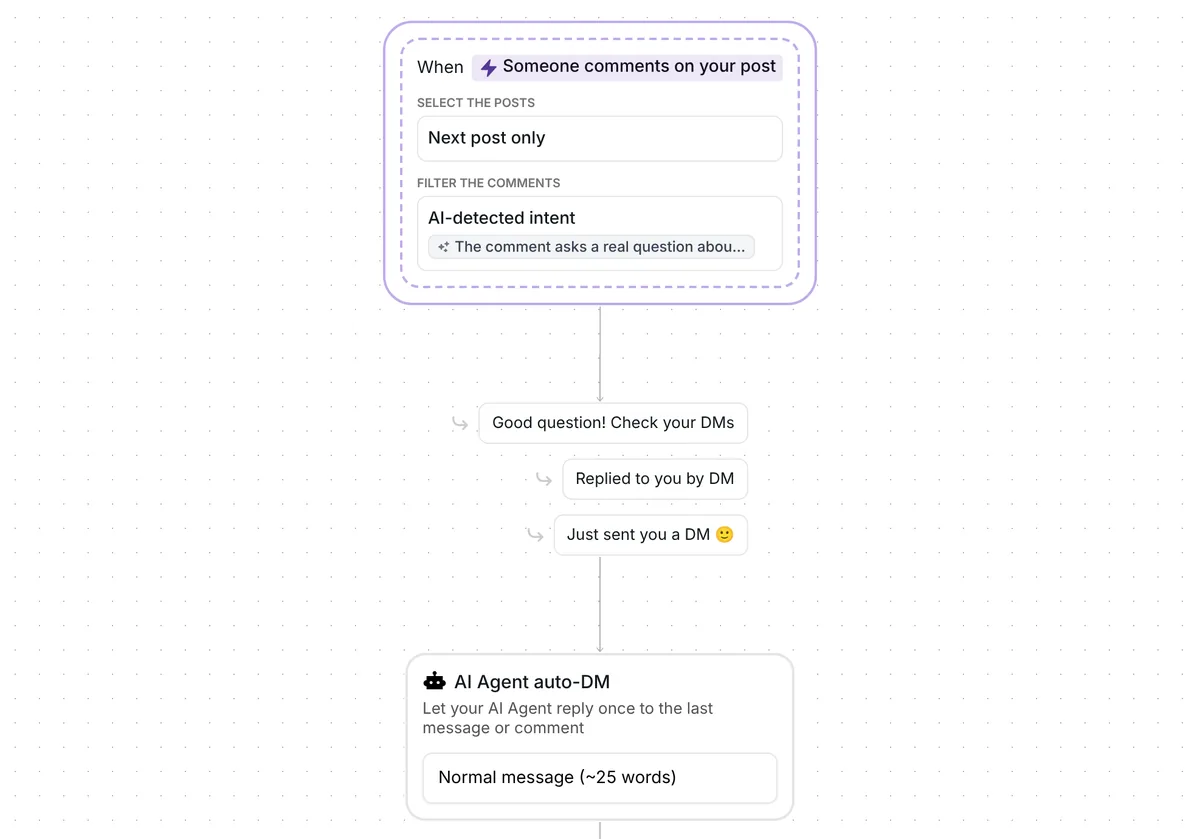
When someone asks a real question under your next post, Inrō adds a short public line such as "Good question! Check your DMs", and your AI Agent sends the answer in their DMs. Each person it matched goes into the folder "Answers: asked", so you see them all in one list.
There is no keyword. AI checks each comment against an intent you can edit, which reads: "The comment asks a real question about the post, the product or the service, such as how it works, the price, sizes or how to book. Not a tag, an emoji, a compliment, a complaint or a single keyword."
The text rules out tags, emoji, compliments, complaints and single keywords. The AI judges one comment at a time, and Inrō notes that AI-detected intents may not always be accurate. Only top-level comments count, not replies inside a thread, and your own comments never start the flow.
Only a single post is watched: the first one you publish once the trigger's date has passed. Copying the template sets that date, so look at it before you publish (details further down).
Inrō replies under the comment with one of three lines, picked at random: "Good question! Check your DMs", "Replied to you by DM" or "Just sent you a DM 🙂". You write these lines yourself, no AI writes them, and the comment is not liked.
The line goes up only once the DM has gone out, so nobody is told to check a DM that never came. The DM itself is a private reply, sent through the comment to DM feature. Instagram lets a business send one private reply to a comment, (Meta for Developers, checked 23 October 2026). One good answer fits that well.
The "AI Agent auto-DM" step, "Let your AI Agent reply once to the last message or comment", sends the answer. It is set to "Normal message (~25 words)", so each answer is about 25 words long. The other choices are about 10, 50 and 100 words.
There is nothing to type into this step. The answer is written from your AI Agent's settings and the knowledge you add to it.
The template sends one answer and nothing else. If the person writes back, what happens next depends on your own AI Agent and inbox settings, or on you.
Last, Inrō adds the person to the folder "Answers: asked". Filter your Inrō inbox and CRM by that folder and you see everyone the template matched, each next to their conversation.
Read the folder as a list of matches. The conversation itself shows what each person was sent.
The trigger comes set up: your next post, top-level comments only, and an AI-detected question as the filter. The template arrives turned off.
Check six things before you go live:
The template needs no link and no email address.
Yes, in the DM. This template pairs a short public line with a private answer from your AI Agent. If you would rather the AI answered in public, use the Reply to comments with AI template.
No. The public line is one of three you write, and the answer goes to the person's DMs. The comment section shows only "Good question! Check your DMs" or one of the other two lines.
No. It picks up top-level comments that the AI reads as a real question. Tags, emoji, compliments, complaints and single keywords are left alone, and so are replies inside a thread and your own comments.
Yes. The answer is written from your AI Agent's settings and the knowledge you add to it, so set those up before you go live.
Not sure how it work?
Read posts about templates on our blog.
Become a creator
Submit your template to the Inrō template gallery and get featured – all in just a few clicks.

It clones straight into your account. Change the message to sound like you, then switch it on.