Automation
Answer messages

Solve support questions and check back

Want support questions answered in your DMs without chasing everyone? This template sends your fix, checks back after 20 hours of silence, and emails you when someone writes back or says it is not sorted.

Solve support questions and check back
About

Someone DMs HELPDESK and gets your answer. Inrō emails you if they write back and checks in after 20 hours of silence. Copy the support template.

Ask people to DM you HELPDESK when they need help. Inrō answers with your usual fix and waits. If they write back, you get an email and they go into the folder "Needs a human". If they stay quiet for 20 hours, Inrō asks "Just checking in. Did that sort it out?" and files the answer.
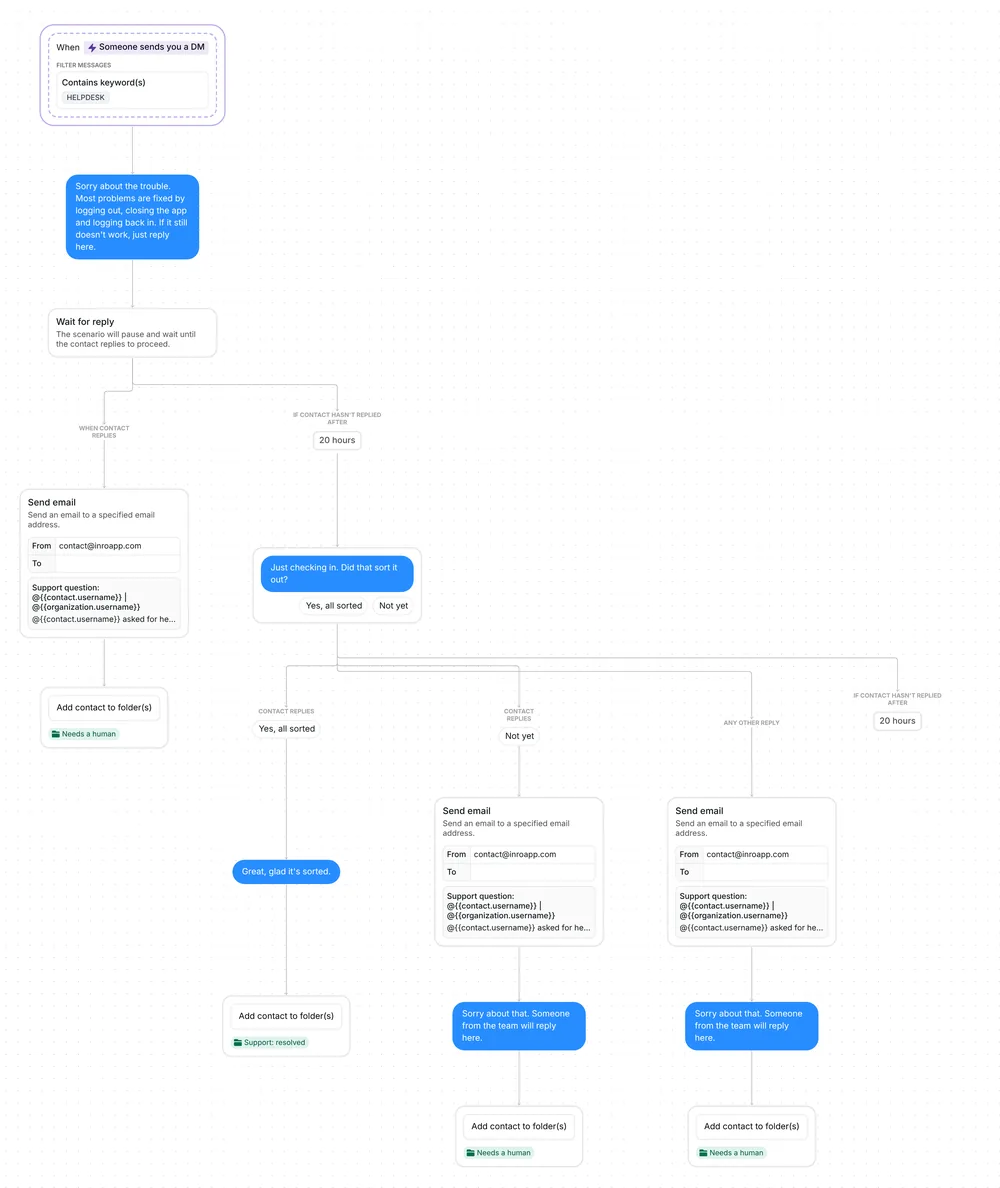
Whole support flow in Inrō: HELPDESK DM, answer, 20-hour wait, check-in question, resolved or needs a human folders

What the template does, step by step

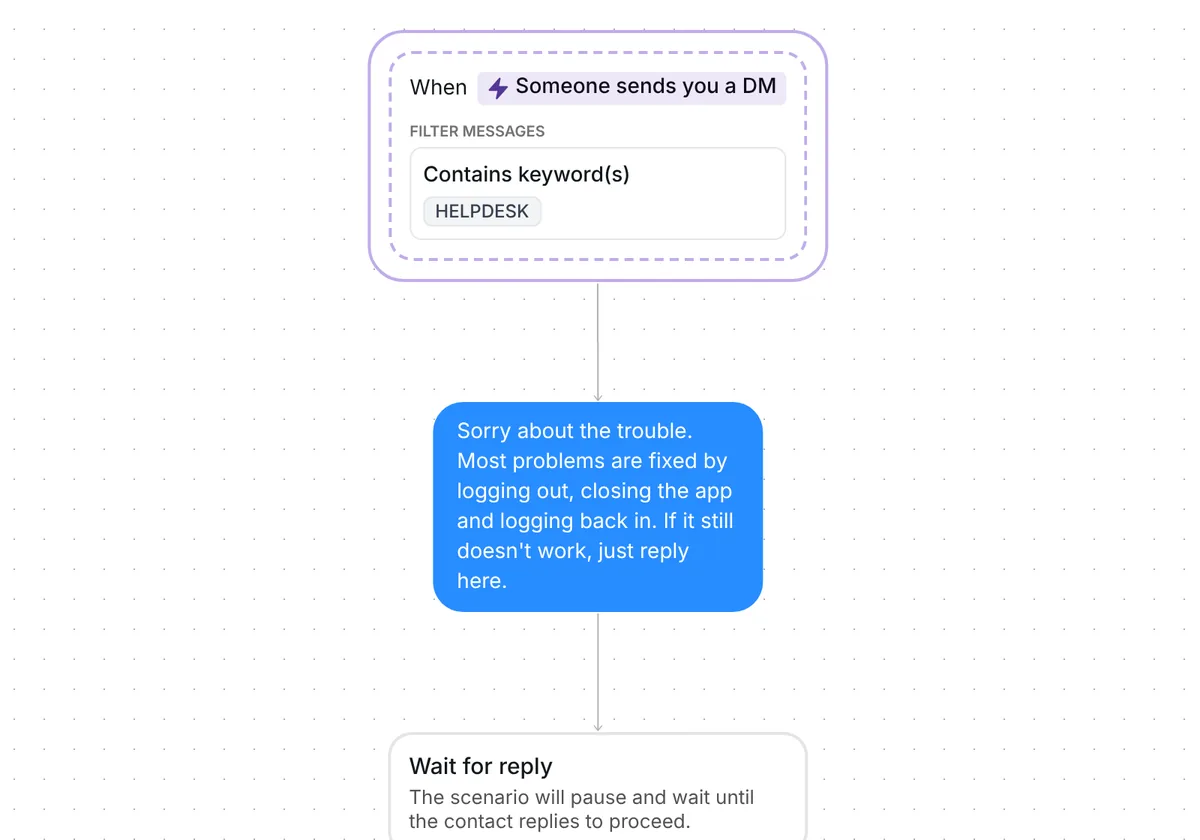
1. Someone DMs HELPDESK

The trigger listens to your DMs for the word HELPDESK. It reacts to the first message in a conversation or any later one, so a customer you already talk to can use it too.

The keyword can sit inside a longer message, in capitals or not: "HELPDESK my login is not working" starts the flow, and so does "helpdesk". Written as two words, "help desk" does not count as built (the setup section shows how to add it).

No AI is involved. The answer is the text you write, and the check-in has two buttons.

2. Your answer, then 20 hours to write back

Inrō replies first with an example for a login problem: "Sorry about the trouble. Most problems are fixed by logging out, closing the app and logging back in. If it still doesn't work, just reply here." You replace it with the fix you give most often.

Then Inrō waits up to 20 hours for the person to write back.
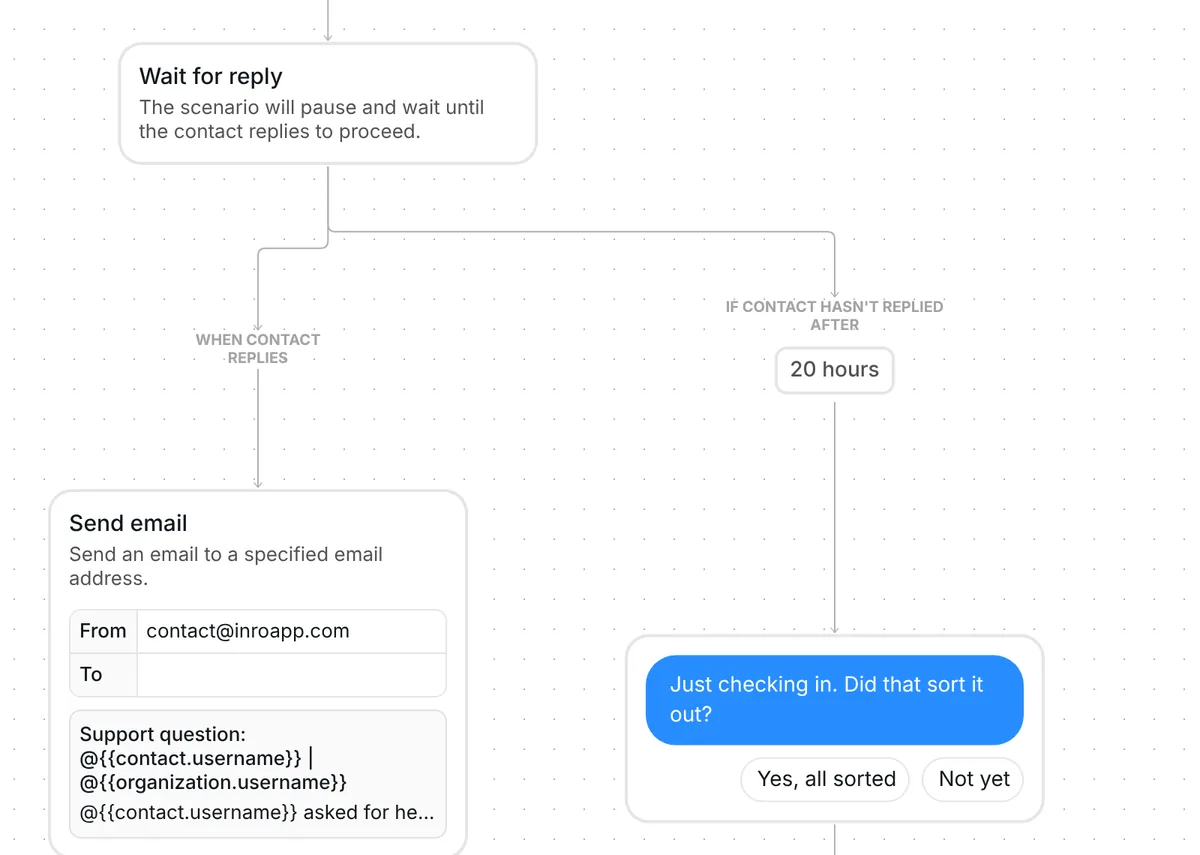
Wait for reply step: a reply sends an email alert, 20 hours of silence sends Just checking in with two buttons

3. A reply comes to you, silence gets one check-in

If the person writes back within 20 hours, you get an email titled "Support question: @username | @yourhandle". It says who asked and shows their first message and their latest message. They go into the folder "Needs a human", and Inrō sends them nothing more: you reply yourself.

Any message counts as a reply, including "thanks, that worked". The step does not read the text, so that person lands in "Needs a human" too.

If nothing comes back in 20 hours, Inrō asks "Just checking in. Did that sort it out?" with two buttons: "Yes, all sorted" and "Not yet".

4. Where each chat ends up

Each answer to the check-in sends a chat to one of two places:

  • "Yes, all sorted" sends "Great, glad it's sorted." and files the person in "Support: resolved".
  • "Not yet" emails you, sends "Sorry about that. Someone from the team will reply here." and files the person in "Needs a human".
  • A typed answer works like "Not yet", unless it contains the words of one of the buttons. Typing "yes, all sorted" counts as sorted.

Folders are lists you filter by in your Inrō inbox, so "Needs a human" shows who is waiting for you and "Support: resolved" who is done.
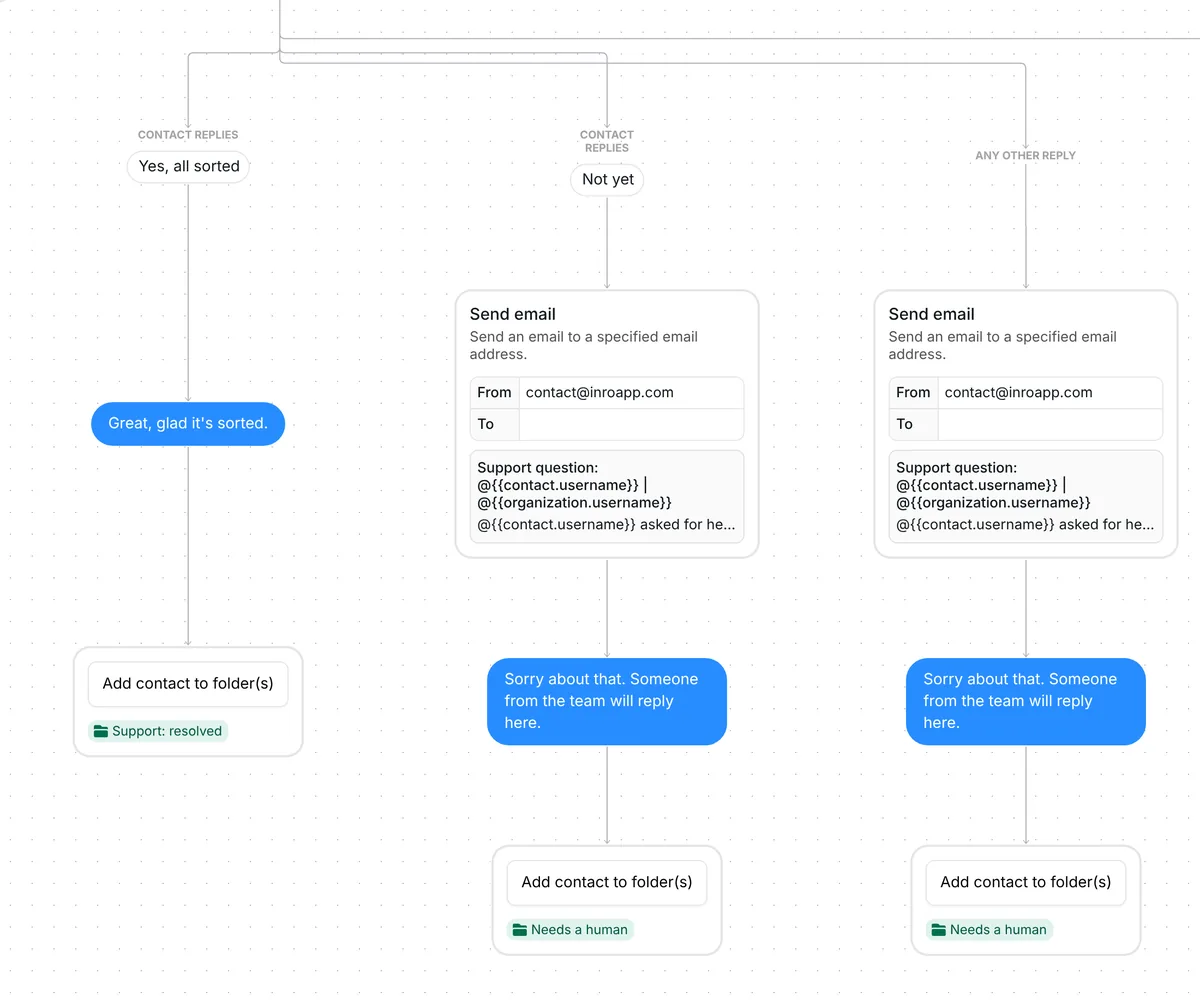
Check-in outcomes: Yes, all sorted files Support: resolved; Not yet or any other reply emails you and files Needs a human

If the person does not answer the check-in within 20 hours, Inrō sends nothing more and the person stays out of both folders.

When you reply to someone yourself, the automation stops for that person. The check-in never lands in the middle of your conversation.

What to change before you turn it on

The trigger comes set up: DMs that contain HELPDESK, in any message of the conversation.
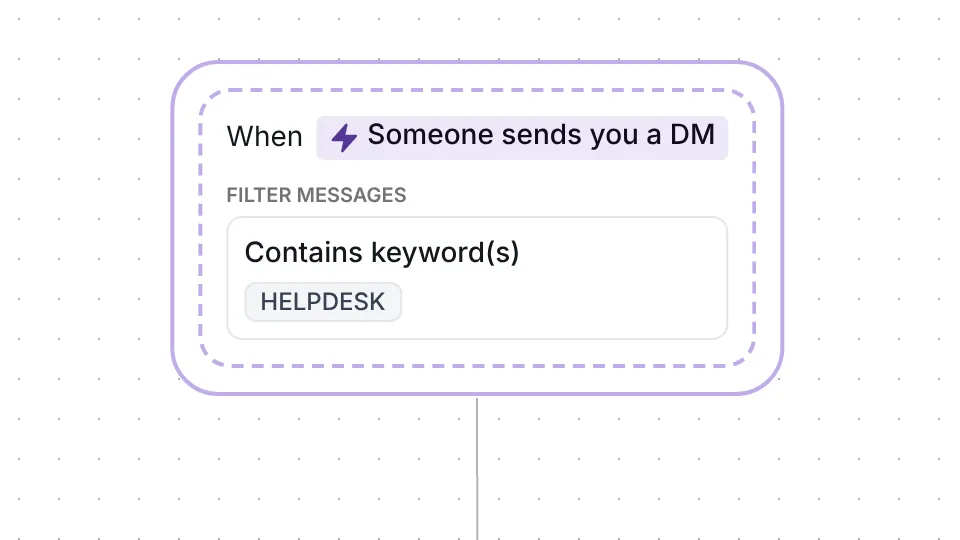
Inrō DM trigger: Someone sends you a DM containing the keyword HELPDESK

Check five things before you go live:

  1. Your answer. The first message is an example about logging out and back in. Replace it with the fix you give most often, in your own words.
  2. Your email address. The three Send email steps have no recipient until you add one, so open each and type your address. Without it, no email goes out. Inrō still files the person in "Needs a human" and, after the check-in, still sends "Sorry about that. Someone from the team will reply here.", so the folder shows who is waiting.
  3. The keyword. Keep HELPDESK or pick a word your customers already use. Add "HELP DESK" as a second keyword if people type it as two words.
  4. The check-in and the waits. You can reword "Just checking in. Did that sort it out?" and change the two 20-hour waits: the first is how long a person has to write back, the second how long they have to answer the check-in.
  5. The folder names. Rename "Needs a human" and "Support: resolved" if you want other labels for your lists.

The sentence "Someone from the team will reply here." goes to customers as written, so change it if you work alone.

Best tips for your scenario

  • Put your most common fix in the first answer. Write the step you would give by hand every time.
  • Tell people where to find the keyword. The trigger listens to DMs only, so show HELPDESK in your bio, your Stories, a pinned post or your help page. The Instagram bio generator writes five bios, each counted live, if you need to fit the keyword into yours. Add a link from the Instagram DM link generator so people open a conversation with you in one tap.
  • Ask people to tap the buttons. Only the words of a button count as sorted, so a typed "yes" reaches you as "Not yet". Taps keep "Support: resolved" accurate.
  • Work the folders each day. "Needs a human" lists who is waiting and "Support: resolved" who is done. Someone who stayed silent after the check-in is in neither folder. After you reply, remove the person from "Needs a human" so the list stays short.
  • Keep it apart from other DM automations. If you run another automation that also listens to DMs, a support DM may match both. Put the two in a priority folder: a folder of automations where only the highest one in the list runs when several match the same DM. They can share the folder "Needs a human", so one list shows everyone who needs a person.

FAQ

How do I automate customer support questions on Instagram?

Ask people to DM you a keyword, like HELPDESK. This template answers with your fix, emails you if they write back, and checks in after 20 hours of silence to file the chat as resolved or needing a reply. The guide to AI customer service on Instagram covers the wider picture.

Does it use AI?

No. The answer is the text you write, and the check-in has two buttons.

What if they never answer the check-in?

Inrō sends nothing more. The person stays out of both folders, so you can tell who did not answer.

Does my reply stop the automation?

Yes. When you write to the person, the automation stops for them, so the check-in never lands in the middle of your conversation.

Not sure how it work?

Read posts about templates on our blog.

Become a creator

Submit your template to the Inrō template gallery and get featured – all in just a few clicks.

Related templates

Copy this template and have it live today

It clones straight into your account. Change the message to sound like you, then switch it on.

Free plan available
Meta Tech Provider
Setup in 5 minutes