Want more clicks on your link from the people who reply to your stories, without sending it to each one by hand? This template sends it for you and follows up with anyone who has not opened it.

Kshitij Maheshwari


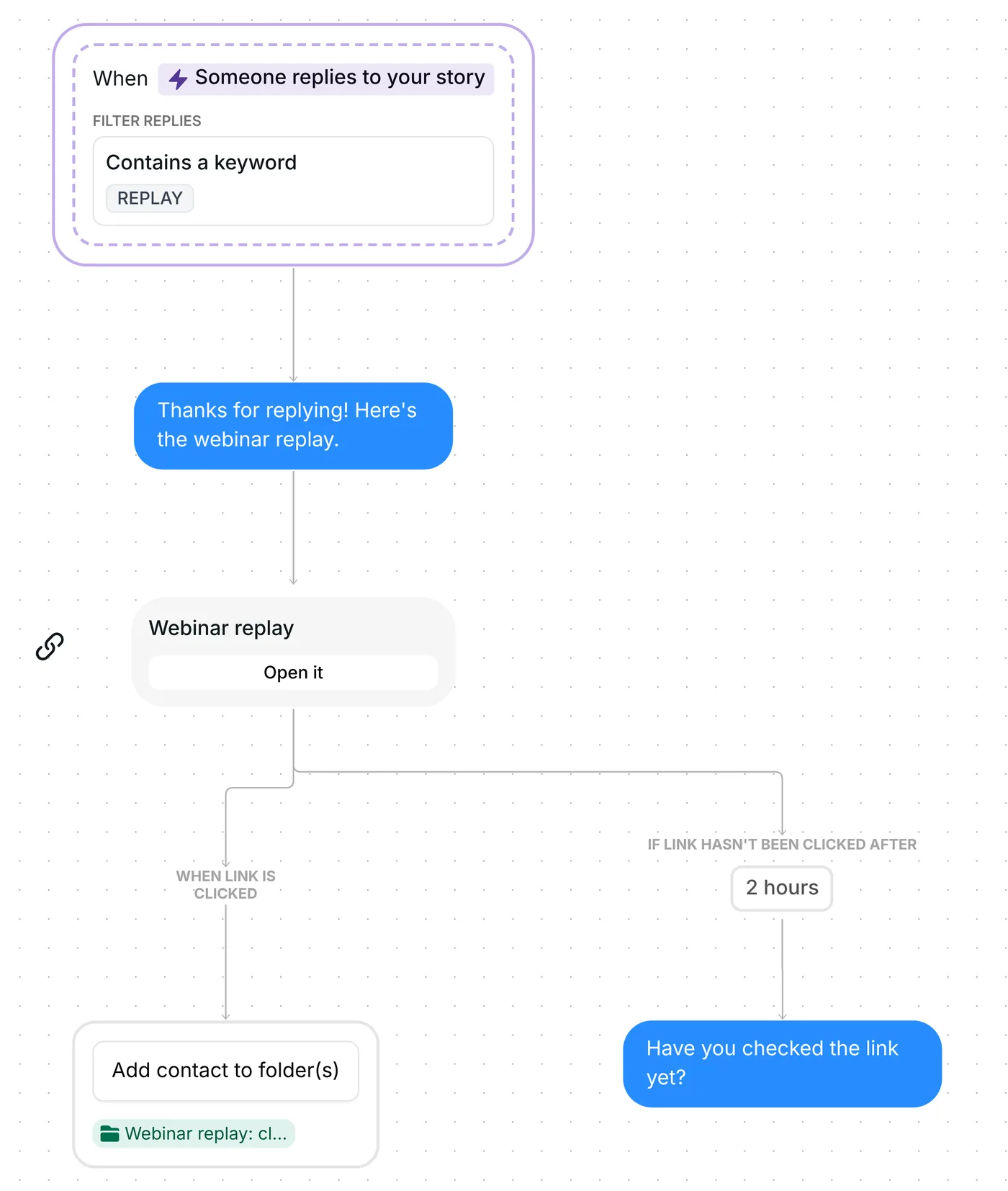
Someone replies REPLAY to your story and gets a thank-you DM, then your link. No tap after 2 hours? One reminder. Every click goes into a folder.
Put REPLAY on your story and ask viewers to reply with it. Each reply with that word gets a thank-you DM and your link card straight away. If someone has not tapped the link 2 hours later, Inrō sends them one reminder. Everyone who taps lands in a folder you can message again.
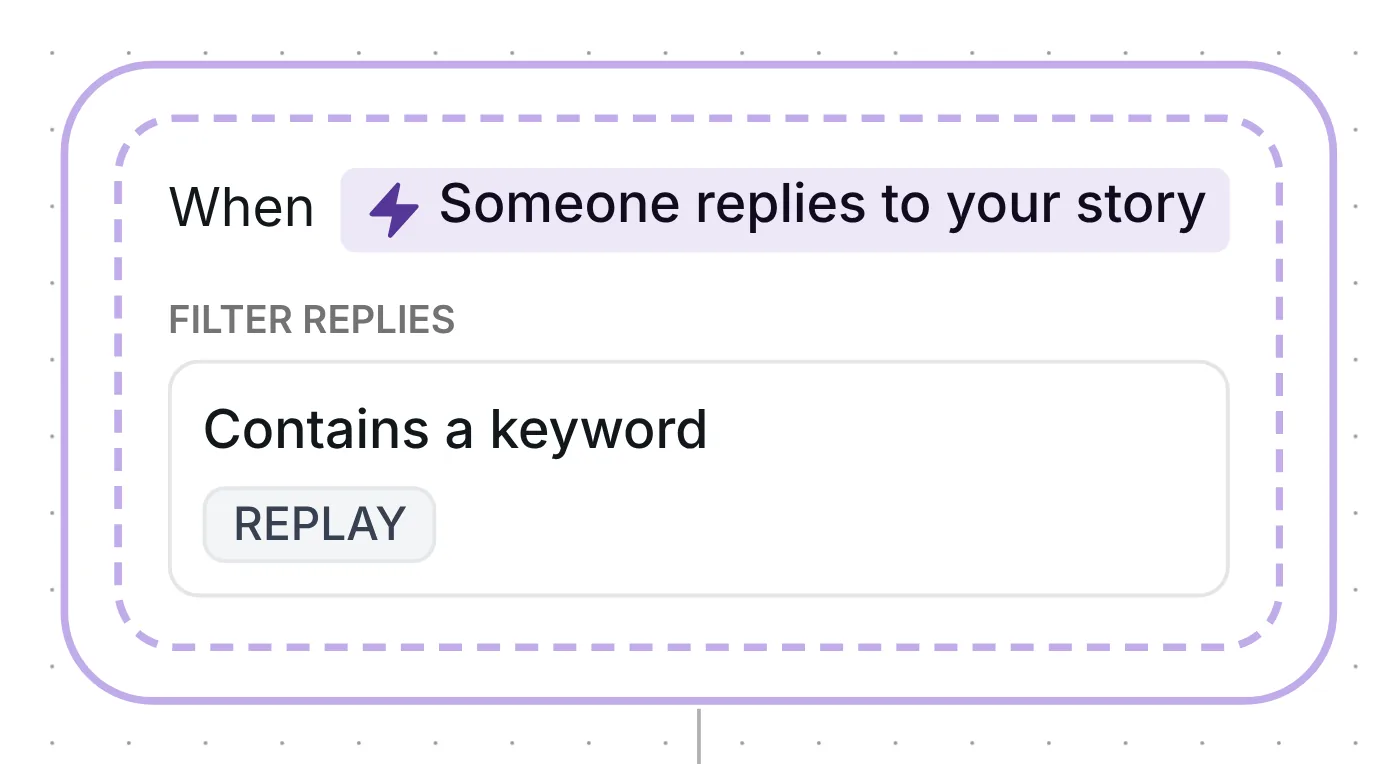
The story reply trigger listens to any story you post while the flow is switched on. Only replies that contain REPLAY start it. The word counts on its own or inside a longer reply, in capitals or not, with accents ignored: "replay" works, and so does "Replay please". A reply with no words in it, like a sticker or a photo alone, does not start the flow.
Each of these replies reaches you as a direct message, and that is where the flow answers. For other ways to use replies, see story reply automation.
The first DM is short: "Thanks for replying! Here's the webinar replay." The person has already written to you, so Inrō can open with a plain message. No button has to be tapped before the conversation goes on.
The link follows as a second message, with no wait step between the two. That order converted better: conversion was 42% with the link in message two and 29% with it in message one, across the 798,041 conversations in Inrō's DM Benchmark. That is a benchmark finding, not a result from this template.
The second message is a link card titled "Webinar replay", with no subtitle and one button, "Open it". Inrō records every tap on that button, so you see who opened your link.

The card has a 2-hour timer. When it runs out, people who have not tapped "Open it" get one more message: "Have you checked the link yet?" People who tapped already get nothing more. The timer only decides when the reminder goes out. Your link still opens after it.
Whoever taps joins the folder "Webinar replay: clicked". A tap that comes after the reminder counts too. It sits next to your other folders in the Inrō inbox and gives you a list of people who opened this replay, ready for a message when your next one is out.
When you copy the template, you get your own copy of the link card, and Inrō creates the folder "Webinar replay: clicked" if your account has no folder by that name. The copy starts switched off. Its trigger is ready to use: Someone replies to your story, Which story: Any story, Which replies: Contains a keyword, with REPLAY as the keyword. It runs once per person. There is no post date to reset, because the flow listens to stories, not to a post.
Go through six checks:
The button text, "Open it", can change too. Selling a course or a coaching program? See Instagram automation for coaches.
Same steps, different wording, folders and resource. The name below opens that version to copy.
Coaches and educators: a 5-day challenge sign-up. A reply with CHALLENGE to any of your stories starts it. The first message is "Thanks for replying! Here's your 5-day challenge sign-up.", then the card "5-day challenge sign-up" with "Join the challenge". Everyone who taps goes into a folder; anyone who has not tapped after 2 hours gets "No rush, your link is just above." Link the card to your sign-up page, and change the keyword for each round: it runs once per person. Coaches and educators version
Ask for a keyword reply on the story and send the link in a DM. This template does both: every reply with REPLAY gets the link card right away, and anyone who has not tapped it after 2 hours gets one reminder.
Yes, for the link card in this template: every tap is logged, and the person lands in "Webinar replay: clicked". Taps on Instagram's own link sticker are not part of this flow.
Yes, a story reply arrives as a DM. That is why this flow can answer with a plain message instead of asking for a tap first.
Every story you post while the flow is on, as long as the reply contains REPLAY. To narrow it, change "Which story" in the trigger to stories with a keyword, stories with a URL, or stories showing something.
Not sure how it work?
Read posts about templates on our blog.
Become a creator
Submit your template to the Inrō template gallery and get featured – all in just a few clicks.

It clones straight into your account. Change the message to sound like you, then switch it on.