
Story replies are private and only the creator sees them. Story comments are public. Here is exactly who sees each one, and how to control both.
.avif)
Automate Comments and DMs in 5 Minutes
Someone comments on your IG post. They get a DM instantly. You do nothing.

Trusted by 10K+ creators and SMBs


TL;DR
TL;DR
Every Story reply is a conversation you can keep
Story replies land in your DMs. Inrō answers them instantly, tags each contact, and lets you follow up later. Free plan, no card.
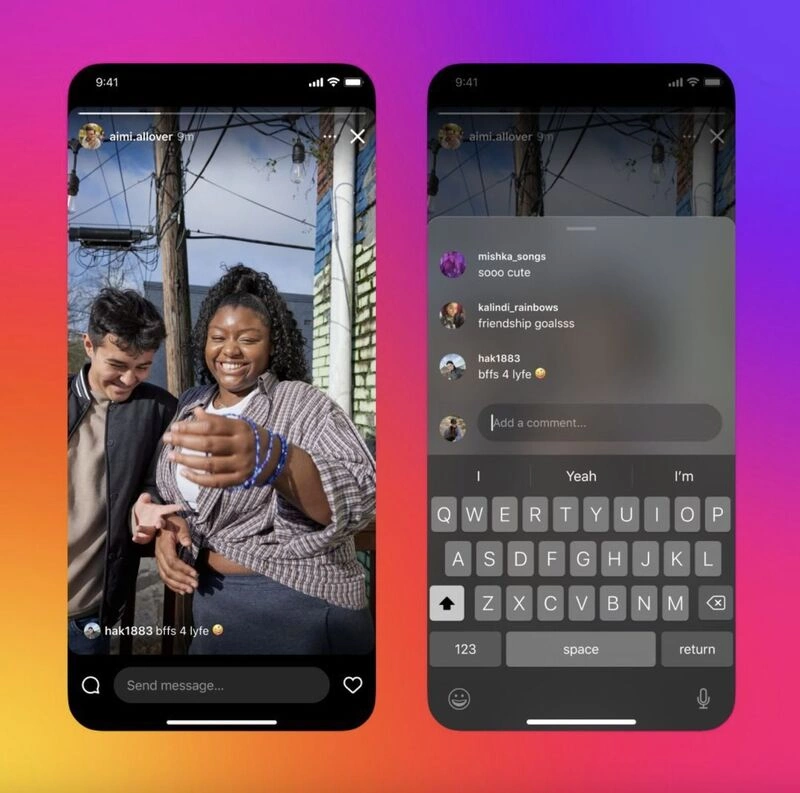
Story replies are private. When you tap the message box at the bottom of someone's Story and send a reply, only that person sees it, and it arrives in their DMs like any other message. Story comments are the opposite: they sit on the Story frame itself and everyone who can see the Story can read them. The two live inches apart on the same screen, which is why people mix them up.
One is a private message, the other is a public post. Everything else follows from that.
If you are not sure which one you used, look at where your message ended up. If it opened a chat thread, it was a private reply. If it appeared on the Story itself alongside other people's messages, it was a public comment.
No. A Story reply is a direct message. It does not appear on the Story, there is no marker telling other viewers you replied, and nobody except the creator can read it. Emoji reactions work the same way and also arrive privately in DMs.
The only way a reply becomes visible to others is if the creator screenshots it and reshares it, which is their decision rather than anything the platform does automatically.
Everyone who can view that Story. On a public account that means any viewer. On a private account it means the creator's approved followers. There is no setting that makes your comment visible only to the creator, because that is what the reply field is for.
Small profile pictures of people who have commented appear near the Story, so viewers can see there is a conversation before they even open it.
Instagram did not remove the feature. If the comment field is missing, one of four things is usually true.
If comments vanished from your own Stories specifically, check your comment settings before assuming anything is broken.
Open the Story, tap the comment field at the bottom of the frame, type your message and post it. Your comment appears on the Story for everyone who can see it and disappears when the Story expires.
You can comment on your own Story the same way. Creators do this to add context, answer the question everyone is asking, or start the thread so followers feel comfortable joining in. It is a small thing that noticeably changes whether anyone else comments.
If you want the message to stay private, use the message box to send a reply instead. That goes to the creator's DMs and nobody else sees it.
You have three levers, and they work at different levels.
One thing worth knowing: you cannot delete a comment you left on someone else's Story once it is posted. If you want a private conversation with a creator, use the reply field from the start.
Before comments, a Story was a broadcast. People watched, some replied privately, and no viewer ever knew what anyone else thought. Comments turned the format into something closer to a room, where viewers see each other and respond to each other.
Two practical consequences.
Your Stories now have a visible social layer. A Story with an active comment thread reads as worth watching before anyone opens it, in the same way a busy restaurant looks better than an empty one. That is a real effect and it compounds: the first comment makes the second one more likely.
Comments and replies do different jobs. A comment is public, light and low commitment, which makes it good for reactions, votes and quick opinions. A reply is private, which makes it the only place someone will ask about price, availability or anything personal. Design Stories that invite both rather than treating them as interchangeable: ask a question in the frame for comments, and give a keyword for the people who want to talk properly.
On the algorithm question, be careful what you believe. Instagram has never published how Story ranking works, and anyone telling you comments carry a specific weight is guessing. What is observable is that comments are an additional interaction where previously there were only views, likes and replies, and that more people engaging with your Stories is not a bad thing.
Comments create visibility. Replies create leads. The gap between them is where most Story strategies fall apart, because a public comment gives you no way to follow up and a reply that goes unanswered for six hours is a cold lead.
The pattern that works is simple: put the invitation in the Story frame, and let the reply do the work.
Short, specific and with an obvious payoff. When someone replies with the keyword, an automation can answer instantly, send the thing you promised, and tag the contact so you can reach them again when you next have something worth sending. Across Inrō's own automations, DMs average a 90% open rate, a 60% reply rate and a 28% click-through rate, which is why the reply is worth more than the comment even though the comment is more visible.
Story comments themselves cannot be automated, because they are public posts rather than messages. Anyone claiming to automate them is either describing replies or doing something Meta's API does not support.

If you run Reels alongside Stories, the same mechanics apply to comments there, covered in generating leads from Instagram Reels.
Keyword triggers, instant replies and a contact record you can follow up with. Free plan, no card required.


Private. A Story reply goes to the creator's DM inbox and only the two of you can see it. No other viewer can tell that you replied. Story comments are the public option: they appear on the Story frame and everyone who can view the Story sees them.
They disappear with the Story, so 24 hours in normal use. If the creator saves that Story to a Highlight, the comments can stay visible alongside it.
Usually not. Comments default to mutual followers only, so unless that creator has widened the setting to all followers, the comment field will not appear. You can still send a private reply.
No. Comments are public posts rather than messages, and Meta's API does not support automating them. Story replies are different: they arrive as DMs, so a keyword in a reply can trigger an automatic response. This is why creators who want automation ask for a reply rather than a comment.
Instagram has never published how Story ranking works, so treat any specific claim with suspicion. What can be said is that comments add an interaction type that did not exist before, and that a Story showing an active comment thread gives viewers a reason to open it.
No. Once posted, it stays until the Story expires. The creator can delete it from their own Story, but you cannot remove it yourself. If you want control over what you send, use the private reply field instead.
Join automations strategies and Instagram Insights weekly
By entering your email address above and clicking Subscribe, you consent to receive marketing communications (such as newsletters, blog posts, event invitations and new product updates), and targeted advertising from Inrō from time to time. You can unsubscribe from our marketing emails at anytime by clinking on the "Unsubscribe" link at the bottom of our emails. For more information about how we process personal information and what right you have on this respect, please see our Privacy Policy.
Connect your Instagram account and build your first automation in minutes. No code required.
.avif)

.avif)