Launching something soon and want people waiting for it before it opens? This template builds that waitlist for you from your Instagram posts and stories, without a form or a landing page.

Kshitij Maheshwari


Someone comments or replies WAITLIST, taps one button in your DMs and is on your list. Asking for the email is optional. Copy the template or a version.
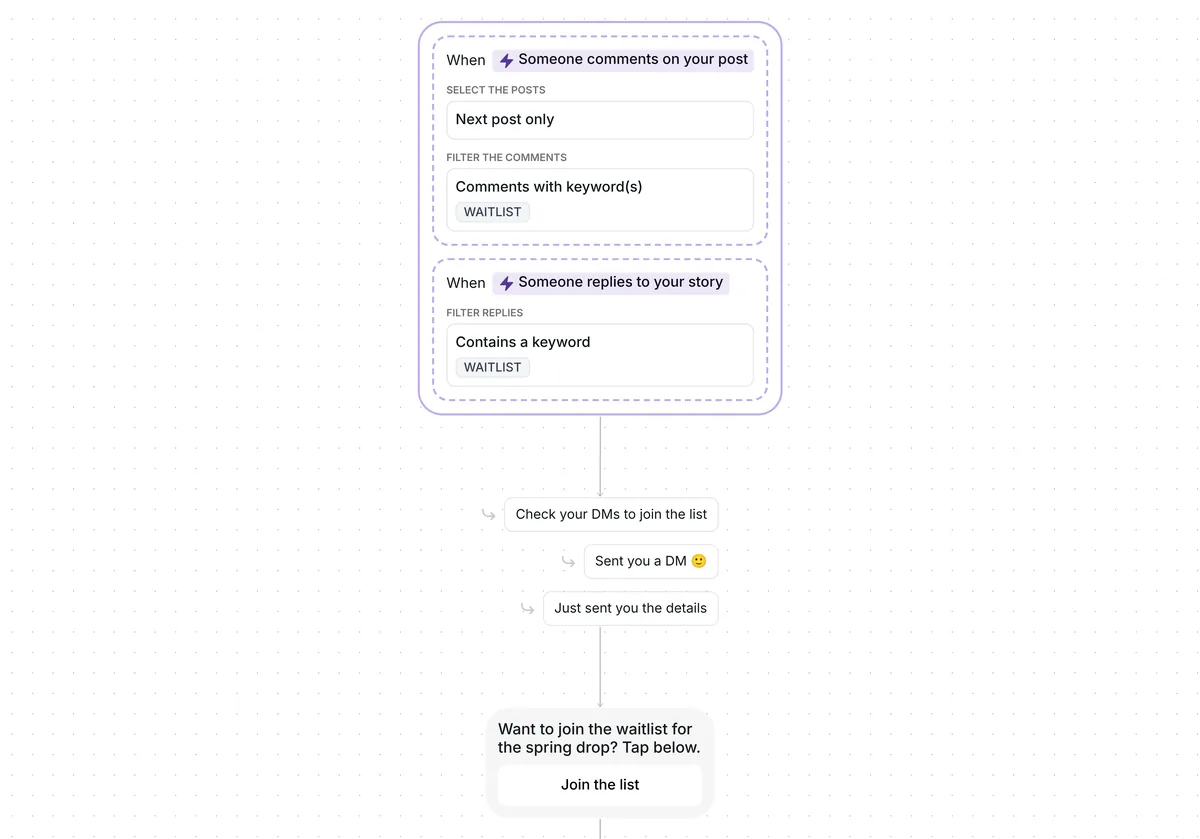
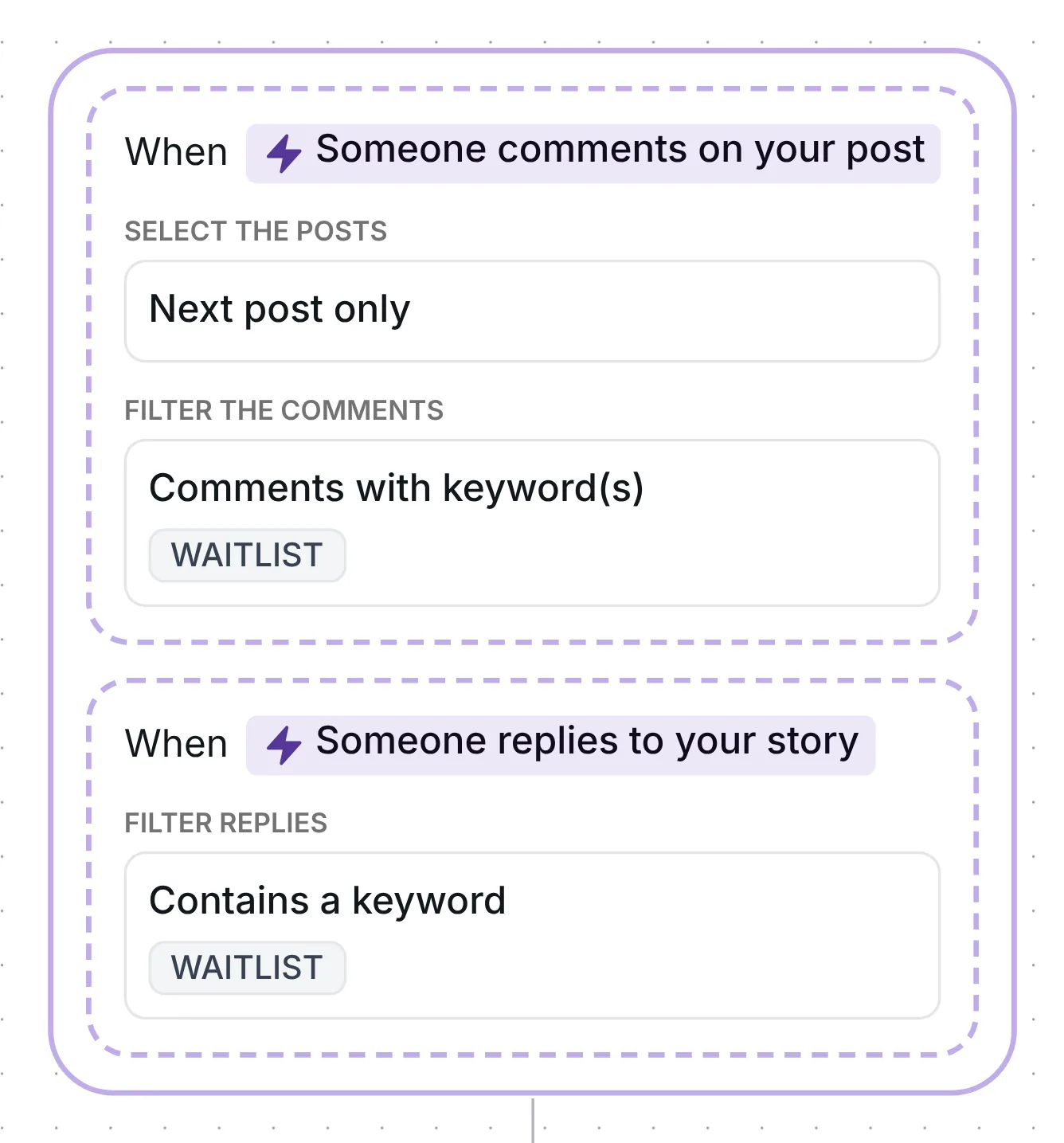
People comment WAITLIST on your next post, or reply WAITLIST to one of your stories. Each one gets a DM with a single button, "Join the list", and that tap puts them on your waitlist: a folder in Inrō. Only then does Inrō ask for an email, and anyone who skips it stays on the list.
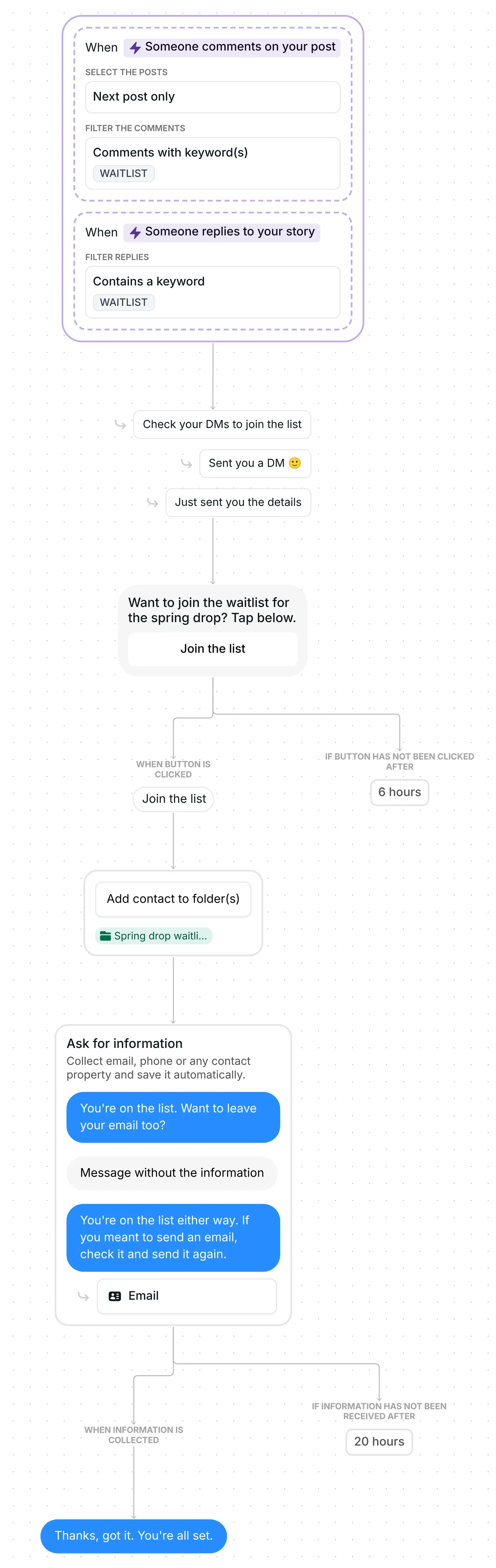
Top-level comments start the flow; replies under other comments do not. WAITLIST counts as a whole word, in capitals or not and with accents ignored, so "waitlist" and "add me to the waitlist" both work. Inrō's comment to DM feature carries the DM. The comment gets an answer under it too, drawn at random from "Check your DMs to join the list", "Sent you a DM 🙂" and "Just sent you the details", and Inrō holds it back until the DM is out.
On the comment side, only one post is watched: your first new post after the date saved in the trigger (setup, check 1).
The second trigger listens to replies on any of your stories, with the same keyword rules. A story reply trigger has no comment to answer, so Inrō skips the public reply and goes straight to the DM.
Both triggers feed the same flow, and it runs once per person. Someone who comments and then replies to a story gets one DM, not two.
In the first DM, "Want to join the waitlist for the spring drop? Tap below." sits above a single button, "Join the list".
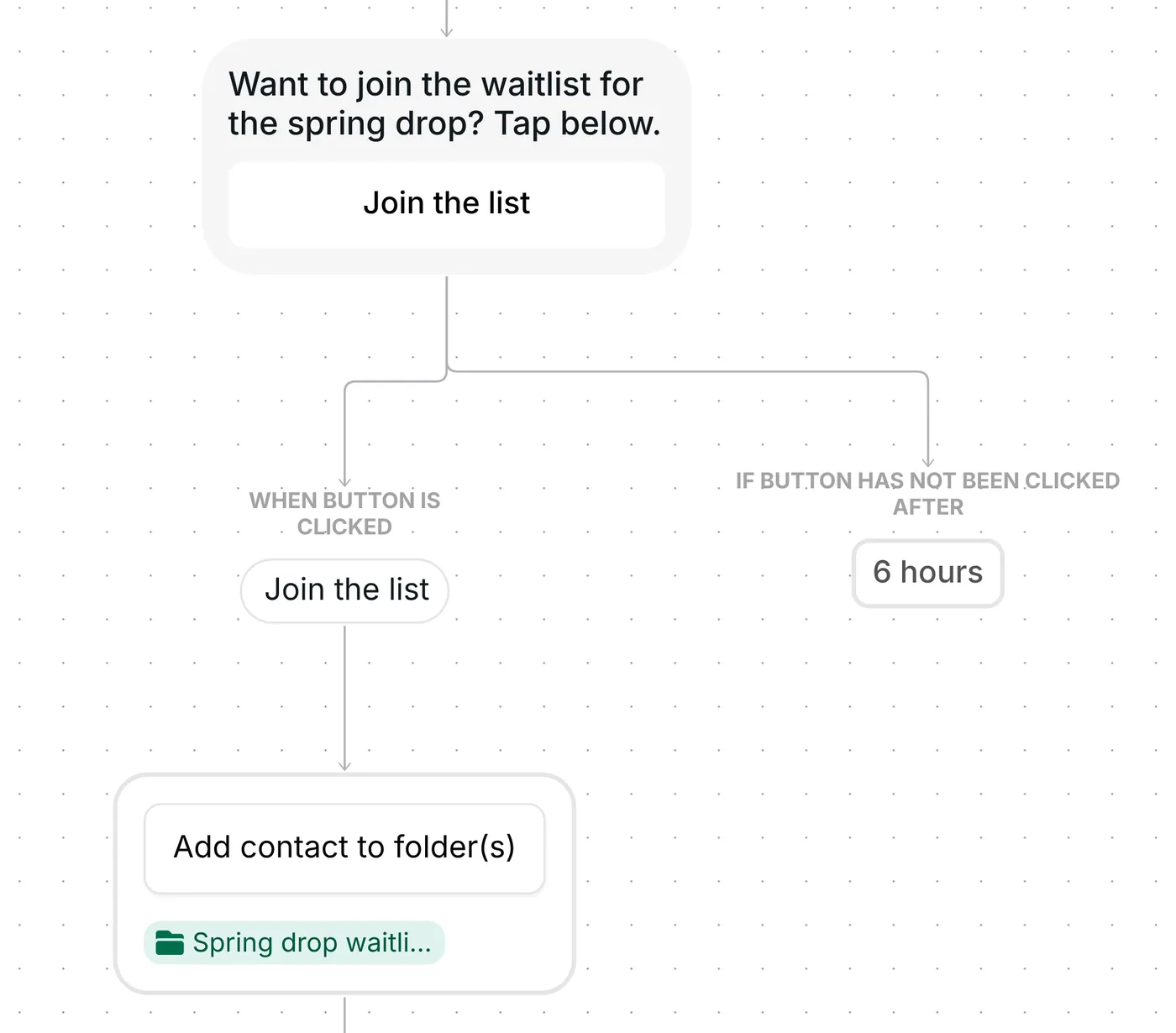
The tap does two jobs. Instagram's private reply gives you one message per comment, with more allowed only after the person responds to it (Meta for Developers, checked 22 October 2026), so the tap keeps the conversation open. It also adds them to the folder "Spring drop waitlist: joined", and that folder is your waitlist. An untapped button closes after 6 hours, and that person never joins the list.
At 57 characters, the opener sits well under 120. Openers below that length converted at 39%, against 22% for longer ones, in the 798,041 conversations of Inrō's DM Benchmark; that is a benchmark finding, not this template's result.
Next, Inrō asks: "You're on the list. Want to leave your email too?" An email address in the reply is saved to their contact, and they get "Thanks, got it. You're all set."
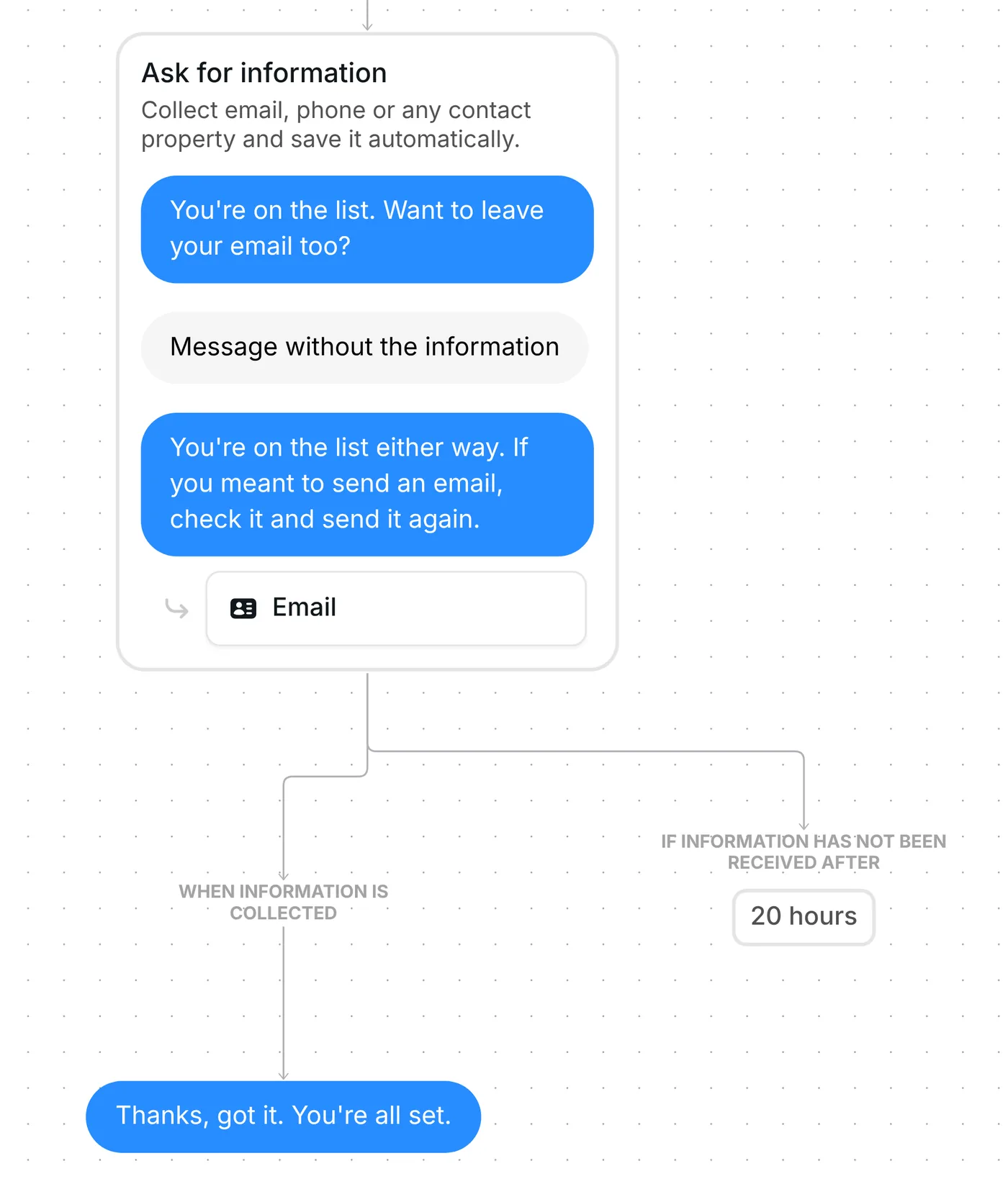
A reply with no email in it gets one re-ask: "You're on the list either way. If you meant to send an email, check it and send it again." After a second reply without one, or 20 hours of silence, the flow ends with no further message, and the person is still on your list. AI reads the email out of the reply; with AI off, Inrō spots an address by its format. AI credits are used only when an email is found.
Both triggers come ready: WAITLIST in top-level comments on your next post, and WAITLIST in replies to any of your stories. Each person goes through the flow once.
Six points to settle before launch:
You can also change the 6 hours on the button and the 20 hours on the email question. The email question also has "Send follow-up if no reply". It is off in this template; turn it on if you want a reminder to go to people who have not answered yet.
Every version keeps the two triggers, the 6-hour button, the folder and the optional email question. What changes is the launch, the keyword, the button, the folder and some of the wording. Click a version's name to copy it.
Coaches: a waitlist for your next program. Keyword WAITLIST, as in the base template. First DM: "Doors to the 8-week program aren't open yet. Want a spot on the waitlist?" with the button "Save my spot". The list is the folder "Program waitlist: joined". Coaches version
Services with limited places: a waitlist for your next client spot. Keyword NEXTSPOT. First DM: "Want a place on the waitlist for the next client spot? Tap below." with "Join the waitlist". The tap puts them in "Client spot waitlist: joined"; the email question that follows is optional, and anyone who skips it stays on the list. For a coach, consultant, designer, studio or stylist with a limited number of client places. Client spot version
Creators: a list for your preset pack. Keyword PRESETS. First DM: "The preset pack isn't out yet. Want to join the list?" with "Count me in". The list is "Preset pack: joined". Creators version
Creators: a fan list for your next release. Keyword DROP, in a comment on your next post or a reply to any story. First DM: "Want in on the new EP list? Tap below." with "Count me in". The tap puts them on the list; then "You're on the list! Drop your email too if you want." and, with an email, "Got it, you're all set 🎧". Use one keyword per release and a folder you name. Creators fan list version
E-commerce: early access to your next drop. Keyword EARLYACCESS or EARLY ACCESS. First DM: "The summer drop isn't live yet. Tap to join the list." with "Add me to the list". The list is "Summer drop: joined". E-commerce version
Local businesses: a guest list for an event. Keyword GUESTLIST. First DM: "Want to join the list for the tasting night? Tap below." with "Add me to the list". The list is "Tasting night: joined". Local business version
Selling products? See more flows in Instagram automation for online stores.
Copy this template, pick a keyword and ask for it in a post or a story. Each person who uses it taps one button in your DMs and lands in a folder that is your waitlist. For the launch plan around it, read the Instagram DM course launch funnel guide.
No. People join with a tap inside the DM, and the list is a folder in Inrō. An email they send is saved to their contact. The template sends no link.
No. They are on the list before the question comes. A reply without an email gets one re-ask, then the flow ends and they stay on the list.
They get the DM once. The template runs once per person across both triggers, so the second message starts nothing.
Not sure how it work?
Read posts about templates on our blog.
Become a creator
Submit your template to the Inrō template gallery and get featured – all in just a few clicks.

It clones straight into your account. Change the message to sound like you, then switch it on.