Add a ☰ menu to your Instagram DMs, choose up to five entries people need most, and make each tap start the right automation.
The Instagram persistent menu is a ☰ menu of a few options (Meta recommends five at most) that stays available in every DM conversation with you. Meta offers it through its API, so you add it with a DM tool: in Inrō, from the Manage persistent menu card on the Scenarios page. Each entry either sends you a message, which a scenario answers, or opens a link. Put your most-asked request first and label each entry with the action it starts.
The Instagram persistent menu is a short list of options, such as "Book a call" or "See prices", that people open from the ☰ icon at any point in a DM conversation with you. Meta offers it through its messaging API, so you add it with a DM tool. Each entry either sends you a message or opens a link.
The Instagram persistent menu is a menu of a business's main options that stays available in every DM conversation with that business. A person opens it from the ☰ icon in the chat and taps an entry instead of typing a question. It is also called the Instagram DM menu.
Meta allows two kinds of entry (Meta for Developers, the persistent menu, checked 9 November 2026):
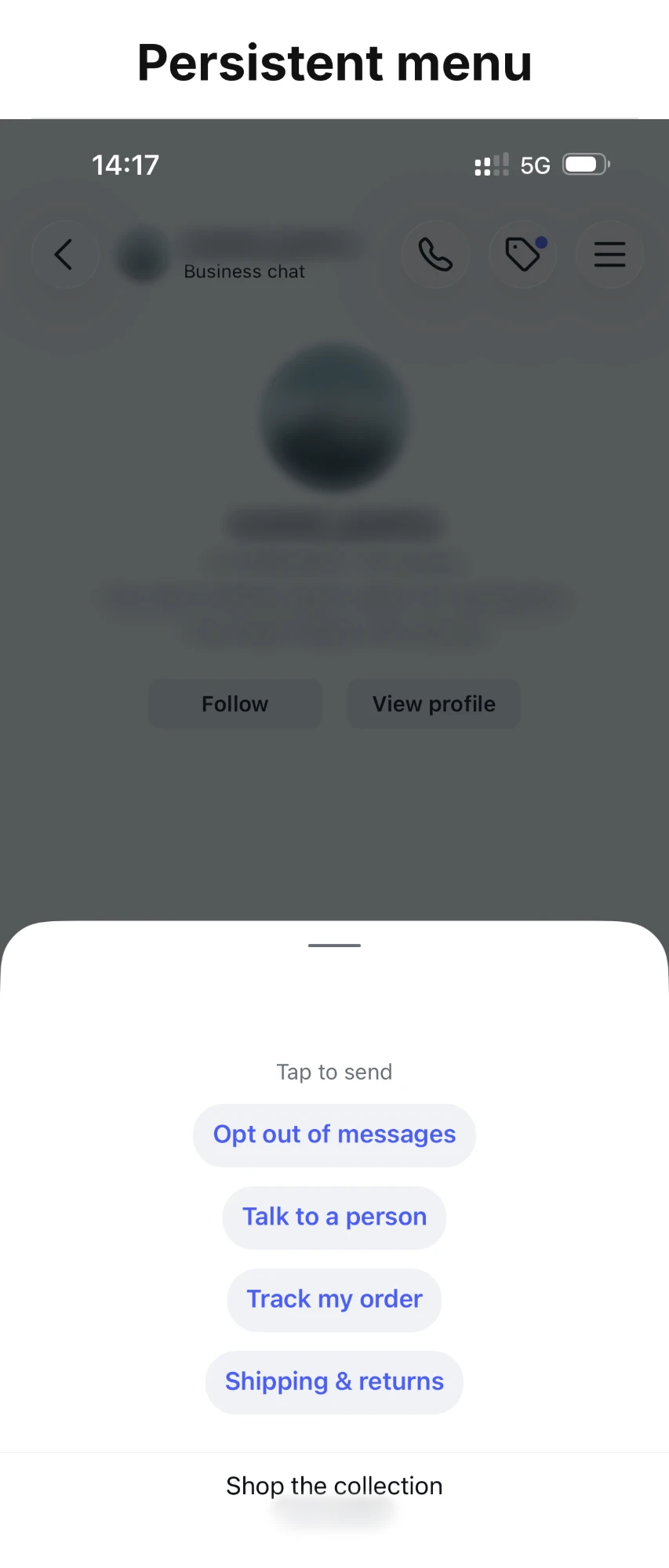
In the Instagram app, message entries are listed under "Tap to send" and link entries sit below them, set apart.
The menu is easy to confuse with icebreakers, and the two do different jobs:
| Icebreakers | Persistent menu | |
|---|---|---|
| Where people see it | Suggested questions when they open a chat with you | The ☰ icon inside the conversation |
| When | Before the first message | At any point in the conversation |
| How many | 4 at most (Meta's limit) | 5 recommended by Meta |
| Set up in the Instagram app | Yes, as Frequently asked questions | Through a DM tool on the API |
To set up the other one, see how to set up Instagram icebreakers. For the short definition of the menu, see what the Instagram persistent menu is.
Icebreakers handle the first question. The menu handles everything after it. It earns its place when:
If almost every question you get arrives in the first message and nobody comes back, icebreakers are enough on their own.
Five entries at most. Meta recommends limiting the menu to 5 entries for the best experience. If you turn on opt-out detection, the unsubscribe entry Inrō adds is one of your entries; see DM opt-out.
Most-asked first. Order the entries by how often people need them. Meta's guidance is to keep prominent positions for your main options, not for pages like your terms or privacy policy.
Short labels that name the action. "Book a call" says what happens; "Booking" makes people guess. A few words read at a glance; a sentence does not.
Message or link, entry by entry.
| Choose | When | Example |
|---|---|---|
| Send a message | You want to answer, ask a question, sort the contact or know who tapped | "See prices", "Talk to a person" |
| Open a link | The page answers everything on its own and you don't need to know who opened it | "Opening hours", "Our menu" |
When in doubt, choose Send a message. The automation behind it can still send the link, and then you know who received it and who clicked.
What not to add. Meta advises against a "Menu" entry that sends the menu again, and against generic actions like "Restart". Don't give an entry the same wording as one of your icebreakers either: a tap with those words can start the icebreaker's automation as well as the menu's.
One menu for everyone. Meta does not let you tailor the menu to a single person, so write entries that make sense to a first-time visitor and a regular alike.
You need your Instagram professional account connected to Inrō. Then:
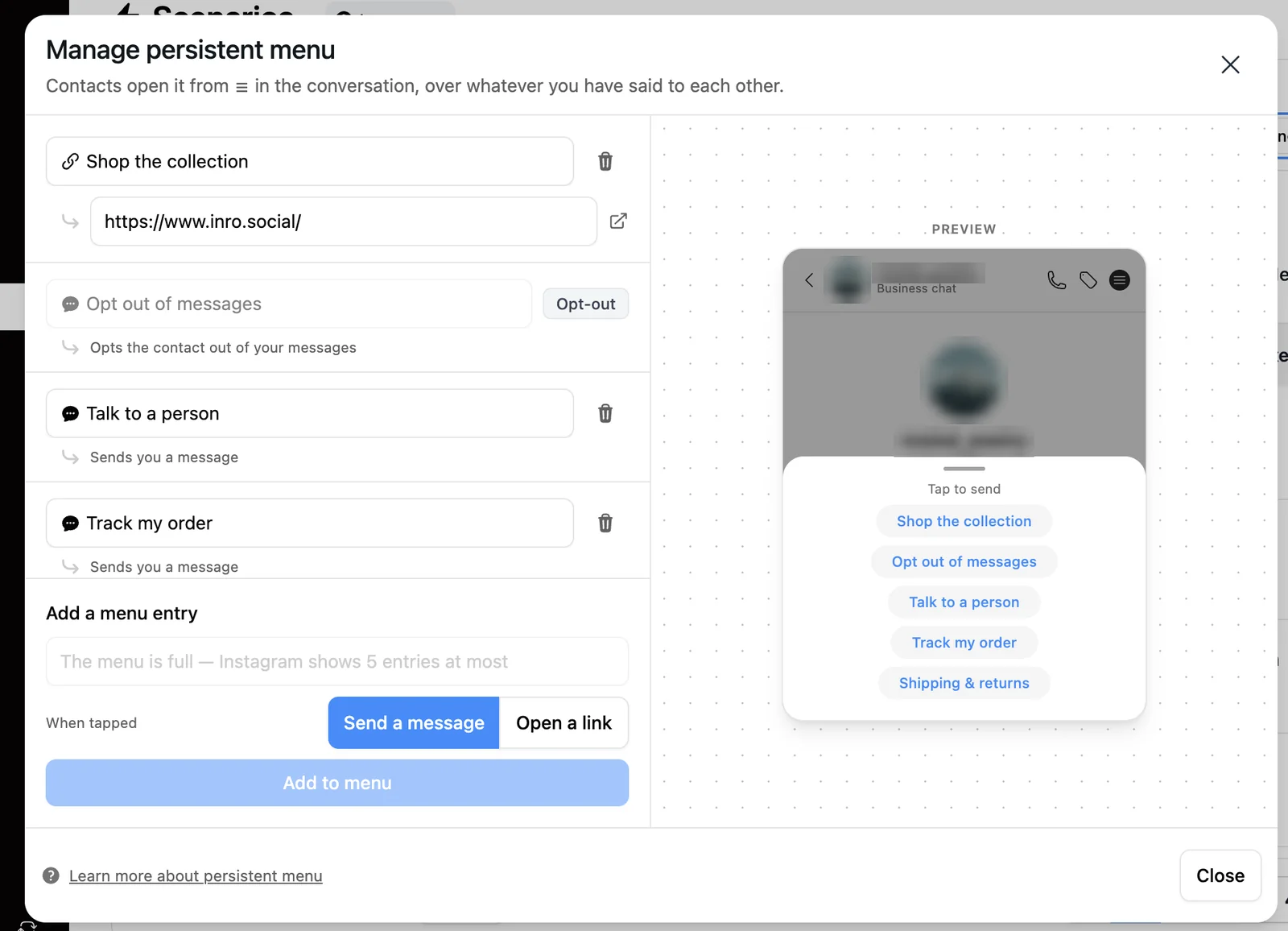
The menu goes to Instagram as soon as you add an entry. A Send a message entry does nothing more until an automation answers it, which is the next step.
A Send a message tap reaches Inrō as a DM from the contact, with the entry's label as its text. There is no separate menu trigger: you answer it like a DM that contains those words.
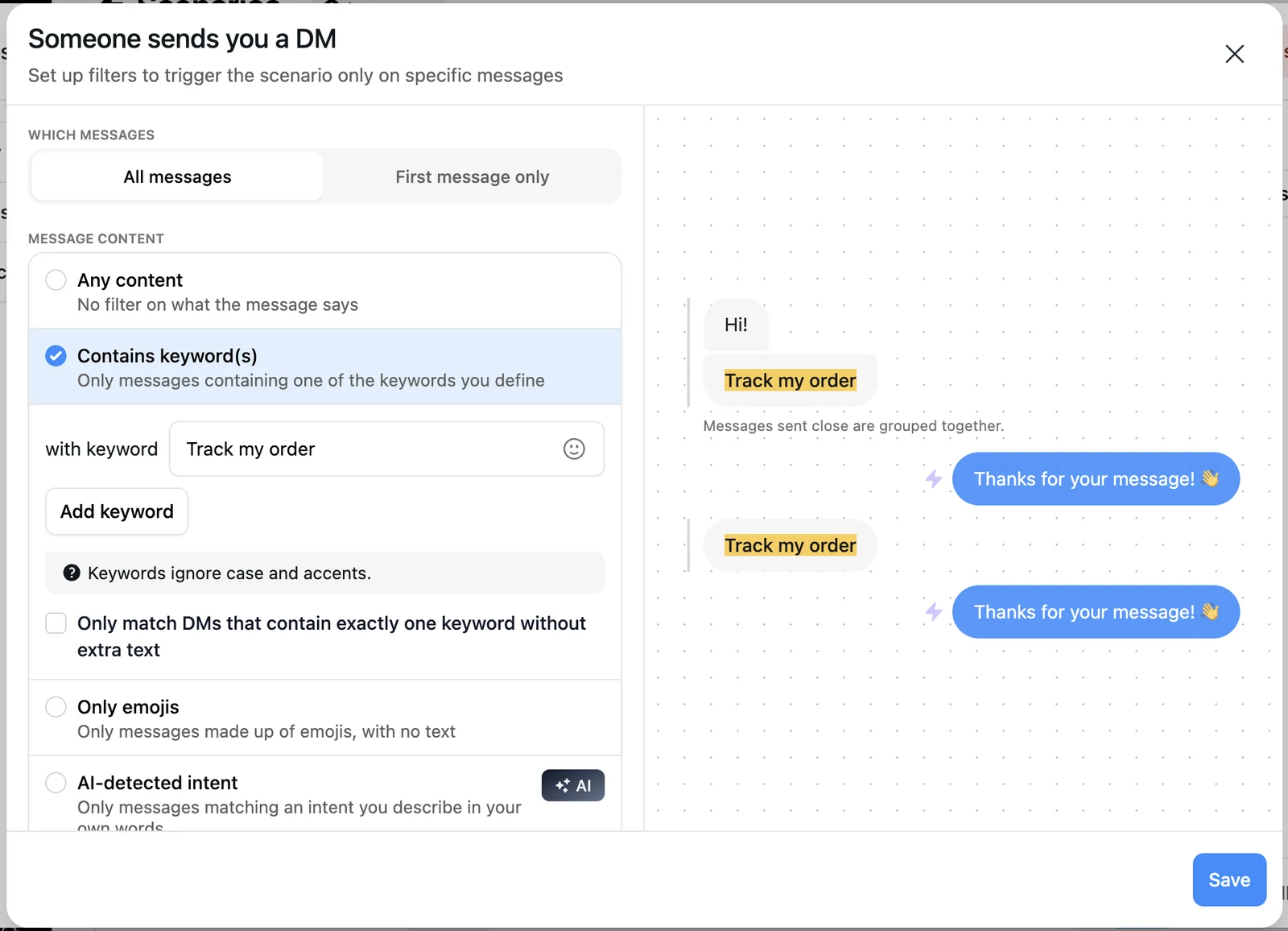
How the keyword matches decides what else starts the scenario:
If no scenario starts on a tap, your Inrō AI agent can answer it like any other DM, depending on when you set it to reply. An Open a link entry starts no automation at all, so if you want to know who tapped, use Send a message and send the link from the scenario as a conversion link, which records the click.
A menu tap is a person asking for one specific thing. The reply should give them that thing quickly.
The same habits apply to every DM flow you run, including comment-to-DM automations and icebreakers.
Instagram's help center describes no setting for it (checked 9 November 2026). Meta documents the persistent menu for its messaging API, so you add it with a DM tool connected to Instagram, such as Inrō.
Meta recommends 5 entries at most for the best experience. If opt-out detection is on, its unsubscribe entry is one of your entries, so plan the rest around it.
Yes. An Open a link entry opens the page in Instagram's in-app browser. It sends nothing back to you, so if you want to know who tapped it, use a Send a message entry and send the link from the automation instead.
No. Meta does not let you tailor the menu to one person, so everyone who messages you sees the same entries. What changes per person is the automation behind each entry, which can check a folder or ask a question before it answers.
Icebreakers are up to four questions shown before the first message, to start a conversation. The persistent menu stays in the conversation from the ☰ icon, so people can use it at any point, including when they come back weeks later.
Copy a template that matches it, or describe the flow you want and let AI build it for you.