What welcome message really covers: whether you can message new followers, Instagram's native greeting and its limits, ice breakers, and the welcome flow that turns a first hello into a conversation.
Welcome message means two different things. Some people want to greet anyone who opens a DM with their account. Others want to message new followers the moment they follow. Instagram lets you do the first, with limits, and does not let you do the second directly. This guide sorts out which you mean, shows how to set up the native greeting and where it runs out, and covers the ice breakers and welcome flow that turn a first hello into a real conversation.
The phrase covers two different jobs, and mixing them up is where most setups go wrong. One is a greeting that fires when someone opens a DM with your account for the first time. The other is a message sent to people the moment they follow you. Instagram supports the first, with real limits, and does not support the second directly. Work out which one you actually want and the rest of this is straightforward.
Not directly. Instagram does not give third-party tools a new-follower trigger, so a true follow-then-DM automation is not available through the official API. Meta has tested versions of it, but it is not public, and any tool that promises to DM every new follower is either using unofficial access, which puts the account at risk, or sitting in a limited private beta.
What works is to get new people to take an action you are allowed to answer, then greet them there. A reply to your Story, a keyword comment on a post or Reel, a first DM, or a click-to-message ad each open a conversation you can automate. The full set of triggers is in the Instagram DM automation guide. In practice, welcoming new followers means welcoming the ones who raise their hand, which is most of the ones worth reaching anyway.
Instagram has a built-in welcome message for Professional accounts. It fires when someone opens a DM with you for the first time, or after a long gap. It does not fire when someone follows you, and it does not fire when someone views a Reel or Story. It is tied to opening a chat, nothing else.
Setting it up is quick, when the option is there:
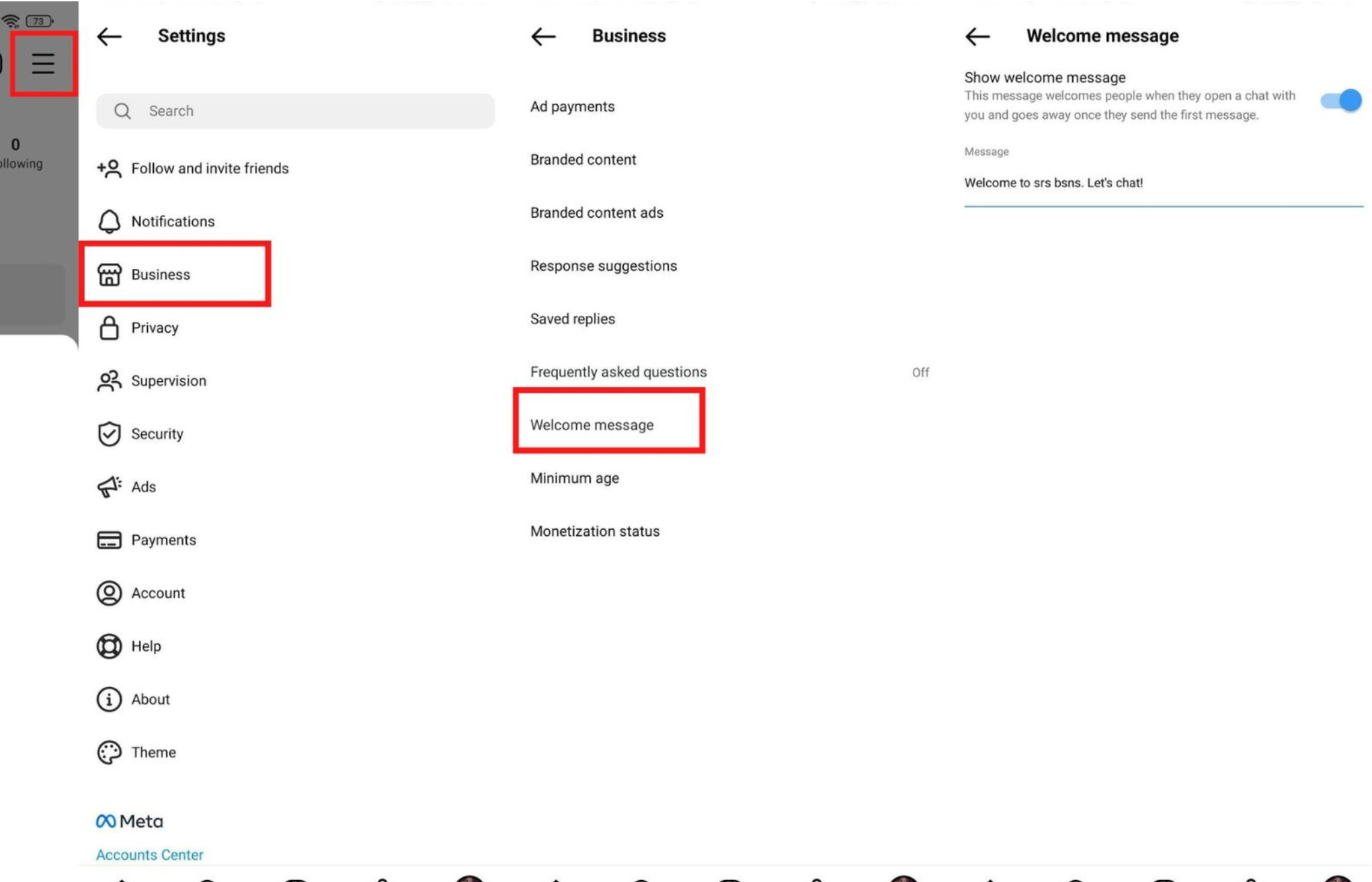
The catch is availability and depth. As of 2026 the native option is rolled out unevenly, often on Android business accounts in select regions, and many iPhone users never see it. It needs a Business or Creator account. And it is text only: no personalisation, no tappable buttons, no analytics, and no follow-up. It greets, then goes quiet until a human shows up. For a simple we reply within an hour, that is fine. For anything you want to convert, it is where the native feature runs out.
A greeting that says hello and waits is a dead end. The moment of highest intent is right after someone messages you, and a static line does nothing with it. A welcome flow does: it gives people something to tap, asks one qualifying question, answers the common questions instantly, and sends the ones who need a person to a person. Here is the difference laid out.
| Native greeting | Welcome flow | |
|---|---|---|
| Fires when | Someone opens a DM | A DM, Story reply, comment, an ad or click on icebreaker |
| Personalisation | Static text | First name and source |
| Tappable options | None | Up to five ice breakers |
| Qualifies leads | No | Asks and tags |
| Answers FAQs | No | AI, around the clock |
| Follow-up and analytics | None | Built in |
Two pieces do most of the work. Ice breakers are the tappable options when you open a DM chat: Pricing, Book, Track order, Talk to a human. The native welcome message is text only, so these come from a flow, and they matter because someone who taps a button is easy to route and far more likely to reply than someone staring at how can I help. An AI layer handles the repetitive questions, shipping, pricing, availability, in your tone and around the clock, and hands off to you when something needs judgment, with every contact tagged in your inbox and CRM.
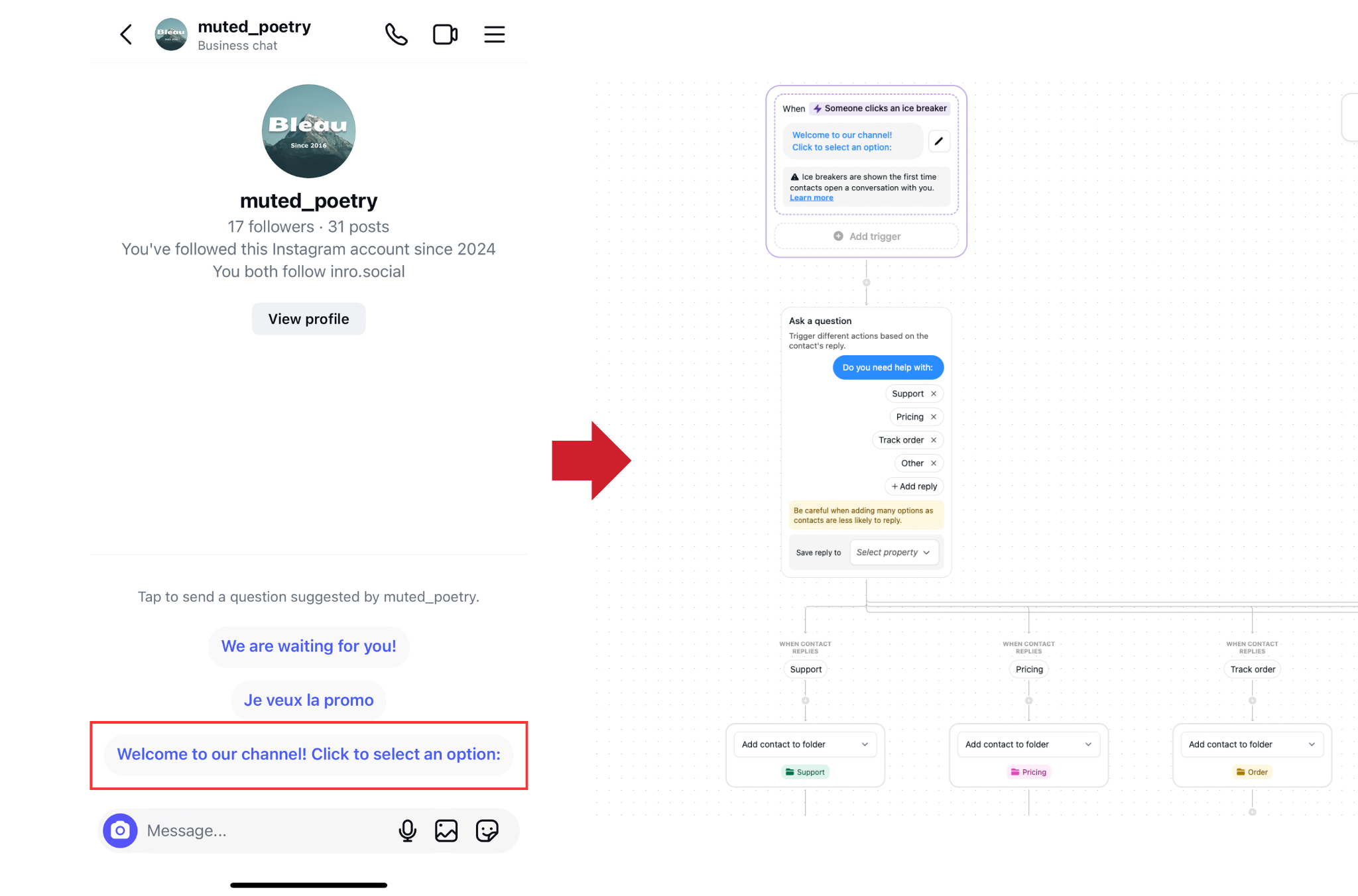
You can also run a different welcome depending on where someone came from. A person who clicked a paid ad gets a different first message than someone who found you organically, because you already know something about what they want. This is what onboarding at scale looks like in practice: Yoyomatch, a dating app, runs new-member onboarding as a first-DM flow rather than a one-line greeting, verifying sign-ups automatically, and has processed more than 15,000 profiles that way.
Whatever tool sends it, the message itself decides whether the conversation starts. The ones that convert follow a simple shape.
Keep the whole thing short enough to read in a notification preview, roughly two lines. Leave out your full price list, multiple links, brand history, and social proof: those belong in the next message, once you know what the person actually wants. A few shapes to adapt to your own voice, rather than paste as they are:
For more shapes, the Instagram DM Script Generator drafts a new-follower welcome that you can edit before you copy it.
A welcome message is step one, not the whole thing. The reply rate is the number to watch: if barely anyone replies, the ask is usually the problem, not the greeting, so change the question before you touch anything else. When someone does reply, either the flow answers and qualifies them or a person picks it up. When someone taps in and then goes quiet, a single nudge a day later, still want that pricing, recovers a real share. The full sequence past the first message lives in the DM automation guide. The welcome is just where it starts.
A welcome message fires when someone opens a DM with your account for the first time. An auto-reply responds to any incoming message, including from people you have talked to before. The welcome message is for first impressions; auto-replies handle the rest of the conversation. A full setup uses both.
No. It fires only when someone opens a DM conversation with you, not when they view a Reel or Story. To start conversations from Reels or posts, use comment-to-DM; from Stories, use a Story reply trigger.
Instagram's native welcome message is rolled out unevenly and many iPhone users never see the option. If it is not in your settings, set up a welcome flow through a Meta-approved tool instead, which works on any device and adds buttons and follow-up.
Instagram's native welcome message is text only, so buttons come from a flow. In a tool like Inrō you add up to five ice breakers (Pricing, Book, Shop, Support, Track order) that appear under the message and route each person to the right follow-up.
No. Both the native welcome message and any automation tool need a Business or Creator account. Switching from Personal is free, takes about 30 seconds, and does not affect your posts or followers.
Yes, with a flow. Someone who clicked a paid ad can get a different first message than someone who found you organically, because you already know something about what they are after. Matching the welcome to the source lifts replies.
No. Instagram does not give tools a follow trigger, so there is no compliant way to DM every new follower the moment they follow. Instead, welcome the ones who take an action you can answer: a Story reply, a keyword comment, a first DM, or a click-to-message ad.
Copy a template that matches it, or describe the flow you want and let AI build it for you.