
How to handle Instagram collaboration requests: the five types, the one question that qualifies each, and how to automate the triage so good offers do not get buried.

Automate Comments and DMs in 5 Minutes
Someone comments on your IG post. They get a DM instantly. You do nothing.

Trusted by 10K+ creators and SMBs


TL;DR
TL;DR
Only see the collabs worth your time
Let an AI agent read collab DMs, ask the qualifying questions, and email you only the requests worth deciding on. Free plan, no card.
The way to handle Instagram collaboration requests without drowning is to qualify fast: get the request into one of a few buckets (paid, gifted, trade), ask the one question that decides fit, and only spend real time on the ones worth it. The hard part is not deciding on a good offer, it is that good offers arrive in the same undifferentiated inbox as spam and fan messages, with no budget, no brief, and no way to tell them apart until you have read and replied to each one. This covers how to evaluate the requests worth evaluating, and how to stop the rest eating your day.
A collaboration request is an inbound DM from a brand, agency or creator wanting to work with you commercially: a paid post, a gifted product mention, a content trade, an affiliate deal. It is not Instagram's native collab post feature, which is the thing that puts two accounts as co-authors on one post you both make. Same word, unrelated. The collab post feature lives in the post creation flow; a collaboration request lands in your DMs and needs evaluating before anything is agreed.
For accounts past a few thousand followers, these arrive in real volume, and most are low-effort or a poor match. A few represent real budget and genuine fit. The whole challenge is that Instagram gives you nothing to tell those apart: a DM reading "wanted to reach out about a partnership" sits in the same list as a meme tag, with no flag, no priority, no budget attached. So the requests worth money get buried alongside the ones that are not.
Almost every request is one of five kinds, and each has a single question that tells you whether it is worth continuing. Ask that first, before anything else, because the answer decides whether there is a conversation to have at all.
The pattern is the same across all five: one categorising question, then one question that surfaces the single fact that makes or breaks the deal. Most senders do not volunteer budget or deliverables because they assume you will ask, so asking early, in the first reply, saves the multi-day back-and-forth that loses the thread.
Handling this by hand works at one or two requests a week and falls apart past that, for three reasons Instagram's inbox does nothing about.
No intent labels. Instagram does not tell you a message is a partnership offer. You open every DM to find out what it is, which is the time sink.
No qualification data. A request with no budget, brief or timeline gives you nothing to judge, and getting those takes several messages over several days.
No sorting. Even if you ask the right questions, the answers live inside separate DM threads with no way to tag or compare them. Weighing five offers means holding five conversations in your head.
Past a certain volume, the default outcome is not that you decline the bad ones, it is that you miss the good ones.
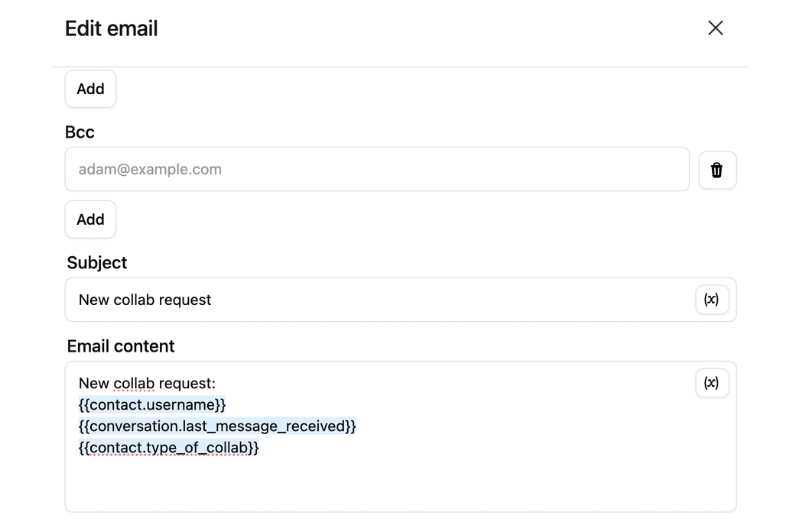
The part worth automating is the catching and sorting, not the deciding. An AI agent can read incoming DMs, recognise a collaboration request even when it is phrased vaguely ("I'd love to do something together" as much as "we're offering a paid partnership"), and reply with your categorising question automatically. Based on the answer, it asks the one follow-up that matters for that type, logs the answers against the contact, and emails you a summary once the request is qualified. You open your inbox to a short list of ready-to-decide requests instead of a scrolling pile of unread DMs.
A few things make this work in practice rather than in theory. It reads intent, not keywords, so informal phrasing still gets caught. The qualification happens inside the DM thread in real time, so to the sender it just looks like a fast, natural reply. And if someone goes quiet mid-qualification, the agent can follow up once after a set interval, recovering conversations that would otherwise stall. The setup is a scenario built on the same qualify-and-route logic covered in qualifying Instagram leads, and because it runs on Meta's official API replying only to people who messaged you, it stays compliant, covered in is Instagram automation safe.
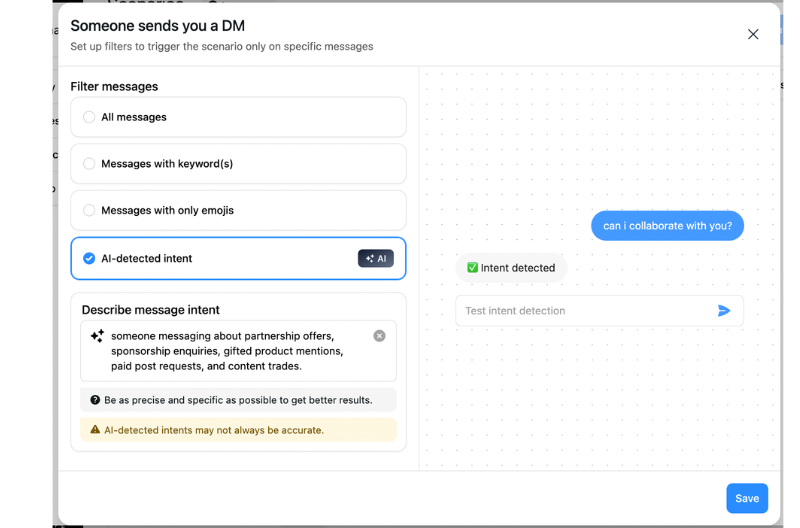
The shape of the setup, without turning it into a manual:
The qualifying question does most of the filtering for you. Real brands answer a direct question about budget, product or deliverables; spam and low-effort mass outreach tend to go quiet the moment they are asked something specific. So by the time a request has answered two questions, it has shown more genuine intent than one that never got past hello. Beyond that, a quick look at the sender's account, follower count, age, whether their content is real, settles most of the remaining doubt before you reply.
It reads the intent, asks the qualifying questions, and emails you the requests worth deciding on. Free plan, no card.


It is an inbound DM from a brand, agency or creator wanting to work with you commercially, a paid post, gifted product content, or a content trade. It arrives in your general inbox with no label and no budget attached, and it is unrelated to Instagram's native collab post feature, which co-authors a single post between two accounts.
The collab post feature lets two accounts co-author one post that appears on both feeds, managed in the post creation flow. A collaboration request is a DM from someone who wants to work with you commercially, and it needs evaluating and negotiating. Same word, unrelated features.
Start with one that categorises it: paid, gifted, or trade. Then ask the single fact that decides fit, budget for paid, product and value for gifted, what they offer for trade. Two answers are usually enough to know whether to keep going, without sinking multiple messages into a request that was never viable.
Qualify at the point of contact rather than continuously monitoring your inbox. An AI agent can read incoming DMs, detect collaboration intent, ask your qualifying questions in the thread, and email you only the ones that are fully qualified, so the good requests surface instead of getting buried.
Yes, when the tool runs on Meta's official API and only replies to people who messaged you, which is exactly what inbound qualification does. Avoid tools that use browser automation or ask for your password. More in is Instagram automation safe.
The qualifying question filters most of it: real brands answer questions about budget or product, spam goes quiet when asked something specific. After two answered questions, plus a quick look at the sender's account, you can usually tell. Genuine intent survives a direct question; low-effort outreach does not.
A follow-up after a set interval recovers a share of stalled conversations. If there is still no reply, the contact stays tagged for manual review, so nothing is lost, it just waits until you choose to look.
Join automations strategies and Instagram Insights weekly
By entering your email address above and clicking Subscribe, you consent to receive marketing communications (such as newsletters, blog posts, event invitations and new product updates), and targeted advertising from Inrō from time to time. You can unsubscribe from our marketing emails at anytime by clinking on the "Unsubscribe" link at the bottom of our emails. For more information about how we process personal information and what right you have on this respect, please see our Privacy Policy.
Connect your Instagram account and build your first automation in minutes. No code required.

.avif)
.avif)