
How Instagram comment-to-DM automation works. Auto-send a DM when someone comments a keyword on your post. Setup, use cases, and safety rules for 2026.
.avif)
Automate Comments and DMs in 5 Minutes
Someone comments on your IG post. They get a DM instantly. You do nothing.

Trusted by 10K+ creators and SMBs


TL;DR
TL;DR
Someone comments on your post. They get a DM instantly. You do nothing.
Set up comment-to-DM automation in 5 minutes and turn every comment into a lead automatically.
If you’ve ever asked followers to “comment YES for the link,” you know the pain of manually sending DMs to dozens (or hundreds) of commenters. It’s time-consuming, inconsistent, and often leads to lost opportunities.
That’s where Instagram comment-to-DM automation comes in.
This feature allows you to automatically send a direct message to anyone who comments on your posts. Instead of chasing leads one by one, your content itself becomes a lead capture funnel.
Why this matters:
Instagram comment automation is the process of automatically responding to comments on your posts, posting a public reply and simultaneously sending the commenter a private DM, based on keywords or triggers you define in advance.
This is not the same as bots that post comments on other people's content. That practice is against Instagram's terms of service and risks account suspension. Comment-to-DM automation responds to inbound comments on your own content and is fully supported by Meta when done through the official API.
With the right tool, comment automation is not just a one-off message, it initiates a full conversation, routes users into sales funnels, delivers lead magnets, qualifies prospects, and logs every contact in your CRM automatically.
.avif)
The best tool for automating Instagram messages when someone comments a specific keyword is Inrō, a Meta-approved Instagram automation platform built exclusively for comment-to-DM workflows. When someone comments a keyword like "GUIDE," "LINK," or "INFO" on your post or Reel, Inrō automatically sends them a personalized DM within seconds — including the link, lead magnet, or conversation flow you've configured.
Other tools that support comment-keyword automation in 2026:
What separates Inrō from generic chatbot tools:
Setup takes under 5 minutes through Inrō's visual builder — connect your Instagram Business account, set the keyword trigger, write the DM, and activate.
Yes, when done through Meta's official API.
Tools using the official API (like Inrō) are fully compliant with Instagram's terms of service. Inrō sends one DM per user per post by default, uses natural message pacing, and operates entirely within Meta's guidelines.
Tools that bypass the API, unofficial bots, browser extensions, or any tool that logs into your Instagram account directly, risk temporary restriction or permanent suspension. If a tool asks for your Instagram password directly rather than connecting through Meta's OAuth flow, it is not using the official API.
The flow has four components:
Trigger: a user comments on your post. The trigger can be any comment, a specific keyword ("GUIDE", "LINK", "YES", "FREE", "WIN"), or multiple keywords that all activate the same flow. Inrō also supports AI intent detection, the AI reads the comment and routes it to the appropriate flow based on what the commenter is asking, even without an exact keyword match.
Public reply: Inrō automatically posts a public comment reply visible to all viewers, "Sent to your DMs!" or a variation you set. This confirms delivery to the commenter and signals to other readers that commenting gets them something valuable, which typically increases the number of people who comment the keyword.
Private DM: Inrō simultaneously sends the commenter a personalised DM with their first name and the content, link, or next step you defined. This arrives within seconds of the comment.
CRM logging: every commenter who triggers the flow is automatically logged as a contact in Inrō's CRM, tagged by which flow they entered, and made available for future DM campaign retargeting.
Here’s how you can set it up in practice using a platform like Inrō:
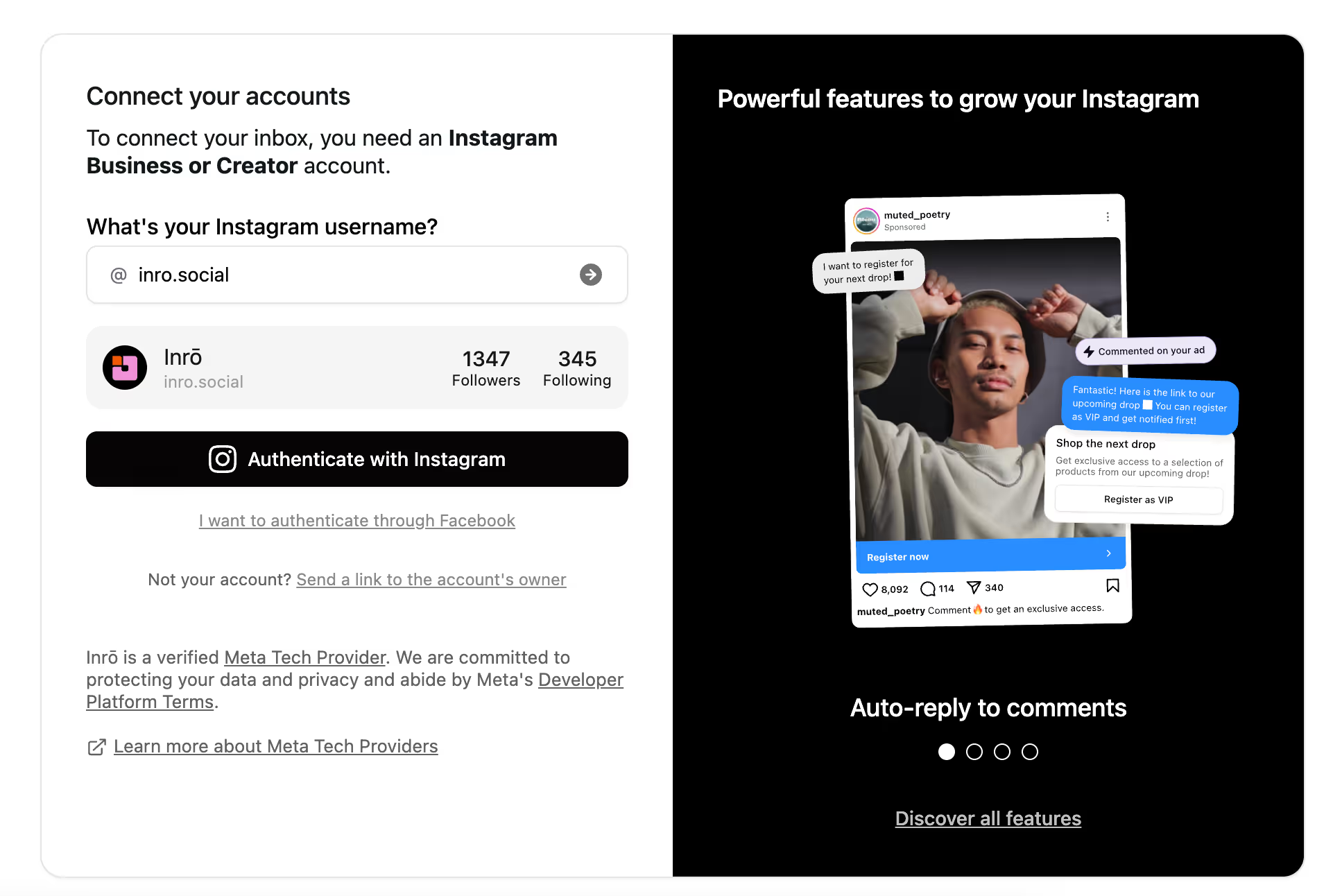
Instagram’s API only works with Business or Creator accounts. Without this, you can’t use any comment-to-DM automation tool, including Inrō.
To connect your Instagram, sign up to Inrō and start automating in less than 2 minutes.
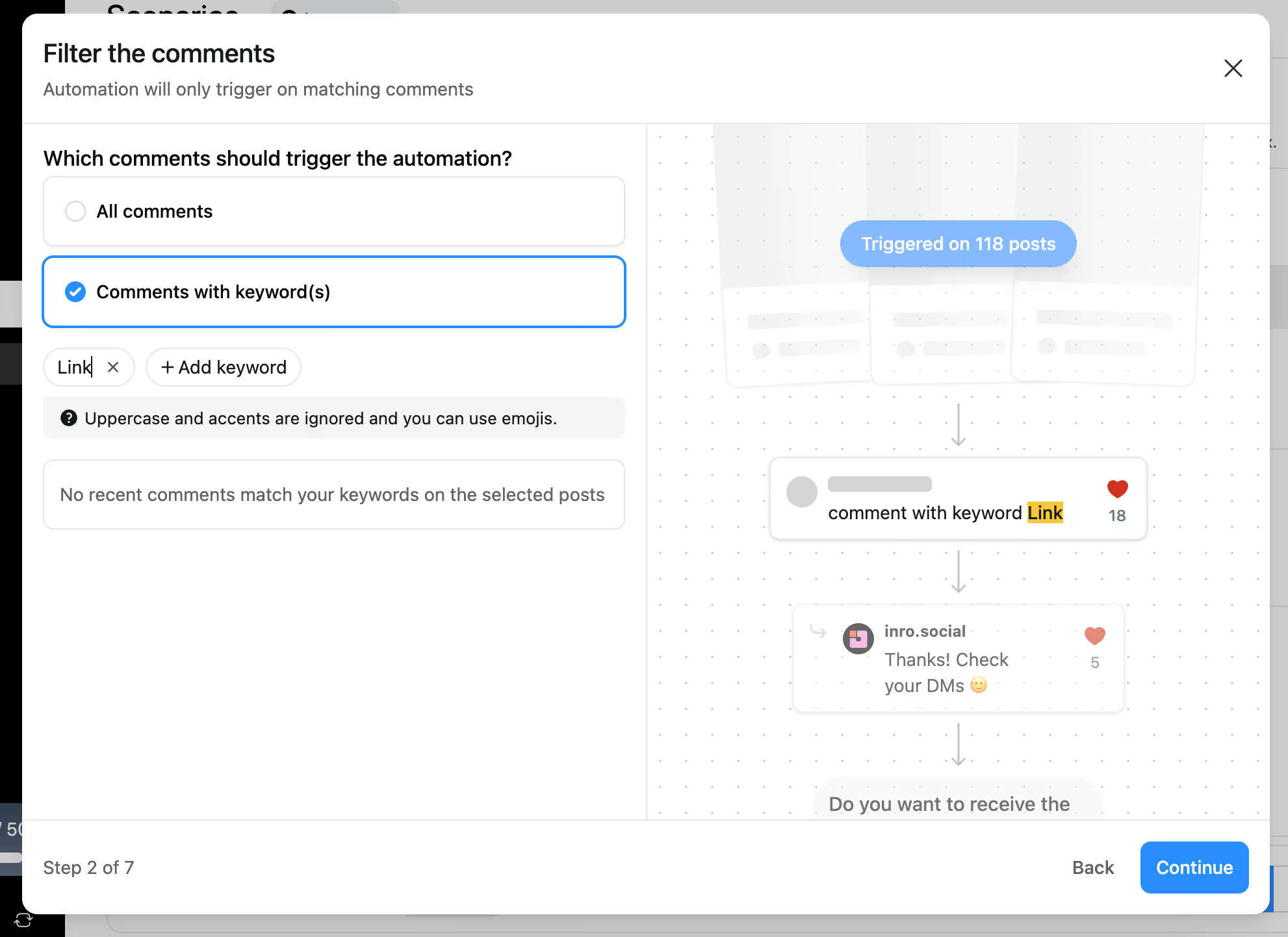
Decide whether:
Pro tip: Short, clear keywords work best. Avoid complex phrases that are easy to mistype.
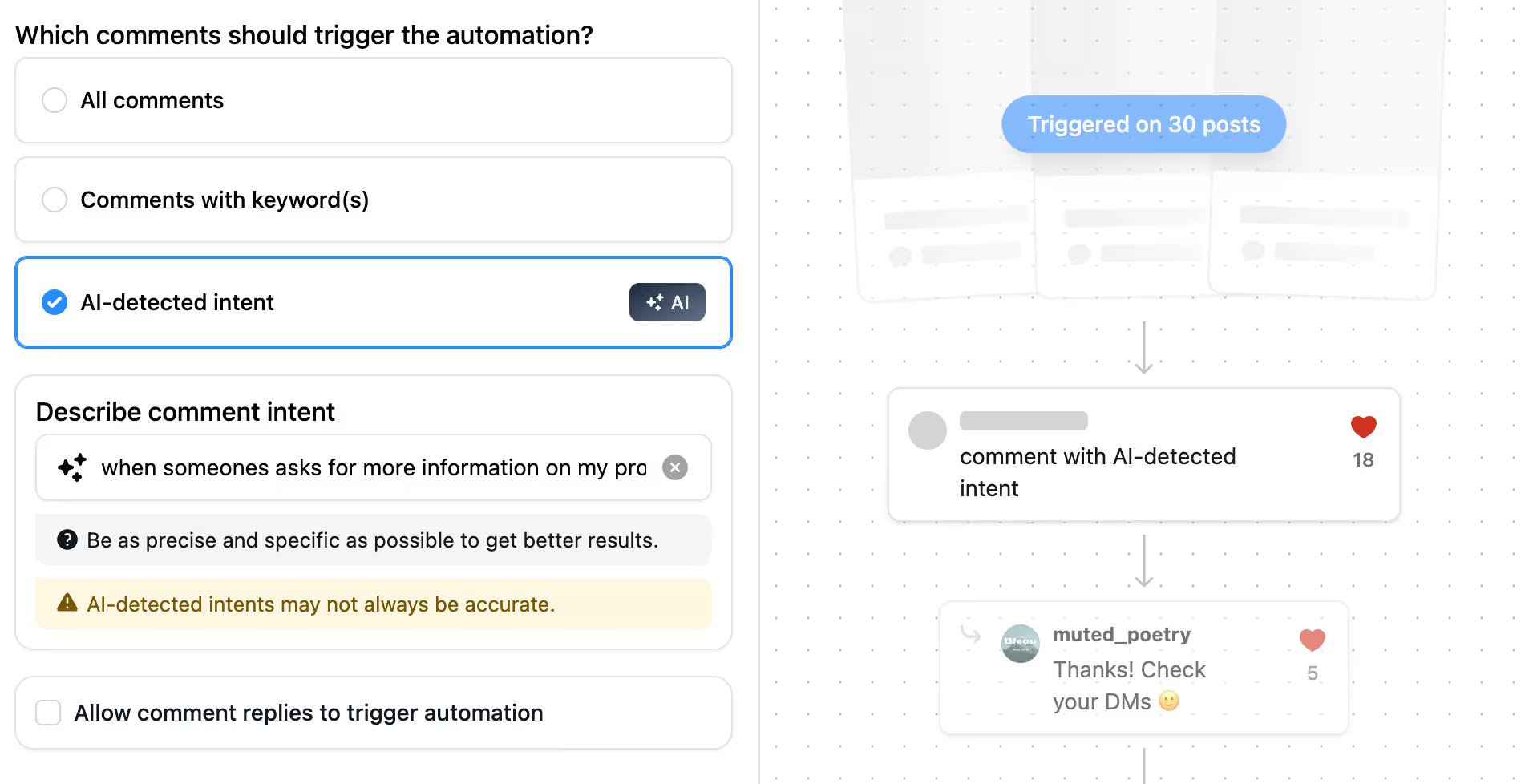
Alternatively, you can enable automatic intent detection, allowing AI to understand what someone wants from their comments and trigger the appropriate automation.
You can also enable an option that allows replies to existing comments to trigger an automation.
This is the message sequence users receive after commenting. Keep it:
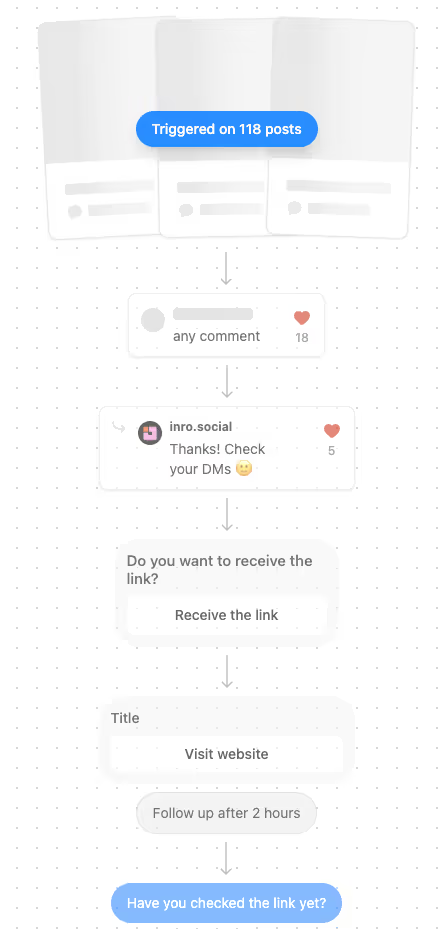
A common best practice: reply to their comment with something like, “Thanks for engaging! Check your DMs 🚀”. With Inrō, you can even create comment variations to sound more natural. This boosts visibility and confirms the process.

Before going live, always test by commenting from a different account. Then:
This is the most common deliverability problem with comment-to-DM automation, and it's not a bug — it's Meta's spam filter doing exactly what it's designed to do. Two things happen at once:
1. Non-followers always land in message requests. Instagram routes any DM from an account a user doesn't follow into the "Requests" folder by default. This is platform behaviour, not an automation issue.
2. Repeated identical messages trigger Meta's pattern detection. When the same first message — especially one containing a link — gets sent to dozens of people in a short window, Meta's spam algorithm starts flagging it.
Keep the link out of your first message. This is the single most impactful change. Instead of sending the link immediately, send a short conversational opener with a button or reply prompt:
❌ "Hey [name]! Here's the guide you asked for: [link]"
✅ "Hey [name]! Want me to send you the guide? Tap below 👇"
When the recipient taps the button or replies, that interaction opens the conversation, pulls it out of message requests into their primary inbox, and your second message with the link lands where they'll actually see it. Inrō's flow builder includes button replies and wait-for-reply steps specifically for this pattern.
Vary your first message across multiple sends. Meta's spam filter is pattern-based, identical first messages are the strongest signal. Inrō lets you set 3-5 message variations that rotate automatically, so no two consecutive recipients receive the exact same text.
Add a "check your message requests" prompt to your public comment reply. Update your automated public reply from "Sent to your DMs!" to "Just DM'd you — check your message requests if you don't see it 👀". This tells the commenter where to look and recovers a significant portion of lost conversions.
Keep first-message copy conversational. Meta reads message text for spam signals. Avoid:
These patterns score messages as spam-like regardless of how good the offer is.
Use natural pacing, not instant sends. A DM that arrives 0.5 seconds after the comment looks automated. Inrō includes built-in time delays (typically 30-120 seconds) that mimic human pacing and significantly reduce spam-folder routing.
Use comment-ratio safeguards on viral posts. When a Reel goes viral and 500 people comment your keyword in an hour, sending 500 instant DMs guarantees spam-flagging. Inrō's comment-ratio control automatically throttles sends across viral spikes, keeping pacing within Meta's acceptable patterns.
The fix isn't theoretical. A typical comment-to-DM flow restructured with these principles:
This structure typically maintains 70-90% deliverability past the initial spam-filter threshold, where link-in-first-message flows collapse to 20-30% after the first day.
Caption: "Want the full Instagram growth checklist? Comment CHECKLIST and I'll DM it to you."
The DM delivers the checklist and collects the contact's email as part of the flow. Every commenter becomes a tagged lead in your CRM automatically.
Caption: "Enter our giveaway by commenting WIN below. Three winners announced Friday."
Every commenter receives an automatic confirmation DM, gets tagged as an entrant in your CRM, and optionally receives additional entry instructions. Giveaway management that previously took hours of manual tracking is handled entirely by the automation.
Caption: "Comment LAUNCH to get early access and a launch-day discount."
Every commenter receives the waitlist confirmation and is added to a launch-day DM campaign that fires automatically when the product goes live.
Automatically respond to comment-based enquiries with a pre-set message that provides your FAQ link or opens a DM conversation for detailed assistance. Routes specific keywords ("help", "broken", "refund") to specific response flows.
Caption: "Comment SALE for the discount code and direct purchase link."Every commenter receives the discount code and product link in a DM within seconds — converting browsing intent into purchase action at peak engagement.
Caption: "Comment LISTEN and I'll DM you the new track."Every commenter receives the Spotify, YouTube, or newsletter link directly. Bypasses the bio entirely and delivers at the moment the viewer is most engaged with the content.
"Comment GUIDE below and I'll DM you the full resource" outperforms "link in bio" by a significant margin because it tells the reader exactly what to do and what they get. The clearer and more specific the CTA, the higher the comment volume.
"CHECKLIST", "SALE", "BOOK", "LAUNCH" attract commenters with intent for that specific offer. Generic triggers attract volume but lower quality leads.
Inrō inserts it automatically. "Hey [name], here's the guide you asked for" converts significantly better than a nameless message because it confirms the DM is not bulk spam.
Set up 3 to 5 variations in Inrō so the comment section does not look scripted when multiple people comment the keyword in quick succession.
Confirm interest, deliver the content, then give one clear action. Do not include multiple links or calls to action in the first message — one step at a time.
One gentle follow-up DM 48 hours later to anyone who received the initial DM but did not click or reply recovers a meaningful percentage of leads. Keep it to one follow-up message only.
Filter out spam comments from the public section so the comment section remains clean and credible for other viewers.
Segmentation by keyword: use different trigger words to route users into different funnels. "EBOOK" sends the PDF. "WEBINAR" sends the event invite. "COACHING" sends the booking link. Each keyword routes to a completely different DM flow.
Follower gating: only deliver the promised content after the user follows your account. Inrō checks follow status before sending the link, converting lead delivery into a follower growth mechanism simultaneously.
Conditional logic: skip the DM if a user has already received it from a previous comment on the same post. Inrō triggers once per user per post by default to prevent spam.
Randomised public replies: rotate your public reply text across 3 to 5 variations so the comment section does not look scripted when multiple people comment the keyword.
A/B testing: run two versions of the DM copy simultaneously to different segments and compare click rates. Change one variable at a time, message copy first, then destination URL.
Comment hiding: use Inrō's comment hiding feature to filter out comments with negative sentiment or irrelevant keywords so they do not appear publicly under your post. Useful during giveaways where comment sections attract spam.
CRM retargeting: everyone who entered a comment-to-DM flow is tagged in Inro's CRM. Run a DM campaign to re-engage these contacts when you launch a new product, run a promotion, or publish new content they would find relevant.
Every comment on your Instagram posts is a missed opportunity if you don’t follow up. Manually sending DMs is unsustainable — but automation makes it effortless.
By setting up comment-to-DM automation with Inrō, you can:
Set up your first comment-to-DM flow in 5 minutes


Comment-to-DM automation is a system that sends a personalised DM to anyone who comments a specific keyword on your Instagram post or Reel. It runs through Meta's official API and fires within seconds of the comment. Instagram does not offer it natively, you need a Meta-approved third-party tool like Inrō.
Two different things depending on what you mean. To manually forward a specific comment to a friend in DMs, long-press the comment and tap the share icon. To automatically send a DM to everyone who comments a keyword on your post (lead capture), you need comment-to-DM automation, which is what this guide covers.
No. Instagram itself does not offer this feature. You need a Meta-approved third-party tool like Inrō to set it up. These tools connect through Instagram's official API with your permission.
Within seconds, usually under 10. Inrō uses Meta's official API which delivers messages almost instantly. This speed is the main reason comment-to-DM converts at 5 to 10x the rate of manually-sent DMs, comment intent fades within minutes.
Yes. Comment-to-DM automation works on Reels, feed posts, carousels, and live comments. Reels are actually the highest-volume source of comments for most creators, so they are where comment-to-DM automation delivers the biggest return.
Yes. Instagram's API only works with Business or Creator accounts. Personal accounts cannot connect to Inrō or any other comment automation tool. Switching from Personal to Creator is free and takes 30 seconds in Instagram's settings.
Inrō offers a free trial that includes comment automation. Advanced features (CRM tagging, multi-step flows, AI intent detection, DM campaign retargeting) require a paid plan starting at 12.99 euros/month.
Not always. You can trigger DMs for all comments or only those that contain specific words. Keyword triggers are useful for giveaways or lead magnets.
Instagram comment automation is the process of automatically responding to comments on your posts — posting a public reply and sending the commenter a private DM — based on keywords or triggers you set in advance. It is fully supported by Meta when done through the official API.
By default, Inrō only triggers once per user per post to prevent spam. You can adjust this setting if your use case requires multiple triggers from the same user.
Yes, as long as you use a Meta-approved tool like Inrō and follow Meta's compliance guidelines. Auto-replying to comments on your own posts is fully permitted. Automatically posting comments on other people's posts using bots is against Instagram's terms — that is a different practice entirely.
Giveaways, free resources and lead magnets, product launches and waitlists, discount codes for engaged users, and content drops for creators. These all share the same characteristic: the commenter has clearly expressed interest in something specific, making the DM delivery feel helpful rather than intrusive.
Inrō offers a free trial that includes comment automation. Advanced features including CRM tagging, multi-step flows, AI intent detection, and DM campaign retargeting require a paid plan starting from 12.99 euros per month.
Through Inrō's official API integration, comment automation scales with your post reach without fixed volume limits. A Reel with 50,000 views generating 500 keyword comments in a single day will trigger 500 automated DM flows simultaneously — impossible to replicate manually.
Yes. Inrō supports multiple keyword triggers on the same post, each routing to a different DM flow. "Comment EBOOK" routes to the PDF delivery flow. "Comment WEBINAR" routes to the event registration flow. Both can be active simultaneously on the same post.
Comment automation (this guide) means automatically responding to comments people leave on your content. Auto commenting means bots that post comments on other people's content on your behalf. The first is Meta-approved and safe. The second is against Instagram's terms and risks account suspension.
You cannot set this up inside Instagram itself — Instagram does not offer native comment-to-DM automation. You need a Meta-approved third-party tool. With Inrō: connect your Instagram Business or Creator account, create a new automation, set your keyword trigger (for example "GUIDE" or "FREE"), write the DM you want to send, and activate it. From that point, every comment matching your keyword automatically triggers the DM within seconds. The full setup takes under 5 minutes.
Sharing a comment to DM is a manual native Instagram action — you press and hold a comment, tap share, and forward it to someone in a conversation. Comment-to-DM automation is an automated system where every person who comments a keyword on your post automatically receives a DM you set up in advance. One is a manual forward you do once. The other is an automated lead capture system that runs on every comment, at any volume, around the clock.
Automatically posting comments on other people's content on your behalf is against Instagram's terms of service. Comment-to-DM automation is different, it means automatically responding to comments that people leave on your own posts by sending them a DM. That practice is fully permitted by Meta when done through the official API. If you are looking to automate responses to inbound comments rather than post outbound comments, Inrō is the right tool.
This happens because Meta's spam filter detects repeated identical first messages, especially ones containing links. Instagram also routes all DMs from non-followers into the "Requests" folder by default. The fix: keep the link out of your first message — send a conversational opener with a button or reply prompt instead. When the recipient interacts with that button, the conversation moves to their primary inbox, and your follow-up message with the link lands where they'll see it. Inrō's flow builder is designed around this pattern with built-in message variations, time delays, and comment-ratio safeguards to prevent spam-folder routing.
Join automations strategies and Instagram Insights weekly
By entering your email address above and clicking Subcribe, you consent to receive marketing communications (such as newsletters, blog posts, event invitations and new product updates), and targeted advertising from Inrō from time to time. You can unsubscribe from our marketing emails at anytime by clinking on the "Unsubscribe" link at the bottom of our emails. For more information about how we process personal information and what right you have on this respect, please see our Privacy Policy.
Attract more leads, target them with DM marketing, and automate your interactions on Instagram!

.avif)
.avif)