
How to qualify Instagram DM leads automatically: intent-based triggers, an AI agent that collects answers into your CRM mid-conversation, and smart routing.
.avif)
Automate Comments and DMs in 5 Minutes
Someone comments on your IG post. They get a DM instantly. You do nothing.

Trusted by 10K+ creators and SMBs


TL;DR
TL;DR
Stop qualifying 50 DMs by hand
Let an AI agent ask the qualifying questions, save the answers to your CRM, and surface only the leads worth your time. Free plan, no card.
Instagram lead qualification is the process of working out, from an inbound DM, whether someone is a serious buyer or just browsing, before you spend time on them. If you get dozens of DMs a week asking about pricing, packages and availability, doing this by hand is where the time goes and where good leads go cold. The fix is a structured DM conversation that identifies intent, collects a few key details, and routes each person to the right next step automatically. This walks through how to build that specific flow, using an AI agent to run the conversation. For the wider strategy behind it, what to ask and how to route hot, warm and not-ready leads, see the lead qualification guide; this article is the step-by-step build.
One quick clarification first, since it trips people up. If you saw the word Lead appear in your Instagram inbox, that is Instagram's own native auto-detection label, not this. This article is about building your own qualification process that sorts serious buyers from browsers before you get involved.
Inbound DMs arrive with wildly different intent. Some people are ready to buy. Others are early in their research, not the right fit, or messaging for reasons unrelated to what you sell. Without a qualification layer, every DM demands the same manual effort: you read it, reply, ask the same opening questions, and try to judge who is worth following up. That does not scale, and it means real buyers wait while you work through browsers.
A qualification flow does three jobs. It decides which messages are worth a full conversation, it runs that conversation to collect what you need to know, and it routes each contact based on the answers: serious leads toward a booking step, everyone else toward useful content and a nurture list. Done well, you only spend human time on people ready to convert.
Most DM automation fires on a specific word. That misses a lot, because high-intent messages rarely use the keyword you guessed. Someone ready to work with you might write "do you still take clients?", "what does working with you look like?", or "I think I'm finally ready", none of which contain an obvious trigger word.
Intent-based triggering fires on what a message means rather than the exact words. You describe the intent in plain language, wants to work with me, asking about my services, and the AI matches any phrasing of it. For post comments, you can still layer a keyword filter (course, mentor, coach) alongside automatic exclusion of hateful and negative comments, so only genuinely interested commenters enter the flow. Running both on the same scenario means someone who comments and then DMs is caught once, not twice, and nobody falls through the gap between channels.
.png)
The point of the conversation is the data it collects. As the contact answers each question, the AI agent writes the value straight to their contact record, not at the end, but as each answer arrives. So if someone drops off after the second question, what they already told you is saved rather than lost.
A typical qualification conversation collects four to six things in sequence: their main goal first, then their experience level, their biggest challenge, and their budget range. Because each answer is saved immediately and readable straight away, the agent can use an earlier answer to frame a later question, referencing the goal someone just gave when suggesting which option fits. That makes it feel like a conversation rather than a form.

Here is how a creator, coach or service business would set this up end to end. The questions and tiers are configurable; the structure works for any offer.
1. Trigger. Someone DMs with interest, or comments a service-related keyword. The intent and keyword filters fire the flow, negative comments are excluded, and the contact drops into an "Interested Leads" folder.
2. Opening message. After a short delay, so it does not feel robotically instant, the agent sends a warm greeting and sets the expectation: "Thanks for reaching out. To make sure I can actually help, can I ask you a couple of quick questions?"
3. First question. It asks the contact's main goal, and writes the answer to their record immediately.
4. Wait, and re-engage if needed. The flow pauses for the reply. If none comes within a set window, typically a few days, it sends one automatic nudge ("Are you still interested?") with no manual input.
5. Evaluate. When they reply, an AI-detected condition reads the whole conversation and the collected data against a plain-language rule ("genuinely interested and aligned with the offer") and returns true or false. It judges the full exchange, not just the last message.
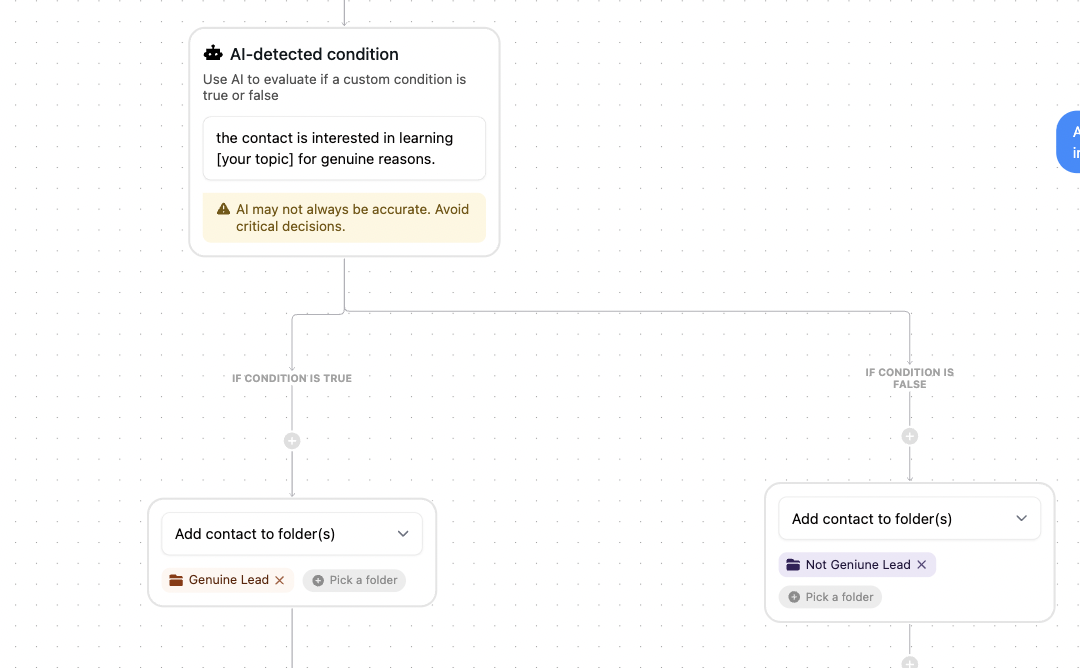
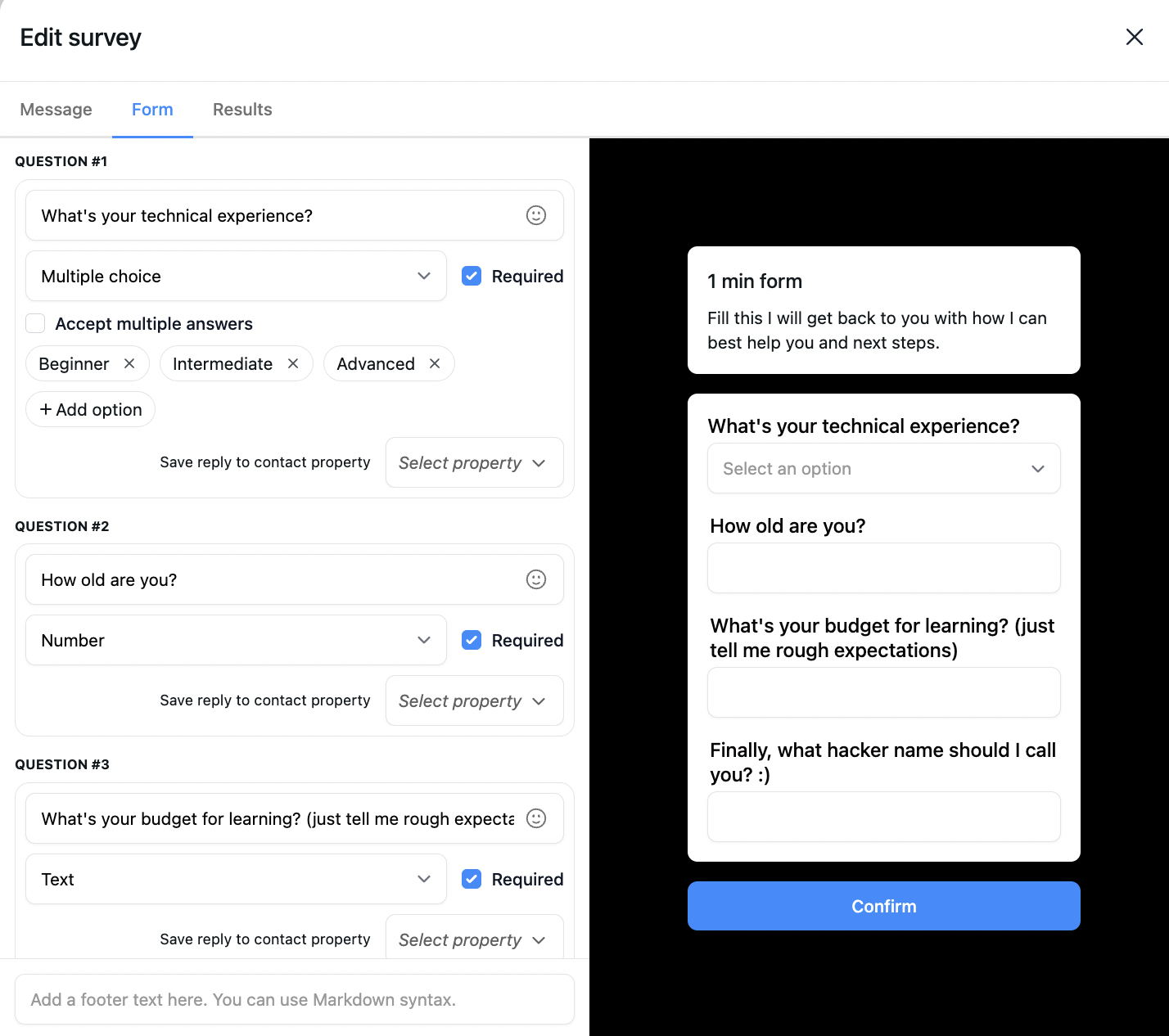
6a. Qualified. The contact moves to a "Genuine Lead" folder and gets a short intake form in the DM, framed around the goal they shared. If they do not fill it within a few days, a reminder goes out. When they submit, the team gets an email with all the collected details filled in, name, username, goal, experience, budget, so the first human conversation starts from a complete picture.
6b. Not a fit right now. The agent sends a message that acknowledges what they shared without making them feel rejected, points them to free content, and adds them to a nurture folder: "Based on where you are right now this might not be the fit, but I'd love for you to keep learning through my content, here's where to start." That folder becomes a segment you can message later when a more accessible offer opens.
The result is an inbox where every contact carries their goal, experience, budget and status, and you only spend time on the ones ready to convert.
Lead Qualification Flow

Inrō
inro.social
Qualify inbound DMs automatically, collect the answers, and route each lead.
Use this automation| Stage | Folder | What you do |
|---|---|---|
| Showed interest | Interested Leads | Nothing, the flow is running |
| Passed the condition | Genuine Lead | Wait for the form |
| Form submitted | Funnel Done | Read the email, book the call |
| Not a fit now | Nurture | Nothing, sequence is active |
| Went quiet | Still in flow | Nothing, re-engagement is automatic |
Every contact ends up in the CRM with their answers and folder, which turns the inbox from a message queue into a segmented database. That makes follow-up targeted: the not-a-fit folder is the audience for a message when a lower-cost entry point opens, the quiet leads can be re-engaged around a new post, and the qualified-but-not-yet-converted can be nudged when a new cohort starts. Each campaign reaches only the people it is relevant to, which keeps volume down and replies up. The broader picture of capturing and nurturing these contacts is in social media lead generation.
You can also tag the trigger source for each contact, so filtering the inbox shows which posts, Stories or ads produce the highest share of genuine leads, which is the data you need to decide where to put your content effort. And contact properties can sync out to a CRM like HubSpot or Pipedrive through an integration, so Instagram lead data flows into the rest of your stack without manual export.
Worth being clear about this, because the AI agent is not always the right tool. A standard keyword-or-button flow is fast to set up and reliable for predictable interactions, comment a keyword, get a link. Use it for those. The AI agent earns its place in open-ended conversations where replies are unpredictable and you need to infer intent, adapt questions to previous answers, and branch on the whole exchange, which is exactly what qualification is. For sorting varied inbound DMs, the agent is the right fit; for a simple link delivery, it is overkill. All of this runs on Meta's official API and responds to people who messaged first, which is what keeps it compliant, covered in is Instagram automation safe.
It asks the questions, saves the answers to your CRM, and surfaces only the leads worth your time. Free plan, no card.


It is working out from an inbound DM whether someone is a serious buyer or just browsing, before you spend time on them. An AI agent can run this: it asks about goals, budget and intent, saves the answers to a CRM as they come in, and routes each contact to a booking step, a person, or a nurture sequence.
A keyword trigger fires on an exact word. Intent-based triggering fires on what a message means, so you describe the intent in plain language ("asking about my services") and it matches any phrasing. That catches high-intent messages that would never hit a keyword, which is most of them.
Usually four to six things: the contact's main goal, experience level, biggest challenge, and budget, plus name and username. Each answer is written to their CRM record as it arrives, so even a conversation that ends early keeps what was already shared.
They get a message that acknowledges what they shared and points them to free content or a lower-cost option, without an awkward rejection, and they go into a nurture folder. That folder is a segment you can message later when something more accessible opens up.
The flow handles it automatically. If they do not answer a question within a few days, it sends one nudge. If a qualified lead does not fill the intake form, it sends a reminder. No manual follow-up needed.
Yes. It runs on Meta's official Instagram API and responds to people who messaged or commented first, which is compliant. What Meta prohibits is unsolicited outbound messaging to people who never engaged, which this does not do.
For predictable interactions, comment a keyword and get a link, a standard keyword flow is faster and perfectly reliable. The AI agent is for open-ended qualification where replies vary and you need to infer intent and branch on the whole conversation. Match the tool to the job.
Join automations strategies and Instagram Insights weekly
By entering your email address above and clicking Subscribe, you consent to receive marketing communications (such as newsletters, blog posts, event invitations and new product updates), and targeted advertising from Inrō from time to time. You can unsubscribe from our marketing emails at anytime by clinking on the "Unsubscribe" link at the bottom of our emails. For more information about how we process personal information and what right you have on this respect, please see our Privacy Policy.
Connect your Instagram account and build your first automation in minutes. No code required.
.avif)
.avif)
.avif)