
How to share your OnlyFans link on Instagram without flags or shadowbans. What OnlyFans links look like, where to place them safely, and how DM automation delivers them instantly.
.avif)
Automate Comments and DMs in 5 Minutes
Someone comments on your IG post. They get a DM instantly. You do nothing.

Trusted by 10K+ creators and SMBs


TL;DR
TL;DR
Someone comments on your post asking for your link.
Inrō sends them your OnlyFans URL directly in a private DM, instantly, without you touching your phone. No bio link. No public post. No flag risk.
OnlyFans links are not explicitly banned by Instagram's Terms of Service, but Instagram's automated systems flag content associated with adult platforms aggressively and without warning. The result for many creators is the same whether or not a technical rule was broken: links become unclickable, posts stop reaching followers, and accounts receive warnings or suspensions.
The specific risk depends on where the link appears. Links placed directly in the Instagram bio, in post captions, or in public comments are scanned by Instagram's automated moderation systems. A URL pointing to onlyfans.com in a public-facing location is a consistent flag trigger, regardless of the content it leads to. Instagram does not send explanations when it acts on these signals.
Every OnlyFans creator profile has a URL in this format:
onlyfans.com/[username]
For example: onlyfans.com/yourcreatorname
This is the direct link to your OnlyFans profile page. When someone visits this URL, they see your profile, subscription options, and any publicly visible content you have set.
What the link looks like when shared:
In a DM: https://onlyfans.com/yourcreatorname
Through a link aggregator: the aggregator URL appears first (e.g., beacons.ai/yourcreatorname), and clicking through takes the visitor to your OnlyFans page.
Why the format matters for Instagram safety:
The onlyfans.com domain itself is what Instagram's automated URL scanner flags. When this domain appears in a public-facing field — bio, caption, or comment — it is recognised and flagged automatically. When the same URL is sent inside a private DM to a user who requested it, it travels through a different pipeline that is not subject to the same automated scanning.
This is why DM delivery is safer than bio placement even when the exact same URL is being shared.
The standard advice for OnlyFans creators on Instagram is to use a link-in-bio tool (Linktree, AllMyLinks, a personal landing page) to add one level of distance between the Instagram bio and the OnlyFans URL. This approach reduces the risk compared to linking directly, but it does not eliminate it.
The bio is still a public-facing field. Instagram's systems still scan it. Creators using Linktree have reported shadowbans and flagging, particularly in adult niches, because Linktree itself has become associated with OnlyFans promotion and because the bio field is exactly where Instagram's systems look first. Link tools marketed specifically to adult creators carry their own risk profile.
There is also a conversion problem. A bio link requires the follower to: see your content, decide to visit your profile, find the bio link, tap it, load an external page, and then click through to OnlyFans. Every step is a drop-off point. Most people who comment "how do I find your link?" on a post never make it through that chain.
DM automation removes every step between "I'm interested" and "here is the link."
For the full breakdown of Instagram's policy on adult content links and what specific phrases trigger automated flags, see our Instagram rules guide for OnlyFans creators.
If you do use a link aggregator as your bio link, here is how the common options compare for OnlyFans creators specifically.
DM automation sends your OnlyFans link inside a private direct message to any follower who signals they want it, triggered by their own action, without you doing anything manually.
The mechanism matters. When a follower comments a keyword on your post ("LINK", "INFO", "OF", or any word you choose), or replies to your Story, they have explicitly signalled interest. Inrō detects that signal and sends them a private DM with your link within seconds. The message goes to their DMs, not into a comment thread or a bio field. It is a private, one-to-one message between your account and theirs.
From Instagram's perspective, this is a user receiving a DM they triggered themselves, from an account they follow or have engaged with. It is not a spammy bulk outreach and it is not a public-facing link being scanned by automated moderation. The link reaches the person who wants it, through the channel least likely to trigger a flag.
This also solves the conversion problem. The link arrives at the exact moment interest is highest, directly in the user's DMs, with no additional steps required.
The following setup uses Inrō's comment-to-DM automation. The Story reply setup is identical except for the trigger type selection in Step 3.
Go to inro.social and connect your Instagram Business or Creator account through Meta's official OAuth flow. The connection takes under two minutes.
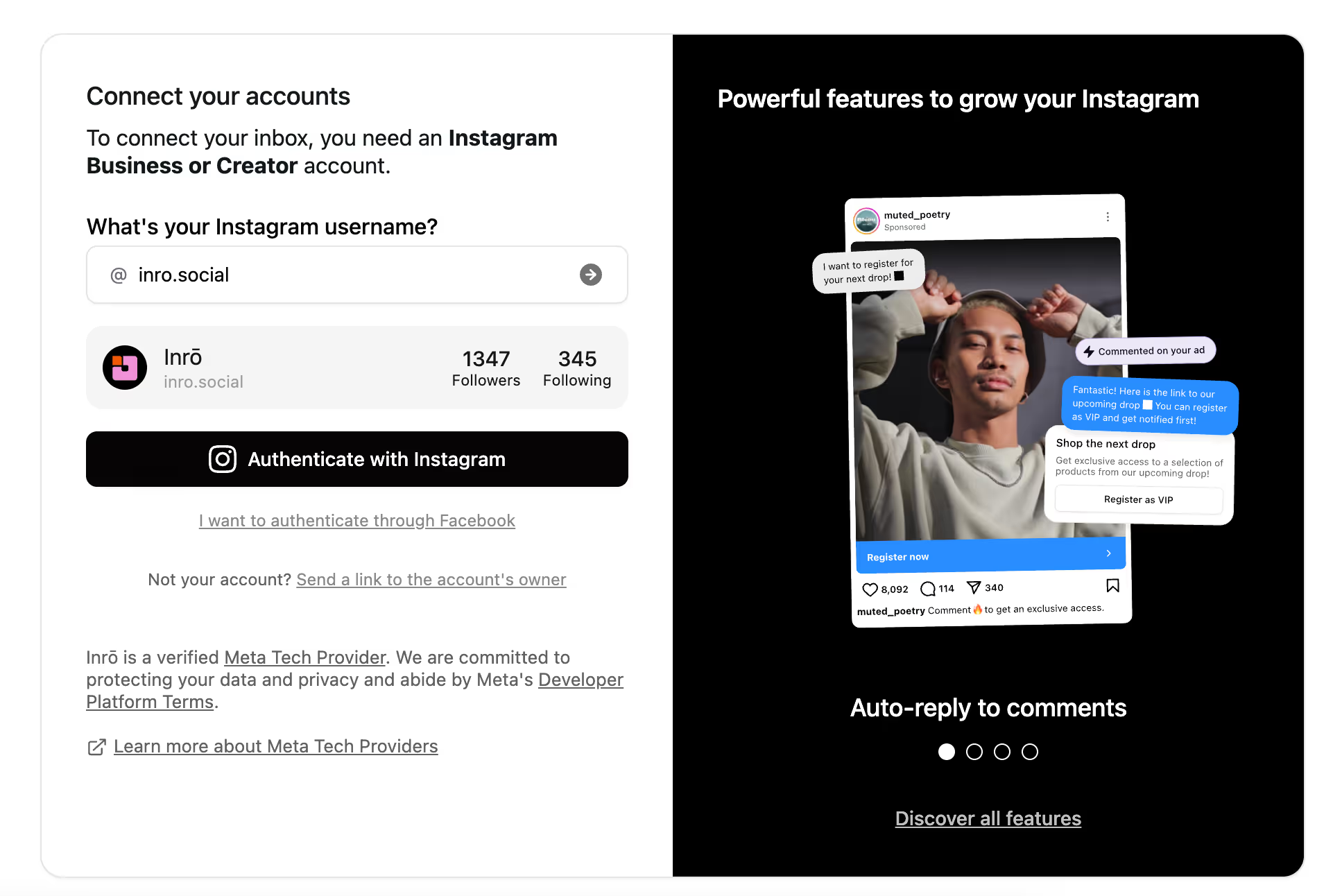
In Inrō's flow builder, select "New Scenario." You will see the types of options on the next screen.

Select "Comment on a post" to trigger the DM when someone comments a keyword, or "Story reply" to trigger it when someone replies to a specific Story. You can run both simultaneously on the same account.
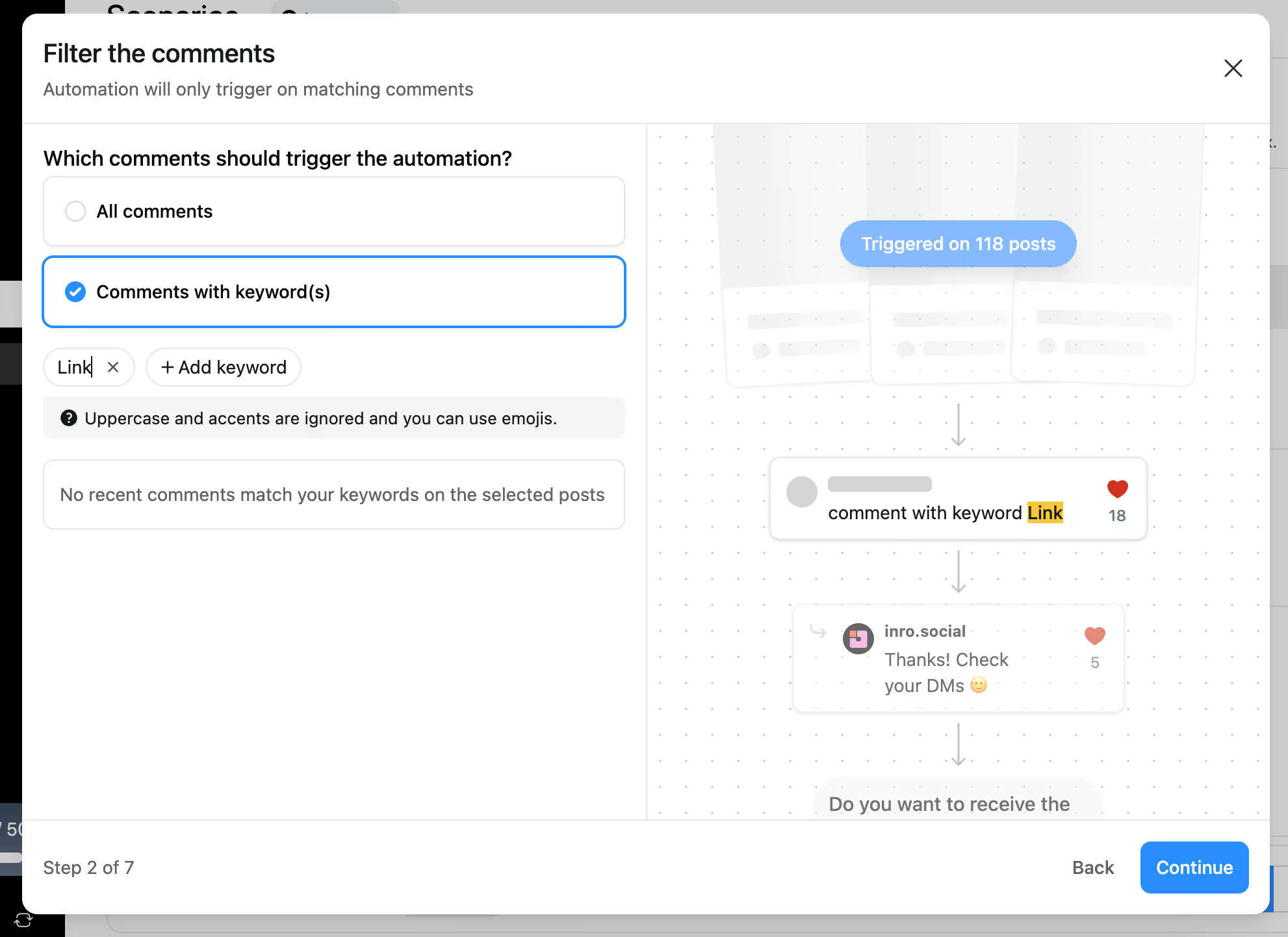
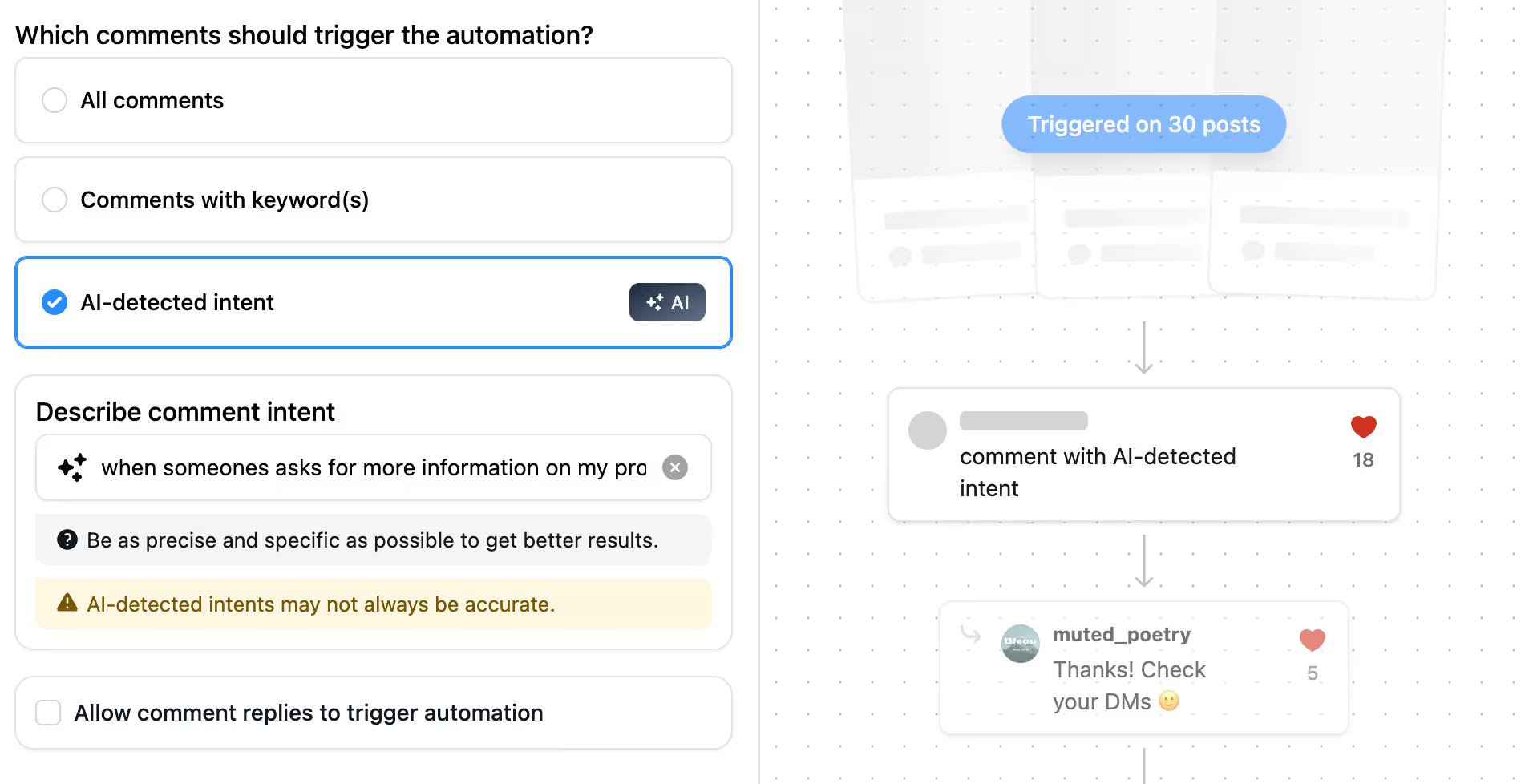
Enter the keyword that activates the DM. Keep it short and memorable: "LINK", "INFO", "OF", or an emoji. This is the word you will ask followers to comment in your caption. Alternatively, you can enable automatic intent detection, allowing AI to understand what someone wants from their comments and trigger the appropriate automation.
The message should be short, warm, and deliver the link immediately. Example: "Here's the link you asked for 🔗 [your OnlyFans URL]. Thanks for the support!" Keep it under 200 characters. One line of context, one link. Do not include additional sales language in the first message.
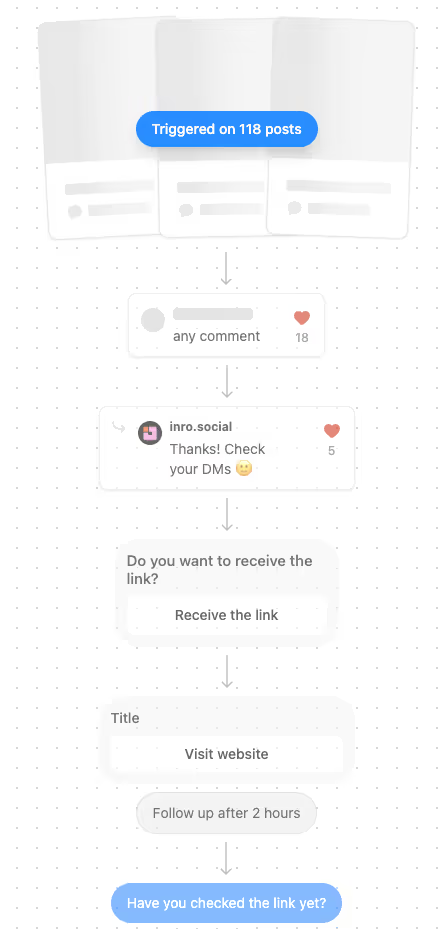
Choose how many times the automation fires for the same contact. "Once per contact" prevents the same follower from receiving duplicate DMs if they comment multiple times across different posts.
Set Inrō to post an automatic public reply on any comment that triggers the flow, such as "Sent to your DMs! 💌" This confirms delivery publicly, which signals to other viewers that they can get the link the same way, increasing the number of people who comment.
Use a secondary account to comment the trigger keyword and confirm the DM arrives with the correct link.
Both trigger types work well for sharing OnlyFans links. The right choice depends on the content type and how you want to drive the interaction.
For creators concerned about any public association between their Instagram posts and OnlyFans, Story reply triggers offer a cleaner path: the CTA is in a Story that disappears after 24 hours, the reply goes to your DMs privately, and Inrō sends the link in a private DM with no public trace of the exchange.
For creators focused on volume, comment keyword triggers on Reels consistently generate more link deliveries because Reels reach a wider audience than Stories.
Running both simultaneously is the highest-performing setup.
The DM copy determines whether the link gets clicked and whether the follower feels good about the interaction.
What works:
What does not work:
A note on follow-up: Every contact who receives your link is saved automatically in Inrō's CRM. When you post new content or run a promotion, you can send a targeted DM campaign to all contacts who previously requested your link. This is the highest-converting follow-up channel available to OnlyFans creators on Instagram because you are reaching people who already showed interest.
For the full DM qualification and follow-up system that converts link recipients into paying subscribers, see our guide on saving time on OnlyFans DMs.
Inrō is Meta-approved and operates exclusively through Instagram's official Messaging API. No browser extensions, no unofficial login methods, no API bypass. This matters for OnlyFans creators because the tools most likely to trigger account issues are exactly those that operate outside official channels.
Inrō's comment-to-DM and Story reply automations send links only to users who triggered the flow themselves, through a private DM channel. The contact frequency limit prevents duplicate sends. The Smart Inbox CRM stores every contact for follow-up campaigns. Per-flow analytics show exactly how many people requested the link, received the DM, and clicked through.
Set up your first comment-to-DM flow in 5 minutes.


OnlyFans links are not explicitly prohibited by Instagram's Terms of Service, but Instagram's automated systems flag content associated with adult platforms, particularly links placed in public-facing locations like bios, captions, and comment threads. The safest way to share an OnlyFans link on Instagram is inside a private DM to a user who specifically requested it, using a trigger-based automation tool like Inrō rather than posting the link publicly.
The safest and most scalable way to send your OnlyFans link on Instagram is via DM automation. With Inrō, you set up a comment keyword or Story reply trigger. When a follower comments your keyword or replies to your Story, Inrō sends them your link in a private DM within seconds, with no manual input required. You can also DM it manually to individual contacts, but this does not scale and requires you to be online.
The lowest-risk, highest-converting placement for your OnlyFans link on Instagram is inside a private DM triggered by a follower's own action. Public placements (bio, captions, comments) are scanned by Instagram's automated systems and carry flag risk. Outside Instagram, Twitter/X has no restrictions on OnlyFans links and Reddit allows them in relevant subreddits. Building an email list from your Instagram DM contacts gives you a channel with no platform enforcement risk at all.
Yes. Instagram uses automated image recognition and URL scanning to detect content associated with adult platforms. OnlyFans is among the most recognised domains in Instagram's scanning systems, which is why direct OnlyFans links in public-facing fields trigger automated action even when no explicit content has been posted on Instagram. Private DMs are not processed through the same URL scanning pipeline, which is why DM delivery carries significantly lower risk than public placement.
You can, but placing an OnlyFans link in your bio, caption, or comment thread risks shadowbanning, link removal, or account warnings because these are public-facing fields Instagram's automated systems scan. A safer alternative is to use DM automation: followers comment a keyword or reply to your Story, and Inrō sends them the link privately. The link never appears in a scanned public field.
Private DMs are not scanned by Instagram's automated moderation systems the same way public posts, captions, and bios are. A link delivered inside a private DM to a user who requested it by commenting or replying to a Story is a normal Instagram interaction, not a public signal that triggers automated review. The key is that the user initiated the exchange. Inrō's automation only sends the link to users who triggered the flow themselves.
Short, clear keywords that work naturally in a caption CTA perform best: "LINK", "INFO", "OF", or a relevant emoji. The keyword in your Inrō flow must exactly match the word you ask followers to comment in your caption. Avoid keywords that appear frequently in organic comments, such as "love" or "yes", unless you want the automation to fire on every comment of that type.
Not if the message is written naturally and delivers exactly what the caption promised. A DM that arrives within seconds of a comment and contains the link they asked for reads as fast and helpful, not automated. Using Inrō's first-name personalisation variable makes the message feel more personal. The public reply Inrō posts on the comment ("Sent to your DMs! 💌") is the only visible signal that an automation is involved, and it is a positive one.
Yes. Inrō's Story reply trigger fires when someone replies to a specific Story. This is a cleaner option for creators who do not want any public association between their posts and their OnlyFans link, since Stories disappear after 24 hours and the CTA and exchange are both private. Story reply triggers also tend to reach higher-intent followers because replying to a Story requires more active engagement than commenting a keyword.
Spam is unsolicited outreach sent to users who have not shown interest. Inrō's automation sends a DM only to users who triggered the flow themselves, by commenting a specific keyword or replying to a Story. The user initiated the interaction. Meta's official API supports this type of triggered messaging. Inrō does not support unsolicited outbound messages to users who have not engaged with your account.
Yes. Inrō is Meta-approved and operates exclusively through Instagram's official Messaging API. It does not use browser extensions, unofficial login methods, or any API bypass. Using Inrō does not put your Instagram account at risk. Tools that do pose a risk are those that ask for your Instagram password directly or operate outside Meta's official channels.
Yes. Every contact who triggers a flow in Inrō is saved automatically in the Smart Inbox CRM with their trigger source and conversation history. When you post new content, launch a promotion, or want to re-engage past contacts, you can send a targeted DM campaign to the full list of people who previously requested your link. This is the highest-converting follow-up channel available because you are reaching contacts who already showed explicit interest.
Yes. Linktree does not prohibit OnlyFans links in their terms of service as of 2026. However, Linktree has become widely associated with adult creator promotion, which means Instagram's automated systems may treat accounts with Linktree bio links alongside adult content signals more aggressively than accounts using a neutral custom domain. If you are experiencing flagging despite using Linktree, switching to a more neutral aggregator or a personal domain is worth testing.
Every OnlyFans creator URL follows the format onlyfans.com/[username]. For example: onlyfans.com/yourcreatorname. This is the direct link to your profile page. When shared through a link aggregator, visitors land on the aggregator page first and click through to your OnlyFans. The onlyfans.com domain is what Instagram's URL scanner flags in public-facing content, which is why sharing the link inside a private DM (rather than in your bio or captions) significantly reduces flag risk.
Beacons.ai is generally considered the most OnlyFans-creator-friendly link-in-bio tool because it explicitly supports adult creators with an age gate option, includes email capture, and has a lower flag association than Linktree. Linktree works and allows OnlyFans links, but its widespread use in adult content promotion means Instagram's systems may treat it with higher scrutiny. A personal custom domain gives the most control and the lowest flag profile, but requires more setup.
Join automations strategies and Instagram Insights weekly
By entering your email address above and clicking Subcribe, you consent to receive marketing communications (such as newsletters, blog posts, event invitations and new product updates), and targeted advertising from Inrō from time to time. You can unsubscribe from our marketing emails at anytime by clinking on the "Unsubscribe" link at the bottom of our emails. For more information about how we process personal information and what right you have on this respect, please see our Privacy Policy.
Attract more leads, target them with DM marketing, and automate your interactions on Instagram!
.avif)
.avif)
.avif)