

Learn how to set up Instagram Story autoreply for reactions, mentions, and DMs. Capture leads before Stories disappear. Step-by-step guide with compliant tools
.png)
TL;DR
TL;DR
Yes, you can automate Instagram Story replies.
No, Instagram does not offer built-in auto-replies for Story reactions.
To set up Instagram Story autoreply, you need an official Instagram automation tool.
Best practice in 2026:
If Story engagement matters for your business, automation is not optional. It is how you stop losing leads to timing.
Stories drive some of the highest engagement on Instagram. According to Meta, Stories generate significantly higher interaction rates than feed posts, and Story replies are one of the strongest intent signals on the platform.
When someone reacts with a fire emoji, replies "need this," clicks a poll, mentions you in their Story, or shares your content, they are not passive viewers. They are active, interested, and in a conversion window.
Here is the problem.
Stories disappear in 24 hours. DMs pile up fast. Manual replies do not scale, and by the time you get to someone's reply, their attention has moved on.
That is where Instagram Story autoreply becomes powerful.
Short answer: not natively.
Instagram does not offer built-in automatic replies to Story reactions or replies inside the app. You can enable Story replies, respond manually, and use quick replies in DMs, but you cannot automatically send a DM when someone reacts to your Story without a third-party tool connected via Meta's official API.
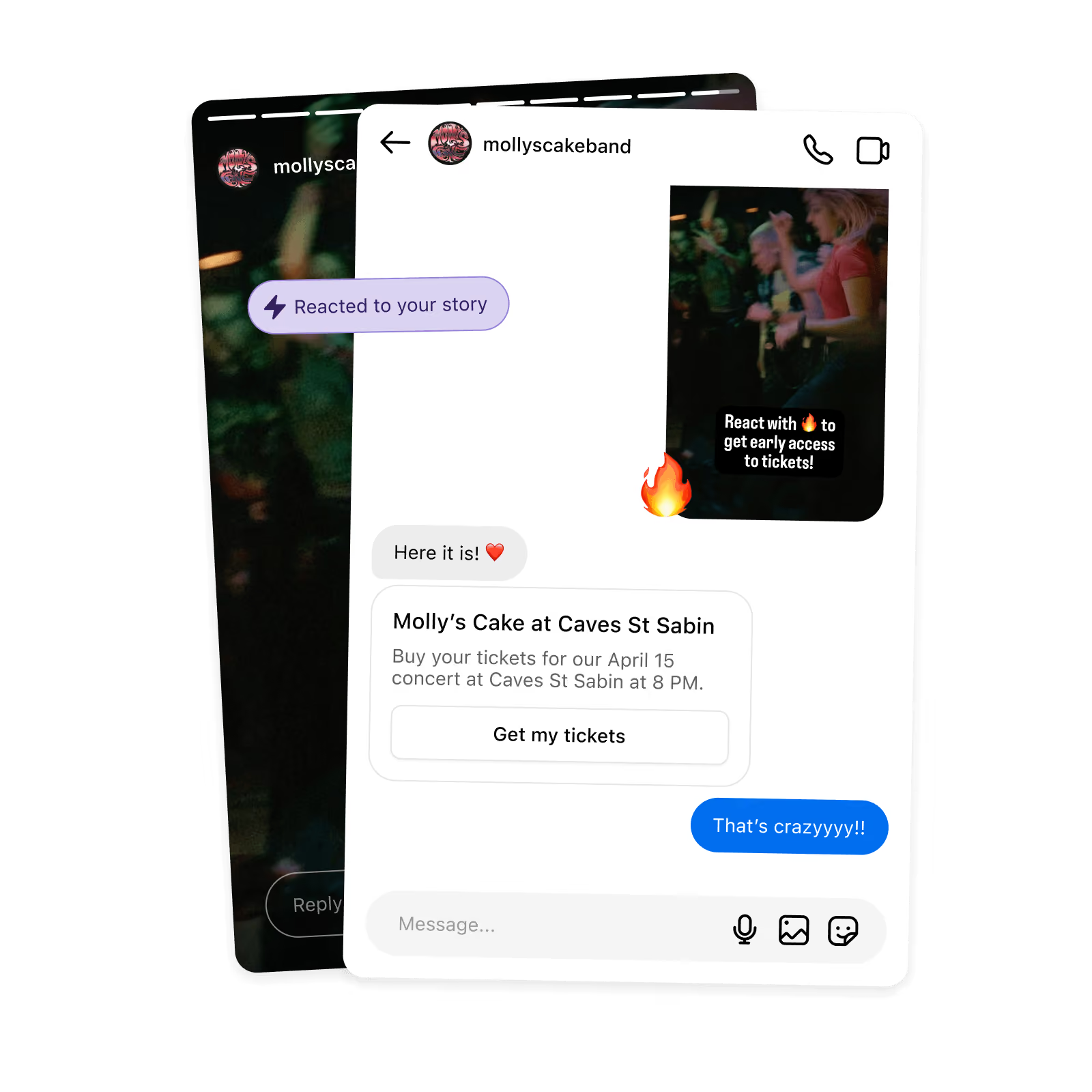
Instagram Story autoreply is the ability to automatically send a direct message when someone interacts with your Story.
This includes Story reactions, Story replies, Story mentions, question sticker replies, and keyword-triggered responses.
Instead of manually replying, the system triggers instantly. The person who replied gets a response in seconds, while their attention is still on your content.
Example:
All automatically.
Not all Story interactions trigger automation the same way. Here is a clear breakdown of what is supported through the official Meta API:
Key point: Story likes and views are not accessible via Meta's API. If a tool claims to auto-DM Story viewers or people who liked your Story, it is not using official API access and carries account risk.
Automation only triggers on direct engagement: replies, reactions, mentions, and question sticker responses.
Here are high-performing setups we see across creators and brands:
Story: "Reply YES if you want early access"
Autoreply: Send access link instantly. Use this as the top of your funnel to turn Story engagement into a sales funnel.
Story: "DM GUIDE to get the checklist"
Autoreply: Deliver the resource automatically with no manual work
Someone tags your brand in a Story
Autoreply: "Thanks for sharing. Want 10% off your next order?"
Story question: "What is your biggest challenge?"
Any reply triggers a DM that qualifies their intent
Someone shares your Story
Autoreply: "Appreciate the support. Here is something exclusive for you."
This is where Story engagement becomes conversion.
Most people set up Story autoreply to save time. The ones who get the best results use it to generate leads systematically.
Here is the difference.
Reactive setup: Someone replies to your Story, they get a "thanks for your message" autoreply. Conversation ends. No data captured. No follow-up.
Lead generation setup: Someone replies to your Story, they get a reply that asks one qualifying question, their answer tags them in your CRM, and they receive a follow-up sequence based on their interest. You now have a segmented lead.
The second setup takes 20 extra minutes to build. It produces results, the first does not.
A practical lead generation flow using Story autoreply:
This works whether you are a coach delivering a free training, an e-commerce brand pushing a product drop, or a creator growing an email list. The Story is the top of funnel. The autoreply is how you qualify and capture. For a deeper look at generating leads from Instagram content, see our guide to generating leads from Instagram content.
One practical note: Story engagement is time-sensitive. Replies come in during the 24 hours a Story is live. Waiting hours to respond manually means the window closes. That is the core argument for automation here. Not efficiency. Timing.
For a full framework on organic lead generation on Instagram, see how brands structure their entire organic lead system.
You must switch to a Business or Creator account and connect via the official Meta API. Inrō connects directly through Meta's Graph API.
Inside your automation dashboard, choose "Story Reply Trigger," select keyword-based or all replies, and define your conditions. You can trigger on any Story reply, specific keywords, Story mentions, or question sticker responses.

This is where most tools fall short.
With Inro, you can check if the user already follows you, prevent duplicate triggers from the same user, segment users into folders based on intent, and route conversations differently based on their reply.
Example logic:
This keeps your automation contextual and prevents spam. A CRM that organizes Story leads automatically means you never lose track of who engaged and what they received.
Story replies often lead to follow-up questions. "Does it ship to Canada?" "What sizes are available?" "Is it refundable?"
Instead of static replies, Inro's AI agent can detect intent, continue the conversation, answer FAQs, and route to a human when needed. This is where automation becomes scalable.
Based on patterns observed across Instagram automation accounts using Story reply triggers:
The biggest performance variable is the Story itself, not the automation. A vague Story with no CTA will generate low reply rates regardless of how well the autoreply is configured. The automation captures intent. The Story creates it.
Story replies have higher intent than likes, shorter response time windows, and stronger conversion correlation. Because Stories are temporary, urgency is built in naturally.
When someone replies to your Story, they are still inside the app, still engaged, and still thinking about your content. That is a fundamentally different moment than someone who liked a feed post two days ago.
Engagement plus immediacy equals a conversion window. Automation captures that window. Manual replies usually miss it.
Meta has tightened enforcement on Instagram automation since late 2025. Here is what that means for Story autoreplies specifically.
What is still safe: Story reply automation through the official Instagram Graph API remains fully compliant. Meta's own developer documentation supports DM triggers from Story interactions.
What has changed: Enforcement against tools that use unofficial API access, browser emulation, or mobile device simulation is now stricter. Accounts using these methods are seeing reach restrictions and inbox limitations.
The practical compliance checklist:
If your tool checks all four, Story autoreply is safe, supported, and consistent with Meta's own platform infrastructure.
You cannot automate posting reactions inside Stories directly from Instagram.
You can automate Story replies, Story mentions, and DM responses triggered by Stories. Scheduling Stories is available through Meta Business Suite. Automated replies require API-based tools.
Instagram does not allow bulk unsolicited DM scheduling. You can trigger DMs from engagement, use automation flows, and send campaign messages to opted-in users. Reliable automation always depends on prior interaction.
If users cannot reply to your Stories, go to: Settings, then Privacy, then Story, then Allow Message Replies. You can choose Everyone, People You Follow, or Off. Automation only works if replies are enabled.
When choosing a tool, check for official API compliance, Story reply trigger support, mention automation, follower checks, segmentation logic, AI handling, and inbox organization.
Inro is built specifically for Instagram-first automation, which makes it more specialized than broad chatbot builders. If Instagram is your primary channel, specialized tools outperform generic ones.
Sending a generic "Thanks for your message" autoreply with no next step. Not checking follower status before sending offers. Not preventing duplicate triggers from the same user. Over-automating complex or sensitive sales conversations. Ignoring segmentation and sending everyone the same sequence regardless of their reply.
Automation should feel contextual, not robotic. The goal is to scale a conversation, not replace it.
Instagram Story autoreply is not about sending automatic messages.
It is about capturing intent while attention is still hot.
Stories disappear. Engagement fades fast. Manual replies miss windows.
The setup is simple. The trigger fires instantly. The follow-up sequences qualify and convert. The only thing that changes is that you stop losing leads to timing.
Use an official API-based automation tool like Inro. Connect your Business or Creator account, create a Story reply trigger, define your conditions, and activate. The setup takes under 10 minutes.
Enable the Story mention trigger inside your automation tool. Create a thank-you or offer message that fires when someone tags you in their Story. This is a separate trigger from Story replies and requires its own setup. To get the set up, visit our template.
Look for tools with API compliance, Story reply triggers, segmentation, and AI handling. Instagram-first tools like Inro are optimized specifically for this workflow rather than generic chatbot builders.
No. You cannot auto-DM viewers without direct engagement. Automation must be triggered by a reply, reaction, or mention. Any tool that claims to DM viewers is not using official API access.
Not directly. Poll votes are not API-accessible. You can work around this by asking poll participants to reply with a keyword, then triggering automation from the keyword reply.
Question sticker replies are treated as Story replies via the API. Set up a Story reply trigger and it will capture both text replies and question sticker responses.
Yes, through official API-based tools. You cannot auto-DM random users without prior interaction. Automation requires a trigger: a comment, Story reply, mention, or DM.
Not natively. You can schedule campaign messages to opted-in users via approved automation platforms, but unsolicited bulk DMs are not permitted.
Instagram offers basic quick replies and away messages natively. For Story autoreplies and advanced triggers, you need a third-party automation tool connected via Meta's API.
Check Settings, then Privacy, then Story, then Allow Message Replies. If this is set to Off or People You Follow, some users will not be able to reply to your Stories.
Go to Settings, then Privacy, then Story, and enable message replies for Everyone.
Yes, if you use a tool connected via Meta's official API. Tools using unofficial access carry account risk. The compliance checklist above covers what to verify before signing up.
Yes. Use tools connected through Meta's official API with inbox organization, segmentation, and AI handling built in. Avoid browser extensions or tools that require your Instagram password.
Join automations strategies and Instagram Insights weekly
By entering your email address above and clicking Subcribe, you consent to receive marketing communications (such as newsletters, blog posts, event invitations and new product updates), and targeted advertising from Inrō from time to time. You can unsubscribe from our marketing emails at anytime by clinking on the "Unsubscribe" link at the bottom of our emails. For more information about how we process personal information and what right you have on this respect, please see our Privacy Policy.
Attract more leads, target them with DM marketing, and automate your interactions on Instagram!