
How to link podcast episodes directly on Instagram Stories: link stickers, reply automation, and DM delivery that turns Story viewers into listeners. Step-by-step.
.avif)
Automate Comments and DMs in 5 Minutes
Someone comments on your IG post. They get a DM instantly. You do nothing.

Trusted by 10K+ creators and SMBs


TL;DR
TL;DR
Linking podcast episodes directly on Instagram Stories means placing a tappable path from your Story content to your episode, without requiring viewers to leave and search for your show manually. Instagram has two native methods and one automation-based approach, and each works differently depending on your audience's behaviour.
Instagram Stories are seen by your existing followers, which makes them a high-intent surface. Someone watching your Stories already follows you, already knows your show, and is more likely to listen than a non-follower who found your Reel through the algorithm. The conversion challenge is friction. Every extra tap between "I want to hear this episode" and "I am now listening" reduces the number of people who complete that journey.
Post a Story teaser for your episode. A listener replies.
They get the Spotify link in their DMs instantly, automatically. That is what linking podcast episodes on Instagram Stories looks like in 2026.
Design your Story frame first: use the episode cover art as a background, add a short text hook that creates curiosity about the episode, and include a visual prompt telling viewers what to do ("Tap the link" or "Reply to get the episode").
This is Instagram's native link sticker, available to all accounts regardless of follower count. Enter your episode URL, which can be a direct Spotify link, Apple Podcasts link, or any podcast hosting page URL. Customise the sticker label text to something specific, like "Listen now" or "Full episode," rather than leaving it as a generic URL display.
.avif)
Place it in the lower third of the Story where thumbs naturally rest on mobile screens. Avoid placing it over text or faces. A sticker that is easy to tap without repositioning your hand gets more clicks.
This is where the majority of conversions that the link sticker misses are recovered. In Inrō, create a new automation and select "Story Reply" as the trigger. Point it to the specific Story (or set it to fire on any Story reply from your account). Write a DM that delivers the episode link with a brief personalised message: "Here's the full episode, hope you enjoy it: [link]." Inrō sends this DM automatically to anyone who replies to the Story, within seconds of their reply.
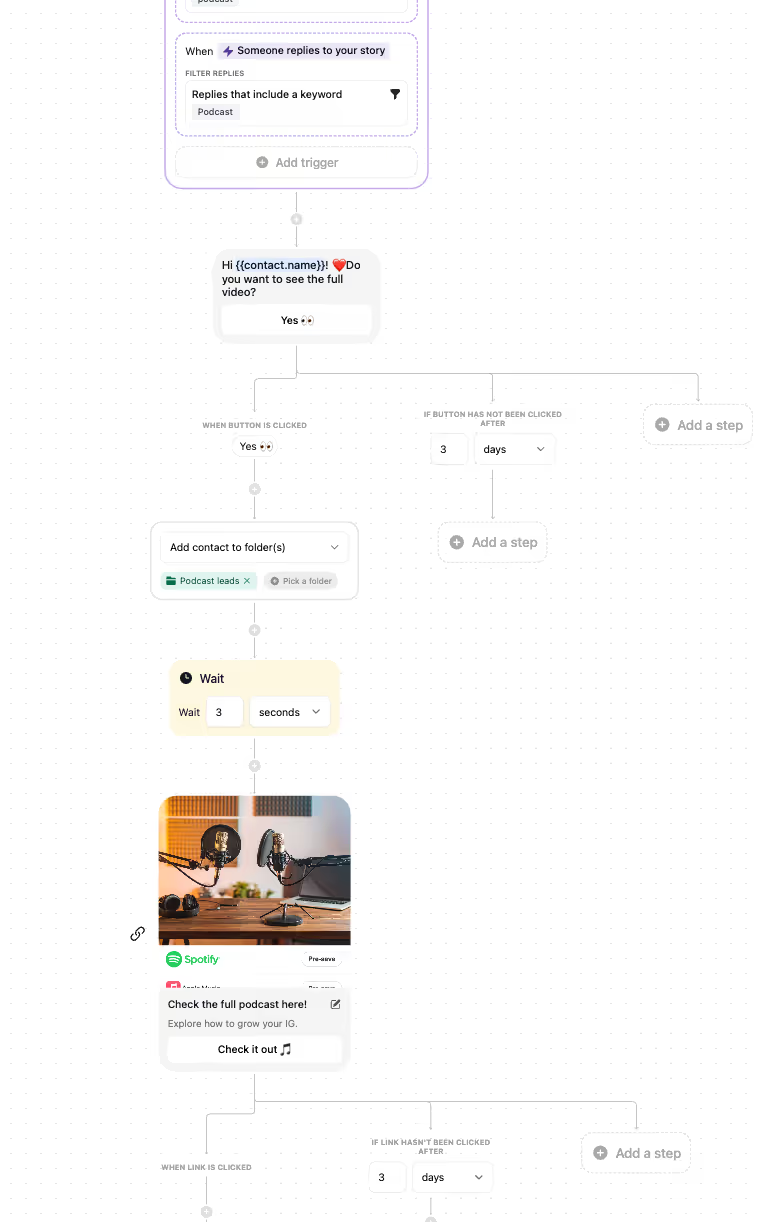
Alongside the link sticker, add text that says "Or reply to this Story and I'll send you the link directly." This captures viewers who prefer a personal interaction over tapping a sticker, and it significantly increases your total Story engagement, which improves your placement in followers' Story queues over time.
In Inrō's CRM, every contact who came in through a Story reply automation is tagged with the source. Compare the volume of Story reply contacts to your link sticker click data in Instagram Insights. For most podcast accounts, Story reply automation generates 40 to 60% more listener conversions than the link sticker alone on the same Story.
Story reply automation has the lowest friction of any Instagram link delivery method because the episode link arrives in the viewer's DM inbox without them needing to leave Instagram, navigate to a new app, or remember to do something later. The DM is already there when they finish watching your Stories.
Once your link sticker and Story reply automation are running, three advanced Story formats consistently increase the volume of listeners you convert per episode launch.
Instead of a single Story, post a sequence of three to five Stories per episode launch. The first shows a behind-the-scenes recording clip. The second teases the key insight without revealing it. The third is the conversion Story: episode art, link sticker, and a reply prompt. Viewers who watch a full sequence convert to listeners at a significantly higher rate than those who see only one Story, because the sequence builds curiosity before the CTA.
Post a Story poll related to your episode topic. A business podcast might ask "Have you ever negotiated your salary?" with Yes/No options. Both answers trigger a follow-up Story: "You might find this episode interesting." Add Inrō's Story reply automation on the follow-up slide. Everyone who responds receives the episode link automatically. The poll creates genuine engagement before the pitch, making the recommendation feel contextually relevant rather than promotional.
Add each episode Story to a Highlights reel organised by topic or season. Viewers who visit your profile and browse Highlights are in active exploration mode. Add a link sticker to each Highlight entry. For listeners who found you through a Reel and are browsing your profile, Highlights function as a self-service episode catalogue.
Inrō's Story reply automation captures every viewer who responds to these advanced Story formats, storing them as CRM contacts for future episode broadcast campaigns.
Story reply automation converts better than the link sticker for three specific reasons that apply directly to podcast listener acquisition.
First, DMs are personal. When a listener receives an episode link in their direct inbox, it registers as a one-to-one recommendation from a creator they follow. The link sticker sends them to a public webpage. The DM feels personal. Podcasts grow on personal recommendations, and the DM delivery mechanism replicates that feeling at scale.
Second, the reply creates a contact. When someone uses the link sticker, they disappear into a browser tab with no record in Inrō. When someone replies to a Story, Inrō stores them as a named contact with full interaction history. You can broadcast your next episode directly to them. The link sticker click is a one-time event. The Story reply is the beginning of a listener relationship.
Third, Stories with higher reply rates receive better placement in followers' Story queues. Instagram surfaces Stories from accounts that get replies more prominently. Every listener who replies to your Story automation improves the organic reach of your next Story, compounding over time.
Inrō is built exclusively for Instagram through Meta's official API, meaning every Story reply automation runs safely within Instagram's guidelines without risk of account action. See how Inrō's freebie automation approach applies to podcast lead magnets like bonus content and episode transcripts, or explore the full mass DM strategy for broadcasting new episodes to your growing listener list.
Set up Story reply automation in Inrō and send every episode link directly to their DMs. Under five minutes to configure.


Tap the sticker icon when creating a Story and select "Link." Enter your episode URL and customise the sticker label. This native link sticker is available to all Instagram accounts in 2026 regardless of follower count. For higher conversion, pair the link sticker with Inrō's Story reply automation, which sends the episode link directly to the DMs of anyone who replies to the Story.
No. Instagram removed the 10,000-follower requirement for link stickers in 2021. Any account, including brand new podcast accounts, can add a clickable link to an Instagram Story using the sticker tool. The link sticker is available to all Business and Creator accounts.
A Story link sticker sends viewers off Instagram to a URL in their browser. Story reply automation sends the episode link directly to the viewer's Instagram DM inbox when they reply to the Story. The DM method removes the friction of leaving Instagram and creates a named contact in your CRM for future episode broadcasts. Inrō handles Story reply automation through Meta's official API.
Yes, when using Inrō. Inrō operates through Meta's official API and is Meta-approved. Story reply automations respect Instagram's rate limits and do not use any scraping or browser-based methods that violate Terms of Service. The automation fires only when a viewer actively replies to your Story, which is a user-initiated action and fully within Instagram's guidelines.
Yes, and this is the recommended setup for podcast episode Stories. Place the link sticker for viewers who prefer to tap immediately, and add reply prompt text ("Reply and I'll send you the link directly") for viewers who prefer a personal interaction. Both mechanisms feed episode listeners. Inrō captures reply contacts automatically; Instagram Insights tracks link sticker clicks.
Inrō offers a free trial that covers Story reply automation, comment-to-DM flows, and DM campaigns. Paid plans scale with your automation volume. Full pricing is available at inro.social.
Story reply contacts are stored in Inrō's CRM and receive future episode broadcasts, creating a compounding listener relationship. Link sticker clicks are anonymous and one-time. A DM delivering the episode link also feels like a personal recommendation from the creator, which aligns with how podcasts naturally grow through word-of-mouth. The personal inbox delivery consistently outperforms a generic outbound URL tap.
Every viewer who replies to a Story and triggers Inrō's automation is saved as a contact in Inrō's CRM, tagged with the episode they came in on. When your next episode drops, use Inrō's DM campaign tool to broadcast directly to the full list. This builds a direct, algorithm-independent listener distribution channel from your Story engagement over time.
Join automations strategies and Instagram Insights weekly
By entering your email address above and clicking Subcribe, you consent to receive marketing communications (such as newsletters, blog posts, event invitations and new product updates), and targeted advertising from Inrō from time to time. You can unsubscribe from our marketing emails at anytime by clinking on the "Unsubscribe" link at the bottom of our emails. For more information about how we process personal information and what right you have on this respect, please see our Privacy Policy.
Attract more leads, target them with DM marketing, and automate your interactions on Instagram!
.avif)
.avif)
.avif)