
Get the exact Instagram post size for 2026, including 4:5, 1:1, carousel, and grid preview changes. Learn the best dimensions to look right in feed and on profile.
.avif)
Automate Comments and DMs in 5 Minutes
Someone comments on your IG post. They get a DM instantly. You do nothing.

Trusted by 10K+ creators and SMBs


TL;DR
TL;DR
The right size gets the post seen. Inrō turns that attention into DMs automatically.
Getting the right Instagram post size helps you win attention. Converting that attention is the next step. With Inrō, you can turn comments, Story replies, and inbound DMs into automated conversations, qualified leads, and trackable revenue from Instagram.
Instagram post size used to be simple. Pick square, upload, done.
That is no longer how the platform works.
Today, creators and brands need to think about three things at once: how a post looks in the feed, how it appears on the profile grid, and how much screen space it takes up on mobile. Instagram supports aspect ratios from 1.91:1 to 4:5, but within that range, the choice you make determines how much of the screen your post occupies and how it previews on your profile.
That is why the best Instagram post size in 2026 is not just a pixel question. It is a visibility question.
In this guide, you'll get the exact Instagram post dimensions to use, when to choose 4:5 vs 1:1 vs landscape, what changed with the grid, and how to make sure your content still looks right after Instagram crops it.
For most brands, the best Instagram post size is 1080 x 1350 pixels, which is a 4:5 aspect ratio.
Why? Because vertical posts take up more room in the feed than square or landscape content. More screen space means stronger visual impact, better readability, and a better chance that your post gets noticed before someone scrolls past it.
If you want one default format for most image posts, use 1080 x 1350 px.
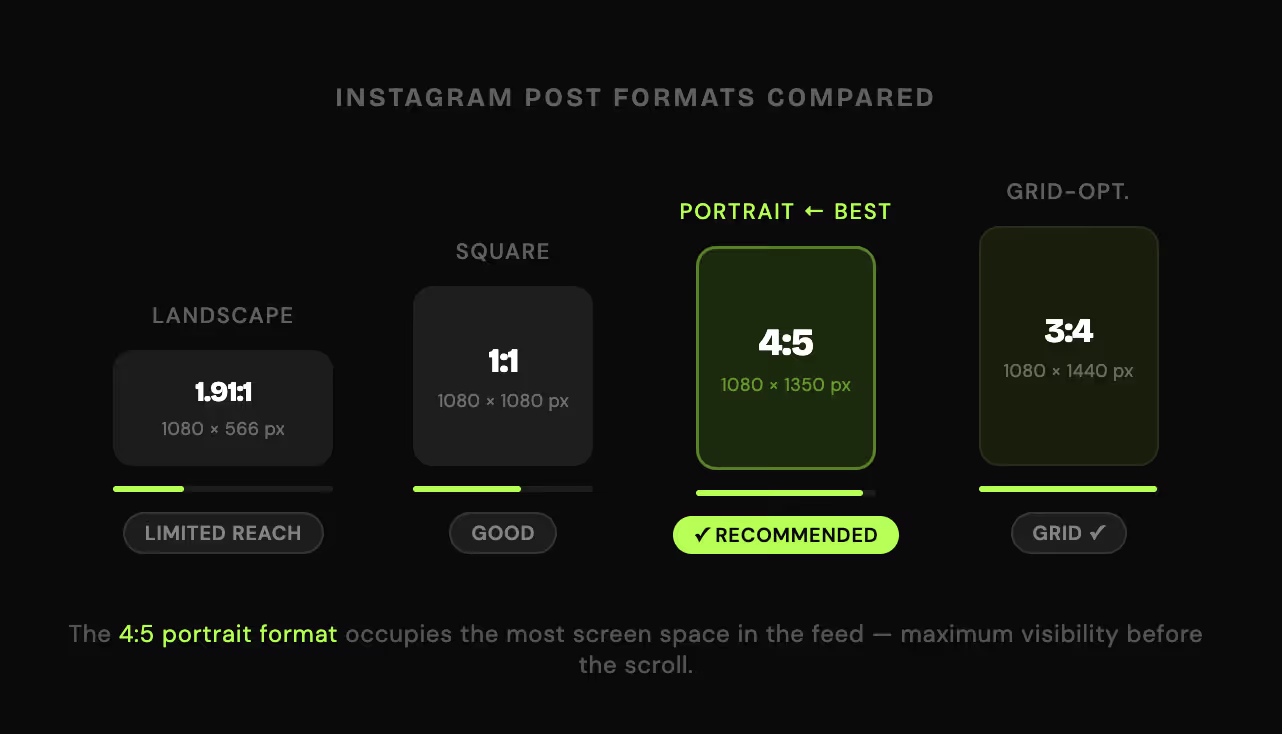
Here are the Instagram post dimensions that matter most.
1080 x 1350 pxAspect ratio: 4:5
This is the best choice for most feed posts. It is especially effective for:
Instagram also supports 1080 x 1440 px at a 3:4 aspect ratio, which fills even more of the profile grid. If grid consistency is a priority for your brand, 1080 x 1440 px is worth using. For general feed design, 1080 x 1350 px remains the standard.
1080 x 1080 pxAspect ratio: 1:1
Square works well when your design is centered and symmetrical. It is a good option for:
Square is no longer the default best choice, but it is still useful when the composition benefits from balance and structure.
1080 x 566 pxAspect ratio: 1.91:1
Landscape posts work for wide product photos, screenshots, or campaign visuals, but they take up less vertical space in the feed and feel smaller on mobile. Use landscape only when the horizontal composition is essential to the content.
The correct carousel size is 1080 x 1350 px for every slide.
Carousels work best when every card uses the same dimensions. The first slide sets the visual expectation for the rest of the post. Portrait carousels occupy more screen space and make educational or sales content easier to consume.
This is where many articles stop too early.
There is a difference between the size you design for in the feed and the way your content previews on your profile grid. Instagram's profile grid now shows a taller vertical crop than the old square layout. The grid previews posts at a 3:4 ratio, which means a standard 4:5 post will be slightly cropped at the top and bottom when someone views your profile.
The practical takeaway is simple: your content can look fine in the feed but feel awkwardly cropped on the grid if important text or faces sit too close to the top or bottom edge.
So even if you upload a standard 4:5 post, design with grid cropping in mind.
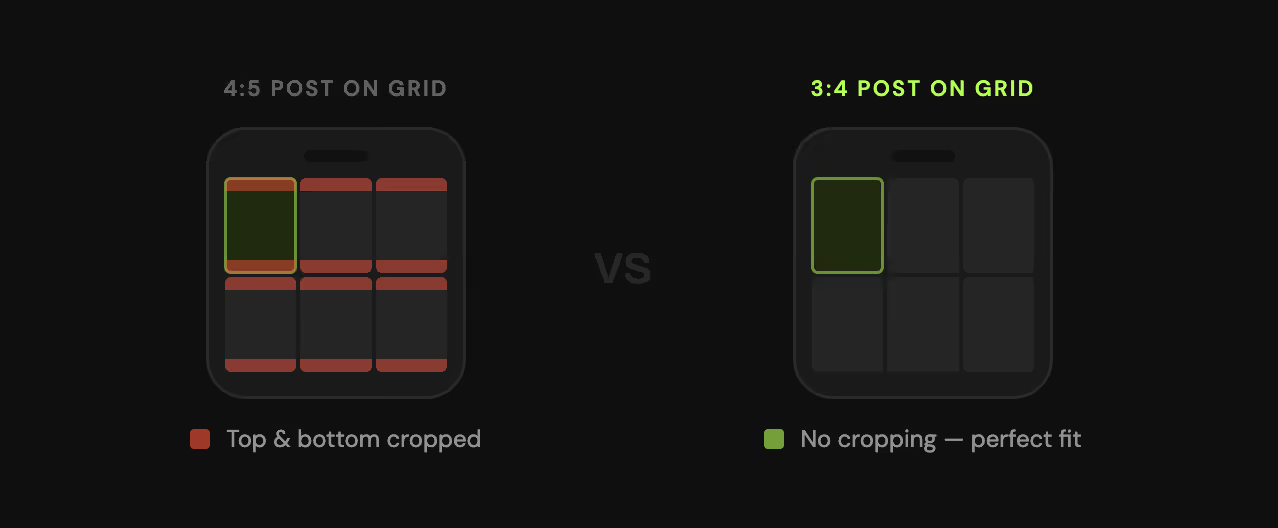
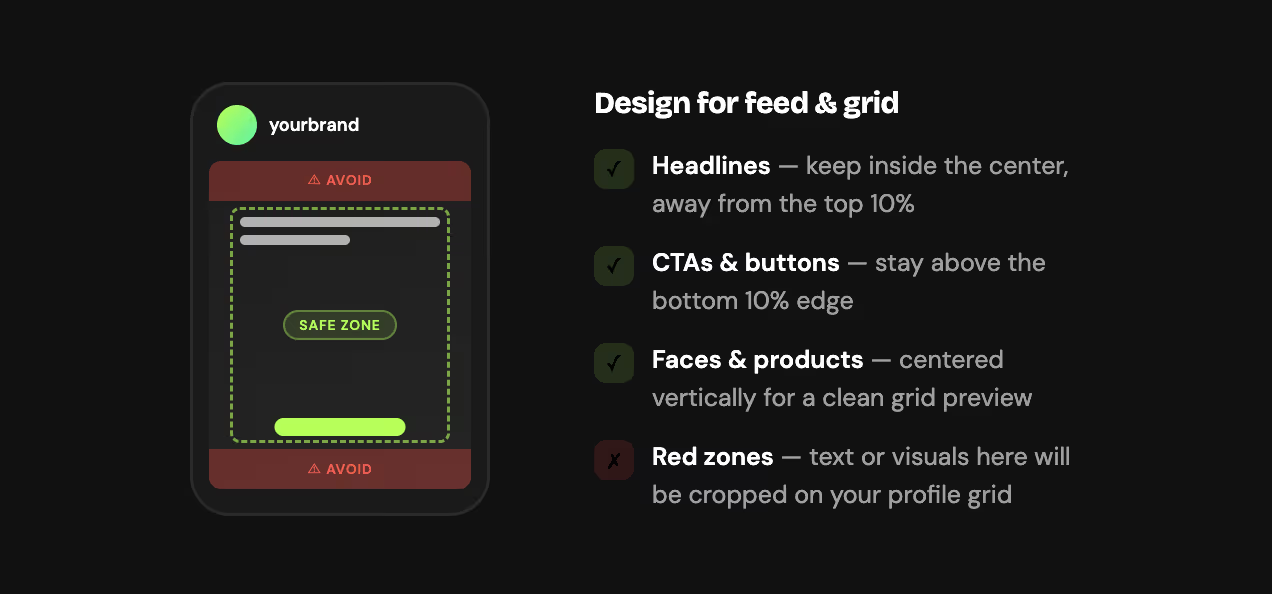
Keep your key visual elements away from the edges:
This matters even more for brands using Instagram as a conversion channel, because a badly cropped post reduces readability and weakens the action you want people to take.
This is one of the biggest sources of confusion right now.
4:5 (1080 x 1350 px) is the standard design size for portrait feed posts. It is what most creators and brands use and what most design tools default to.
3:4 (1080 x 1440 px) is relevant because it matches the profile grid preview ratio exactly. A post designed at 3:4 displays with no cropping on your profile grid, while a 4:5 post gets a small crop at the top and bottom.
For most brands, the right approach is to create standard portrait posts at 1080 x 1350 px and compose them so the most important content sits in the center third of the frame. If your grid matters as much as your feed, switch to 1080 x 1440 px as your default.
Yes, for most content types.
A 4:5 post takes up more space on the screen than a square post. That extra space gives your content more presence in the feed. It makes product images feel larger, educational content easier to read, and brand visuals more immersive.
Use square when:
Use 4:5 when:
For most feed posts, the best aspect ratio is 4:5.
It gives you the strongest balance of visual impact, readability, and screen coverage. Square still has use cases. Landscape is still supported. But if your goal is general performance, 4:5 is the right default.
Not every post should use the same format. Here is a better way to think about it.
For most businesses, the smart move is to standardize around portrait and only use square or landscape when the creative specifically needs it.
Resizing for Instagram takes four steps:
In Canva, the Instagram Post (Portrait) preset is 1080 x 1350px by default. For the grid-optimized 3:4 size, create a custom canvas at 1080 x 1440px.
Carousel posts deserve their own section because they often drive the most saves, swipes, and educational engagement.
The best Instagram carousel size is 1080 x 1350 px per slide. Keep every slide consistent and use portrait cards, because that format feels more native in the feed and gives you more room for storytelling or product explanation.
For ecommerce and conversion content, portrait carousels are especially useful for:
If your goal is to get more comments, DMs, or clicks, carousels are one of the strongest formats to pair with a clear CTA.
The wrong post size does more than make your content look messy.
It can also hurt:
That matters because Instagram is not just a branding platform anymore. For many brands, it is a sales and lead generation channel.
A post that is sized correctly is more likely to feel polished. A post that is composed for both feed and grid is more likely to keep your message intact. And a post that clearly guides people to comment, reply, or DM is more likely to convert attention into action.
That is where the format side and the funnel side meet.
Getting the Instagram post size right helps you win the first step: attention.
The next step is turning that attention into measurable action.
With Inrō, brands can use Instagram content as the trigger for automated conversations. That means a post can do more than look good. It can also start a workflow.
For example:
So while this article is about Instagram post dimensions, the real business value comes from what happens after the post gets attention.
A better-formatted post improves visibility. A better DM funnel improves results.
If you want your posts to look good both in the feed and on the profile grid:
This is especially important if you publish educational content, ecommerce offers, or lead-generation posts where the CTA needs to stay visible.
How much of the screen does your content need to own?
Portrait wins that answer almost every time. 1080 x 1350 px gives you the most feed presence of any standard format. 1080 x 1440 px goes one step further and matches the profile grid exactly, so your posts look as intentional on your profile as they do in the feed.
Get the size right, compose for the center, and your content is doing its job before a single person reads the caption.
What happens after they engage is a different problem. That is what Inrō is for.
AInrō sends the first DM automatically the moment someone comments.


The best Instagram post size for most feed content is 1080 x 1350 pixels (4:5 aspect ratio). It takes up more vertical space than a square post, which means more screen coverage, more dwell time, and a stronger chance of stopping the scroll.
The standard Instagram post dimensions are 1080 x 1350 px (portrait, 4:5), 1080 x 1080 px (square, 1:1), and 1080 x 566 px (landscape, 1.91:1). Instagram requires a minimum upload width of 1080 pixels and supports aspect ratios from 1.91:1 to 4:5 for feed posts.
4:5 is the best aspect ratio for most feed posts. It fills more of the mobile screen than square or landscape, which increases visibility before someone scrolls past.
Both are supported. 4:5 (1080 x 1350 px) is the standard design size for portrait feed posts. 3:4 (1080 x 1440 px) matches the current profile grid preview ratio exactly, so posts designed at 3:4 display without any cropping on your profile.
A 4:5 Instagram post is 1080 x 1350 pixels.
Yes. 1080 x 1440 px is a supported upload size. It is the right format if you want posts to fill the profile grid preview without cropping. For feed-only design, 1080 x 1350 px is the more common choice.
Yes, for most content. A 4:5 post occupies more vertical screen space than a 1:1 square, which gives it more feed presence and more time in view before someone scrolls past. Use square only when the composition is naturally centered and benefits from a symmetrical layout.
It is supported as a landscape format but is the weakest option for feed visibility. A 16:9 post takes up less vertical space on mobile than any other format, which makes it harder to stop the scroll. Use it only when the horizontal composition is essential to the content.
Instagram's profile grid now previews posts at a 3:4 vertical ratio. This replaced the old square (1:1) grid layout. Posts designed at 4:5 are slightly cropped at the top and bottom on the grid. Posts designed at 3:4 (1080 x 1440 px) display without any grid cropping.
Yes. Instagram changed the profile grid from a square (1:1) preview to a taller vertical (3:4) preview. Every post on your profile, including older ones, now displays at the new 3:4 ratio. You cannot revert to the old square grid layout.
Set your canvas to the target size before designing: 1080 x 1350 px for portrait, 1080 x 1080 px for square, or 1080 x 1920 px for Stories. Keep faces, text, and logos centered in the frame. Export as JPG at 80 to 90% quality and upload at a minimum width of 1080 pixels to avoid compression artifacts.
The best Instagram carousel size is 1080 x 1350 px per slide. Every slide should use the same dimensions, because the first slide sets the aspect ratio for the entire carousel and Instagram will crop subsequent slides to match.
Upload at exactly 1080 pixels wide. Instagram scales images down to 1080 px if you upload larger, and scales up to 320 px if you upload smaller, both of which can introduce compression. Uploading at 1080 px wide gives you the most control over final image quality.
Join automations strategies and Instagram Insights weekly
By entering your email address above and clicking Subcribe, you consent to receive marketing communications (such as newsletters, blog posts, event invitations and new product updates), and targeted advertising from Inrō from time to time. You can unsubscribe from our marketing emails at anytime by clinking on the "Unsubscribe" link at the bottom of our emails. For more information about how we process personal information and what right you have on this respect, please see our Privacy Policy.
Attract more leads, target them with DM marketing, and automate your interactions on Instagram!
.png)
.png)
