
Everything about Meta's Edits app in 2026. 130+ features added since launch, AI tools, templates, storyboards, desktop availability, and how it compares to CapCut.
.avif)
Automate Comments and DMs in 5 Minutes
Someone comments on your IG post. They get a DM instantly. You do nothing.

Trusted by 10K+ creators and SMBs


TL;DR
TL;DR
Create the content. Let Inrō capture every lead it generates.
Turn every comment on your best-performing Reels into an automatic DM conversation.
Edits is Meta's standalone mobile video editing app for content creators, launched April 22, 2025. It's designed for creating short-form videos for Instagram, Facebook, and other platforms, with deep integration into Instagram Reels publishing and analytics. Unlike Instagram's built-in camera and editor, Edits is a dedicated app focused entirely on the creation and editing workflow — from idea to finished video — with no posting required until you're ready.
Brett Westervelt, who leads the Edits team, has described the goal as "building powerful tools creators need and bringing them into a video editor that feels simple and approachable." The development team maintains direct communication with a group of high-engagement creators and releases updates roughly every week based on their feedback.
What makes Edits different from other editing apps:
No. As of May 2026, Edits is mobile-only — available on iOS and Android. There is no desktop version, no web app, and no announced timeline for one.
The app was designed explicitly around the mobile creation workflow. Meta has not signalled that a desktop version is in development. If you need desktop video editing for Instagram content, you would need to use a separate tool (CapCut's desktop app, DaVinci Resolve, Adobe Premiere) and then manage publishing separately.
What you can do on desktop via Meta Business Suite is manage scheduling, ads, and analytics — but Edits itself is phone-only.
When Edits launched in April 2025, the core feature set included:
The first version was explicitly described as incomplete. What followed was a pace of development that surprised most observers: 130+ features added in 12 months.
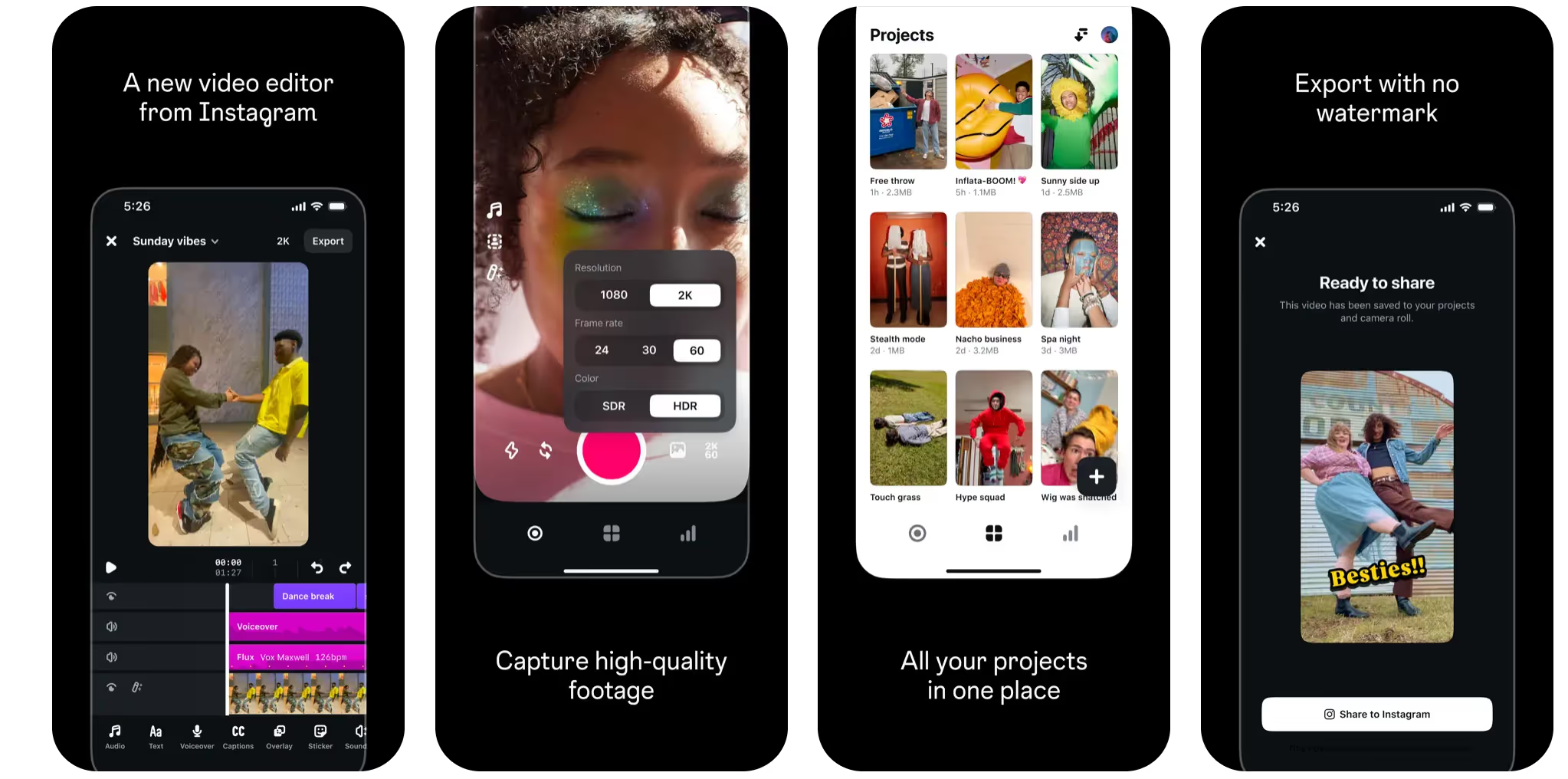
Capture:Up to 10 minutes camera recording, higher-quality built-in camera, Clip Preview, Teleprompter (recording), Safe Zone Mapping
Editing:Trimming, cutting, splitting, Keyframes, Freeze Frame, Reverse Play, Lip Sync, Beat Markers, Variable Volume, Cut Silences, Import Audio from Files, Voiceover Teleprompter
AI tools:AI Object Segmentation (SAM), Restyle (style presets, up to 10 seconds), Personalized Sound Effects
Text and captions:Library of text styles, per-word font styling, caption animations, new font presets including Indic language support, title cards
Planning:Storyboards with sticky notes, Multiple Takes, Weekly Ideas (English), Ideas section for saving references (Reels, audio, notes)
Templates:Creator-led and trend-based templates (US, UK, Canada, Australia, NZ, Ireland — expanding)
Collaboration:Share drafts via Instagram DM, editable project files from featured creators
Publishing:Direct publish to Instagram and Facebook, performance analytics connected to Instagram Insights, Interactive links in videos
Sound:150+ sound effects library, Personalized Sound Effects, Beat Markers, Import Audio from Files
Platform:iOS and Android, no desktop version, free to use
The competitive picture has shifted significantly since April 2025 when Edits launched as a credible but thin alternative to CapCut.
Where Edits leads: Instagram-native workflow, no watermarks required, storyboard planning, SAM-powered object-level AI effects, deeper Reels analytics integration.
Where CapCut still leads: Template breadth, desktop app, more mature AI generation features, larger overall library of effects and fonts.
The practical verdict for Reels creators: If your primary output is Instagram content, Edits is now the stronger tool for that specific workflow. If you also create for TikTok, YouTube Shorts, or need desktop editing, CapCut or a combined approach still makes sense.
Based on anniversary webinar coverage and creator feedback communications, Meta has been discussing:
On pricing: Meta has repeatedly indicated that some AI-powered features may eventually move behind a paywall. The core editing tools are expected to remain free. No paid tier has launched as of May 2026, but it remains a possibility as the AI feature set matures.
Creating great Reels in Edits is one half of the workflow. The other half is capturing every viewer who engages with that content and moving them toward a conversion — without manually replying to every comment.
The combination:
In Edits: Use Storyboards to plan a Reel that ends with a specific keyword CTA ("comment GUIDE for the full breakdown"). Use the Teleprompter to deliver the CTA cleanly on camera. Export and post to Instagram.
In Inrō: Set a comment trigger for that keyword. Every person who comments it automatically receives a DM with your link, resource, or offer within seconds of commenting.
In Inrō's CRM: Every commenter is tagged by which Reel brought them in. When you drop your next piece of content, you already have a warm, segmented list of people who previously expressed interest.
The Reel keeps generating views in Edits' analytics. The leads keep arriving in Inrō automatically.
Attract more leads, target them with DM campaigns, and automate your interactions on Instagram!


Edits is Meta's standalone mobile video editing app for content creators, launched April 22, 2025. It's designed for creating short-form videos for Instagram, Facebook, and other platforms, with direct publishing to Reels and integrated Instagram analytics.
No. As of May 2026, Edits is mobile-only, available on iOS and Android. No desktop version or web app exists and none has been announced. Desktop video editing for Instagram content requires a separate tool like CapCut Desktop, DaVinci Resolve, or Adobe Premiere.
Meta reported over 130 features added in the first year since the April 2025 launch. Updates have been released roughly weekly throughout that period.
Yes, as of May 2026 Edits is free to download and use. Meta has signalled that some AI-powered features may move to a paid tier in the future, but no paid tier has launched and the core editing tools are expected to remain free.
Yes, though with a smaller library than CapCut. Templates rolled out in late 2025, initially in the US, UK, Canada, Australia, New Zealand, and Ireland. Creator-made templates — including editable project files from named creators — were added at the one-year anniversary in April 2026.
Edits leads on Instagram-native integration, watermark-free exports, storyboard planning, and AI object-level effects via Meta's SAM model. CapCut leads on template breadth, desktop availability, and its more mature AI generation suite. CapCut's free tier does include a default watermark, though it can be removed by toggling off "Add default ending." For Reels-first creators, Edits is now the stronger choice for that specific workflow.
Yes. Android support launched after the initial iOS release in April 2025. Both platforms receive the same feature updates.
As of May 2026: AI Object Segmentation using Meta's Segment Anything Model (SAM) — apply effects to specific people or objects in a video frame with tracking; Restyle — change the visual style of a video using AI presets (clips up to 10 seconds); Personalized Sound Effects — AI-suggested sound effects based on video content; and Cut Silences — automatically removes silence from recordings.
Yes, two types. A recording teleprompter shows your script on-screen while you film. A voiceover teleprompter (added in early 2026) shows the script during playback for narrating over existing footage.
"Made with Edits" is an attribution tag that appears on videos created in the app when shared in certain contexts. Unlike some competing apps, Edits does not force a watermark on exports — you can export and share your video without any Edits branding.
Edits has become the preferred tool for creators whose primary output is Instagram Reels, particularly those who value watermark-free exports and native Instagram integration. CapCut retains advantages in template volume, desktop editing, and AI breadth. For most creators, the practical choice depends on workflow rather than an either/or decision.
Partially. You can share drafts via Instagram DM with collaborators. At the one-year anniversary, creator-made editable project files were introduced, allowing creators to share full project files for others to study and adapt. More full collaboration features have been discussed but are not yet available.
Join automations strategies and Instagram Insights weekly
By entering your email address above and clicking Subcribe, you consent to receive marketing communications (such as newsletters, blog posts, event invitations and new product updates), and targeted advertising from Inrō from time to time. You can unsubscribe from our marketing emails at anytime by clinking on the "Unsubscribe" link at the bottom of our emails. For more information about how we process personal information and what right you have on this respect, please see our Privacy Policy.
Attract more leads, target them with DM marketing, and automate your interactions on Instagram!
.png)

.avif)