
Instagram saved replies are manual templates. DM automation sends messages on its own. Here is what each does, how to set up saved replies, and which you need.
.avif)
Automate Comments and DMs in 5 Minutes
Someone comments on your IG post. They get a DM instantly. You do nothing.

Trusted by 10K+ creators and SMBs


TL;DR
TL;DR
When typing faster is not enough
When saved replies stop keeping up, comment triggers, Story reply automation and a CRM turn engagement into contacts. Free plan, no card.
Instagram Saved Replies, also called quick replies, are message templates you insert into a DM yourself with a shortcut. They make typing faster and they automate nothing. DM automation is the other thing entirely: it sends messages on its own when someone comments, replies to a Story or sends a keyword, whether or not you are online. Saved replies help you keep up. Automation replies for you. Which one you need comes down to how much of your day the inbox is eating.
Saved replies are built into Instagram for Business and Creator accounts. You write a response once, give it a shortcut, and drop it into any conversation by typing that shortcut. Nothing happens until you open the DM and insert it. They are a typing shortcut, not a bot.
They are genuinely useful for that. If half your inbox asks the same pricing question, a saved /price reply removes the retyping and keeps your wording consistent. What they cannot do is answer while you are asleep, respond to a comment, or do anything at all until you personally open the thread.
On mobile, on a professional account:
To use one, type / in any DM and pick it from the list. To edit or delete, open the same Saved replies list, tap the reply, and change the text or remove it.
.png)
They also work on desktop through Meta Business Suite: open the Inbox, go to its settings, and Saved replies sit there. Replies you make on mobile show up in both places.
One habit worth forming: keep shortcuts to two or three characters, since a shortcut you have to think about is one you will not use. /pr for pricing, /bk for booking, /lk for a link.
The ones that work are short, specific, and end with a question or a next step rather than a full stop. Starting points, not scripts.
Pricing. "Our [product] is [price], and it includes [X and Y]. Want me to send the full details?"
Pricing, variable. "Pricing starts at [price] depending on [variable]. What are you after specifically?"
Link. "Here's the link you asked for: [URL]. Shout if you have any questions."
Booking. "Grab a slot here: [URL]. Or reply with a date that suits and I'll check."
Availability. "That's currently [in stock / sold out / back on {date}]. Want me to let you know when it's back?"
Shipping. "We ship to [locations], usually within [timeframe]. Want the full shipping details?"
Collaboration. "Thanks for reaching out. Send your media kit to [email] and we'll take a look."
Collaboration, warmer. "We like working with creators. Tell me a bit about your audience and what you had in mind?"
Free trial. "Yes, there's a free trial. Here's how to start: [URL]."
High-intent acknowledgement. "Thanks for this, I'll come back to you within [timeframe]. In the meantime this might help: [URL]."
Out of hours. "I'm offline right now but will reply within 24 hours. Anything urgent: [email]."
The rest are variations on these. If you find yourself writing a genuinely new answer more than a couple of times, that is the one to save next.
Everything above depends on you being there. That is fine at low volume and becomes the bottleneck as soon as Instagram starts producing real inbound.
The point where people outgrow them is usually not a message count so much as a set of situations saved replies cannot touch:
Saved replies were never meant to do these. They are a manual tool, and these are the jobs that are not manual.
DM automation connects your account through Meta's official API and sends a message when someone does something, rather than when you type a shortcut. The triggers are comments, Story replies, mentions, inbound keywords and click-to-DM ads. Every one of them is an action the other person took, which is what keeps it inside Meta's rules and separate from cold outreach.
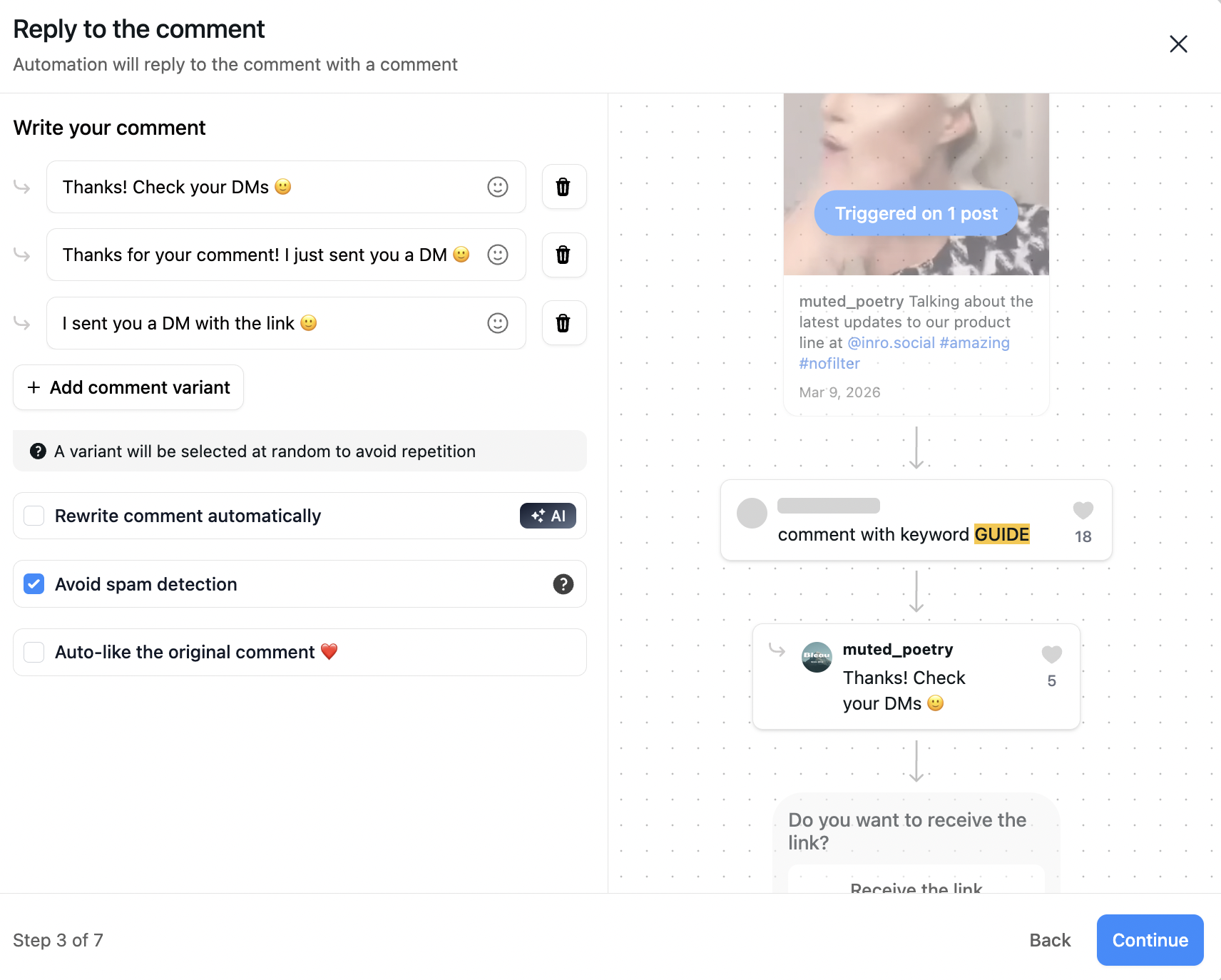
A typical flow: someone comments GUIDE on a Reel, the automation checks whether they already follow you, sends the guide if they do, asks them to follow first if they do not, and saves them as a contact either way. That runs whether you are at your desk or asleep. The setup is covered in setting up an Instagram auto DM.
The difference that matters is not speed, it is that automation catches the entry points saved replies cannot see, and keeps a record you can act on later.
The honest version is that most active accounts end up using both, but the starting point depends on what your inbox is for.
Saved replies are enough if you handle DMs personally, volume is manageable, and Instagram is support rather than sales. Early-stage creators, local businesses and FAQ-heavy inboxes are the clear cases.
Automation earns its place once Instagram drives revenue, you use comment CTAs, you run launches, or you keep missing messages overnight. The tell is not a follower count, it is that a missed comment now costs you something.
Used together, the split is simple: automation handles the first touch and the repetitive, predictable paths, and saved replies speed up the real conversations that automation hands over to you. If you go the automation route, the tools are compared in the DM automation tools guide, and the boundaries of what is allowed are in is Instagram automation safe.
Saved replies speed up the conversations you have. Automation handles the ones you would otherwise miss. Free plan, no card.


Pre-written message templates for Business and Creator accounts, also called Saved Replies. You insert them into a DM yourself with a shortcut. They speed up typing and do not automate anything.
On a professional account, go to Settings and privacy, then Business tools and controls, then Saved replies. Write the message, give it a shortcut, save. Type / in any DM to use it.
Open the same Saved replies list, tap the one you want, and either change the text or delete it. On desktop the same list is in Meta Business Suite under the Inbox settings.
When you write a message in a DM, Instagram sometimes offers to save it as a template. Tapping the prompt adds it to your Saved replies with an auto-generated shortcut you can rename, without going into Settings.
No. They only work inside a DM you have opened yourself. Answering comments, or replying to a Story reply automatically, needs a DM automation tool on Meta's official API.
When comments asking for links start piling up, when Story replies come in overnight, when a launch produces more messages than you can insert templates for, or when Instagram starts driving real revenue. It is less about a message count than about a missed message starting to cost you.
Not if the tool uses Meta's official API and replies to engagement-based triggers. The risk comes from unofficial tools that log in as you or scrape. An official-API tool replying to people who acted first is doing what Meta built the API for.
Yes, and most active accounts do. Automation covers comment funnels, campaigns and the first response; saved replies speed up the human conversations that follow.
Join automations strategies and Instagram Insights weekly
By entering your email address above and clicking Subscribe, you consent to receive marketing communications (such as newsletters, blog posts, event invitations and new product updates), and targeted advertising from Inrō from time to time. You can unsubscribe from our marketing emails at anytime by clinking on the "Unsubscribe" link at the bottom of our emails. For more information about how we process personal information and what right you have on this respect, please see our Privacy Policy.
Connect your Instagram account and build your first automation in minutes. No code required.
.png)
.avif)
.avif)