
How Instagram DM automation actually works in 2026: the rules that govern it, the numbers to expect, the six triggers, and a 30-minute build that turns engagement into conversations.
Instagram DM automation sends a relevant direct message automatically when someone engages with you, comments a keyword, replies to a Story, mentions you, or clicks a click-to-message ad, so people get an instant, in-context reply instead of waiting hours for you to notice. Done right it runs on Meta's official API, always starts from a user action, and is the fastest way to turn attention into a conversation. But the tool is the easy part. What decides your results is the opener and where you route the reply, which is what most of this guide is about.
Almost everyone treats DM automation as a tool problem: pick the software, switch it on, wait for leads. Then it underperforms and they blame the tool. In practice, the tool is rarely the bottleneck. Two things decide whether automation works: your first message, and what happens to the reply. A cheap tool with a sharp opener and clean routing beats an expensive one firing generic "How can I help?" messages into a void. So think of this as building an operating system for conversations, not installing a reply bot. The rest of this guide is that system.
DM automation is automatic, relevant replies triggered by something a person does on your account. It is not mass-DM blasting, and it is not cold outreach. Good automation is built on user-initiated triggers, respects Instagram's messaging limits, and hands off to a human the moment a conversation needs judgment. If a tool promises to DM strangers who've never interacted with you, it's scraping or using unofficial access, and it will eventually get the account restricted.
Three rules matter more than any tactic. Get these wrong and nothing else you do holds up.
Via the official API, a conversation generally has to be initiated by the person first. So your flows begin from inbound DMs, Story replies, comment-to-DM Private Replies, mentions, or click-to-message ads. There is no compliant way to cold-DM someone who never engaged. (Auto-DMing every new follower is still not publicly available; Meta has been testing it, so it may change.)
After someone messages you, you generally have a 24-hour window for standard messaging, including promotional content. Inside it: respond, qualify, share the right link, offer the next step. Outside it: no random follow-ups, use explicit opt-in or approved message types. Build the meaningful work to happen inside the window and capture an opt-in for anything longer-term.
You can send one automated private message to someone who commented, generally within seven days (tighter for Live, where the message can only be sent during the broadcast itself). This is the most misunderstood rule. Comment-to-DM is an entry point, the first message in a flow, not a full chat channel. The conversation only continues normally once the person replies.

Every automation starts with a trigger, and picking the right one for the goal matters more than people realize. There are six. Each has a natural strength.
Most teams start with one comment-keyword flow because it's the easiest to launch and see work. Add the others as you go. The strongest accounts run several trigger types at once, each feeding the same routing and CRM.
The reason to automate isn't "save time," it's that the format converts better than anything else you're running. These are the ranges we see across accounts running DM automation through Inrō. Hold your own results against them.
Inrō benchmark data.
You don't need a complex flow to start. One objective, one trigger, one short message.
1. Pick one objective. Send the right link, qualify leads, book calls, deflect FAQs, or capture emails. One. It decides everything downstream.
2. Pick one trigger. For most people, a comment keyword ("Comment GUIDE") or a Story reply. Both are high-intent and both keep you inside the rules.
3. Use a three-message structure. Don't dump a link. Confirm and route first, deliver and qualify second, offer a next step or human handoff third:
4. Add minimal tags. Intent (pricing, link, support) and outcome (clicked, booked, unresponsive). Keep the list short or it rots.
5. QA before launch. Test the trigger end to end on mobile, confirm message 1 references the trigger, confirm you ask one question at a time, confirm the link opens fast and matches what you promised, confirm a human handoff path exists.
6. Review after 7 days, then change one thing. Don't rewrite everything. Shorten message 1, or swap the qualifier question, or move the link from message 1 to message 2, or add numbered choices. That weekly one-lever loop is how automation compounds.
The single biggest reason DM automation underperforms isn't the tool, it's the first message. Three mistakes kill reply rates before the conversation starts.
"Hey! How can I help you today?" reads as a bot, because the person who just commented a keyword doesn't know why they're getting it.
Fix: mirror the trigger. If they commented "GUIDE," your first message says "GUIDE" in it.
A link in message one is the fastest path to being ignored or reported, there's no context to trust it yet.
Fix: one line of context before the link, always. "Here's the guide you asked for" then the link.
"What's your budget, timeline, and goal?" gets no reply.
One question, one answer, then the next.
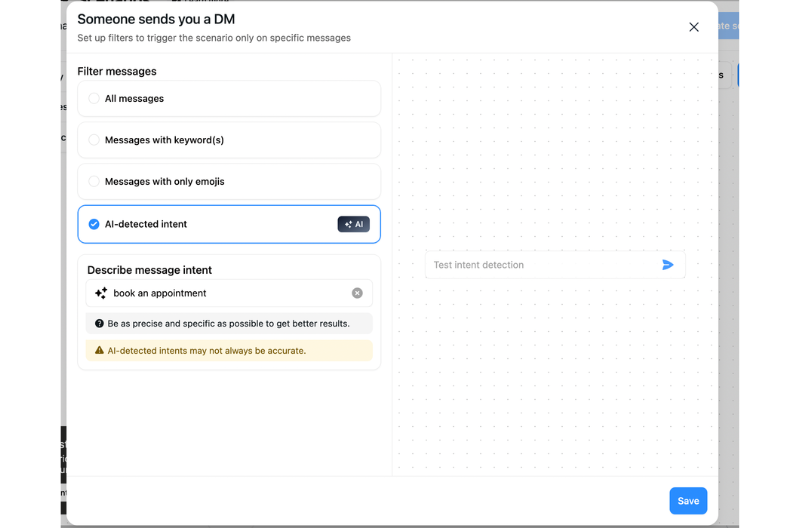
A keyword flow is rule-based: if the comment says "GUIDE," send this message. That's perfect for predictable intent. But real people go off script, they ask a question you didn't map, or reply with something messy, and a rule-based flow either sends the wrong thing or stalls. That's the difference between a comment-keyword trigger and AI-detected intent: the first matches exact words, the second reads what the person actually means and responds in your tone, then escalates to a human when judgment is needed. Start rule-based because it's simple and predictable. Add AI for the messy middle, where most rigid flows quietly lose people.
Instant conversions are the floor, not the ceiling. Use the first automation to capture an opt-in through real value, then stay present with regular touchpoints, and use DM campaigns for the moments that matter: a launch, a drop, a piece of news. Balance frequency with respect. A broadcast every time you breathe trains people to mute you. Structure it as three layers: initial automation from engagement, regular content touchpoints, and campaigns for major news.
When you are ready to scale past the first flow, build in this order.
| Priority | Flow type | Why it comes first |
|---|---|---|
| 1 | Comment-to-DM automation | Highest volume, directly tied to post engagement and lead capture |
| 2 | Story reply automation | High intent, often tied to ongoing campaigns |
| 3 | Welcome DM | Lower urgency but builds the contact base for future campaigns |
| 4 | AI qualification flows | Rebuild after the basics, test thoroughly before activating |
| 5 | Re-engagement campaigns | Run these once the new contact base is populated in Inrō |
Automating replies to mentions and story-mentions, when someone tags or shares you, is its own focused topic with its own page, rather than part of this pillar.
Instant conversions are the floor. The system that compounds has four layers, not one.
Capture is the trigger and first message above.
Qualify is one or two light questions that tag intent, so you know who's ready and who needs nurturing.
Nurture is a short sequence for contacts who aren't ready yet, spaced out, value first, never a wall of pitches. A simple nurture for a coach: deliver the resource, then two days later a quick tip tied to their stated goal, then an invitation to the next step.
Re-engage is a single, specific message to people who went cold, referencing why they came in the first place ("You grabbed the [resource] last week, did the [pricing / timing] give you pause?"). One good re-engagement message recovers conversions you'd otherwise write off.
And decide what stays human. Automate the repetitive first layer, first response and routing, FAQs, light qualification, sending the right link. Keep humans on negotiation, upset customers, refunds, and complex support. The handoff rule that works: if someone shows frustration, asks something complex, or is ready to buy and needs custom help, hand off within one or two messages.
Automation shouldn't be an island. The contacts and tags you capture in DMs should flow into the rest of your tools: intent and outcome tags feeding your CRM, captured emails syncing to your email platform, and for e-commerce, order and discount context connecting to Shopify. Capturing the email inside the DM itself, rather than sending people to a landing page to fill a form, is one of the quiet advantages of DM funnels, fewer steps, less drop-off.
Nona Source, the LVMH-owned marketplace for reselling deadstock luxury fabric, wanted to turn organic Instagram interest into registrations for a private sales event. They had the attention but no automated way to convert it, and handling sign-ups by hand would have capped the numbers and let warm interest cool before the date. So they set up one flow off a single organic post: anyone who engaged got an automated DM that opened a conversation, qualified them, and walked them through registering, with no manual outreach from the team. That one post triggered more than 1,500 automations, captured 660 leads, and converted 22% of them into full event registrations, all from organic content rather than paid reach or manual follow-up. It worked for the same reason the whole system does: the automated reply meets people at the moment they raise their hand, and it does the qualifying and sign-up work while intent is still live.
Results from an Inrō client case study: 1,500 automations generated 660 qualified leads, with 22% converting into full event registrations.
The principles here work with any compliant tool. If you're evaluating, check six things:
1. Official API access (avoid anything relying on scraping or browser automation)
2. Trigger coverage (ideally all six above; most tools cover two or three)
3. Routing and a real CRM (tags, assignment, handoff, history in one place)
4. Per-flow analytics (reply, click, and conversion by flow, not just message counts)
5. Reliability (failure logging so you know why a message didn't send)
6. AI handling for messy intent.
Inrō covers all six, but hold any tool to the same checklist, and for the full head-to-head see the tools review and alternatives page.
Do one thing: launch a single comment-to-DM or Story-reply flow, run it seven days, then improve one lever. Not five. That loop, live flow, measure, change one thing, is how DM automation actually gets good.
Yes, if it uses compliant methods, respects the messaging policies, and honors consent. The risk comes from unofficial tools, not from automation itself.
Not reliably via the official API, the conversation generally has to be initiated by the person. The workaround is to get new followers to trigger a DM (Story reply, comment keyword, click-to-message ad).
Reference the trigger, give two choices, ask one question. "Got it, do you want the beginner or advanced version?" Avoid "How can I help?" and avoid a link in message one.
Generally one, within seven days of the comment (tighter for Live). Continue only if the person replies.
Usually because the person didn't reply to your Private Reply, or messages landed in requests due to their settings, or a rate limit was hit. Log failures and design flows that earn a reply early.
Pick on workflow, not feature lists: do you need comment and Story triggers, an AI agent for messy intent, a team inbox with CRM, and campaigns? If yes to all, Inrō fits; the principles here apply either way.
Attract more leads, target them with DM marketing, and automate all your interactions on Instagram!


.png)




.png)