
Everything you can and can't change in an Instagram carousel after publishing: reorder slides, delete photos, edit captions, tags, alt text, and more.
.avif)
Automate Comments and DMs in 5 Minutes
Someone comments on your IG post. They get a DM instantly. You do nothing.

Trusted by 10K+ creators and SMBs


TL;DR
TL;DR
Turn your best-performing carousels into lead machines.
When someone comments on a carousel post, Inrō sends them a DM automatically.
Instagram added the ability to reorder carousel slides after publishing on March 24, 2026. Before this update, the only way to fix a slide order was to delete the post entirely and repost, losing all engagement in the process.
Steps to reorder:
The new order saves immediately. All existing likes, comments, saves, and shares are preserved.
Why slide order matters: The first slide is the only one visible in the feed before someone swipes. It functions as the cover image. A weak first slide reduces swipe-through rate. Moving a stronger image to the first position can revive an underperforming carousel without any content creation.
The feature is rolling out gradually. If you open Edit and do not see the drag option, update Instagram to the latest version and check again in a few days.
You can remove individual slides from a published carousel without deleting the whole post.
Steps to delete a slide:
The remaining slides close the gap automatically. All engagement on the post is preserved. Note that you cannot undo a slide deletion after saving, if you want to keep the image, save it to your camera roll before deleting.
The minimum carousel size is two slides. If you try to delete slides from a two-slide carousel, Instagram will not allow it — you would need to delete the post entirely.
Caption editing has been available for some time and works the same way in 2026.
Steps:
Caption edits are immediate and do not affect engagement. There is no character limit difference between editing and original posting — the same 2,200-character limit applies. Hashtags added during an edit are indexed by Instagram's search.
All of these are available in the same Edit menu:
Tag people: Tap Edit → Tag people → tap on the slide where you want to add a tag → search for the account → tap Done.
Edit alt text: Tap Edit → swipe to the slide → tap Edit alt text in the bottom left corner → enter or update the description → tap Save. Alt text improves accessibility and can influence how Instagram's algorithm categorises your content. Each slide has its own alt text field.
Change or add location: Tap Edit → tap Add location or the existing location tag → search for the new location → tap Done. You can also remove a location entirely from the same menu.
Add new slides. This is the most requested feature that Instagram has not yet enabled. If you want to include an additional photo or video, you need to create a new carousel post. The Edit menu only works with slides that were part of the original post.
Replace an existing slide. You cannot swap one image for another in place. The workaround is to delete the slide you want to replace, but since you cannot add new slides, you cannot put a replacement in. If the image itself needs to change, the post needs to be recreated.
Change the music. Music or audio added to a carousel at posting time cannot be changed or removed through the Edit menu. This is a known limitation with no official workaround.
Move the post to a different account. If you have multiple Instagram accounts and posted to the wrong one, there is no transfer option — you need to delete and repost on the correct account.
Instagram does not have a dedicated "change cover photo" option for carousel posts. The cover is always the first slide. The only way to change which image appears in the feed is to reorder your slides so that the image you want as the cover is in the first position.
Workaround:
The image now appears as the cover in the feed, on your profile grid, and in any sharing surfaces.
If you posted a carousel with the wrong image in the first slot and have already accumulated engagement, this reorder workaround means you no longer need to delete and repost — you can move the right image to the front without losing your likes or comments.
Engagement: No edit made through the Edit menu affects likes, comments, saves, or shares. The post is not deleted or reposted when you edit — it remains in place with its full engagement history.
Reach and algorithm: Instagram has not stated that editing a carousel post triggers any re-distribution or penalty. The post stays in its original position in the feed chronology and retains its engagement signals. Improving the first slide to increase swipe-through rate may indirectly improve ongoing performance, since Instagram's algorithm uses engagement signals to determine whether to continue distributing a post.
Notification: Caption edits, reorders, and other post-publish changes do not send notifications to followers or people who have commented. No one is alerted that you edited the post.
Reorder option not showing: The slide drag feature launched March 2026 and is rolling out gradually. Update Instagram to the latest version and check again in 24-48 hours. If the option is still not visible, your account may not have received the rollout yet.
Edit option missing entirely: Make sure you are on your own post — you can only edit your own content. Also confirm your app is up to date. On iOS, check the App Store; on Android, check Google Play.
Changes not saving: If the Done button is unresponsive, try force-quitting the app and reopening. If the problem persists, check your internet connection and try again on a different network.
Deleted slide still showing: Carousel edits sometimes take a few minutes to propagate across all surfaces. If a deleted slide is still appearing, hard-refresh the post by closing and reopening it.
Cannot delete a slide: If the delete icon is not appearing, confirm the carousel has more than two slides. Instagram requires a minimum of two slides in a carousel.
Carousel posts that end with a question or a keyword CTA ("comment GUIDE for the resource mentioned in slide 4") consistently generate more DM-worthy comments than single-image posts, because viewers who swipe through six slides are higher intent than passive scrollers.
With Inrō connected to your Instagram:
Every comment matching your keyword on a carousel triggers an automatic personalised DM: the link, resource, or follow-up you promised in the caption or on the last slide. This works regardless of when the comment arrives, so a carousel can keep generating leads weeks after posting if the algorithm continues distributing it.
Now that you can reorder carousel slides after posting, it's worth periodically reviewing high-performing old carousels: move a stronger first slide to the front, update the caption CTA, and let Inrō capture the renewed engagement automatically.
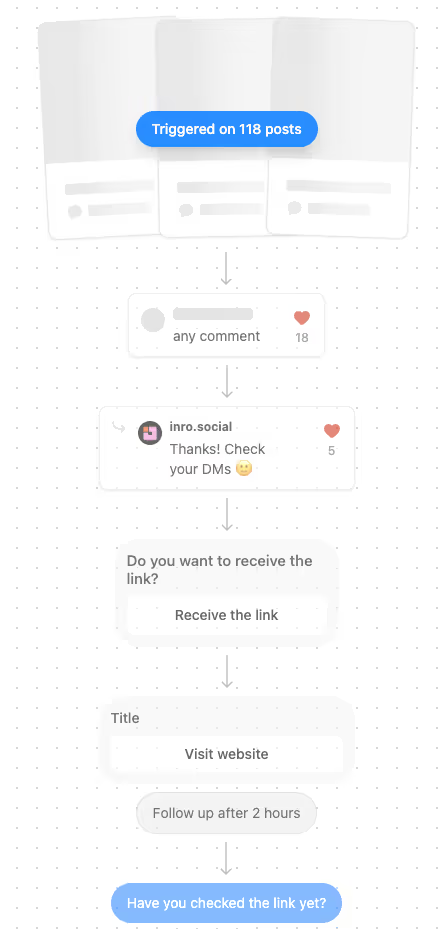
Set up a keyword trigger on your next carousel and Inrō handles every follow-up automatically.


Yes. You can reorder slides, delete individual slides, edit the caption, add or change tags, edit alt text, and change location — all through the three-dot Edit menu. You cannot add new slides or replace existing ones after posting.
Yes, as of March 24, 2026. Open the post, tap the three dots → Edit, then long-press a slide and drag it to a new position. The change saves immediately and does not affect likes, comments, or shares.
No. Instagram does not currently support adding new slides to a published carousel. You can reorder and delete existing slides, but adding new media requires creating a new post.
Yes. In the Edit menu, navigate to the slide you want to remove and tap the delete icon. Note that you cannot undo this after saving, and a carousel must keep a minimum of two slides.
No. Edits made through the Edit menu do not affect any engagement metrics. Likes, comments, saves, and shares all remain intact.
There is no dedicated cover-change option. The cover is always the first slide. To change it, reorder your slides so the image you want as the cover is in the first position.
The Edit menu is available on instagram.com. Most editing options including caption, tags, alt text, and location work on desktop. The reorder drag feature may be more reliable on mobile — if reordering is not working on desktop, try the mobile app instead.
The slide reorder feature launched in March 2026 and is still rolling out to all users. Update the Instagram app to the latest version and check again in 24-48 hours. If it still does not appear, the rollout has not yet reached your account.
No. Editing a carousel post does not trigger any notification to followers, commenters, or people you have tagged.
No. You can delete a slide but you cannot add a replacement. If a slide needs to be replaced, the carousel would need to be recreated as a new post.
Instagram carousels support between 2 and 20 slides. You cannot have a carousel with fewer than 2 slides or more than 20.
Carousel Reels follow slightly different rules. Standard carousel post editing (reorder, delete, caption) applies. For Reel-specific settings like audio and effects, the editing options are more limited than for standard carousel posts.
Join automations strategies and Instagram Insights weekly
By entering your email address above and clicking Subcribe, you consent to receive marketing communications (such as newsletters, blog posts, event invitations and new product updates), and targeted advertising from Inrō from time to time. You can unsubscribe from our marketing emails at anytime by clinking on the "Unsubscribe" link at the bottom of our emails. For more information about how we process personal information and what right you have on this respect, please see our Privacy Policy.
Attract more leads, target them with DM marketing, and automate your interactions on Instagram!
.avif)
.avif)
.avif)