
Instagram now lets you edit comments within 15 minutes of posting. Full rules, how it works on iOS and Android, and what you can't edit.
.avif)
Automate Comments and DMs in 5 Minutes
Someone comments on your IG post. They get a DM instantly. You do nothing.

Trusted by 10K+ creators and SMBs


TL;DR
Quick answer
To edit an Instagram comment, open the post, find your own comment, tap and hold it on Android (or swipe left on iOS), and tap Edit. Make your changes and save. Other users will see an Edited label but not your original text.
The rules:
The feature officially launched on April 9, 2026 and is rolling out to all users.
Editing typos is easy. Capturing every commenter is the hard part.
Instagram now lets you edit your own comment in 15 minutes. Inrō lets you turn every qualified comment into a personalised DM automatically, so nothing slips through when a post takes off.
Comment editing on Instagram is an official feature that lets users change the text of their own comment after posting it, instead of deleting and rewriting it. Instagram officially confirmed the rollout on April 9, 2026, closing out a multi-week test period.
The mechanics are simple and tightly scoped:
This puts Instagram roughly in line with Threads (which has had editing inside a 15-minute window for some time), behind Facebook (which keeps an edit history), and ahead of X/Twitter for free users (where editing is paid-only).
.avif)
The exact gesture is different on iOS and Android. Both get to the same menu.
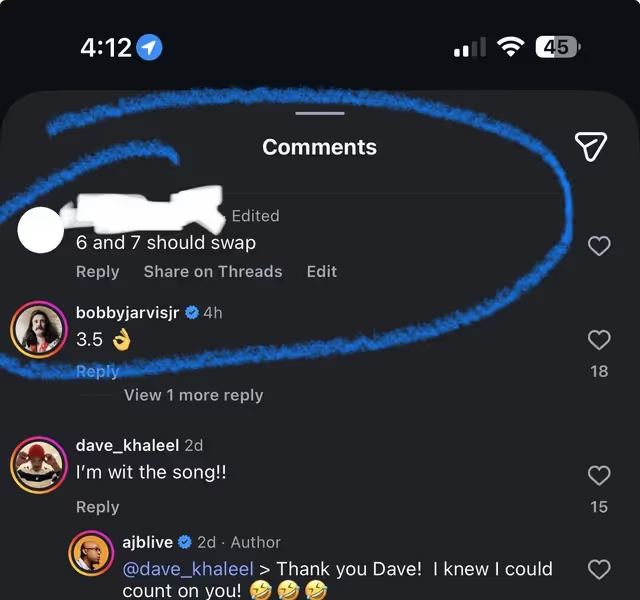
On both platforms, the comment immediately updates for everyone viewing the thread, with the Edited label visible next to the timestamp.
Instagram's comment editing is tightly scoped. Here is exactly what works and what does not.
The 15-minute countdown. The moment you hit post, a 15-minute timer starts. After 15 minutes, the Edit option disappears permanently from that comment. Your only remaining option is to delete and repost, which is what the old workaround was.
Unlimited edits within the window. You can edit the same comment as many times as you want in those 15 minutes. Fix a typo, then fix another, then change the wording. All of it counts as a single "edited" state.
Text only. You can change letters, words, punctuation, and emoji. You cannot swap out a GIF, a sticker, or media attached to the comment. If the thing you want to change is media, you still have to delete and repost.
Mobile only. As of April 2026, the Edit option only appears inside the Instagram mobile app on iOS and Android. Desktop users on instagram.com do not see the option at all. Web users still need to use Your Activity to delete and repost.
The Edited label is public. Other users cannot see what your comment originally said, but they can see that you changed it. The label is permanent once a comment has been edited, even if you later edit it back to the original text.
No notifications for edits. Unlike a new comment, an edit does not trigger a notification for the post owner or anyone following the thread. The Edited label is the only visible signal.
If the Edit option is missing, it is almost always one of five reasons.
The 15 minutes expired. The most common cause. Instagram removes the Edit option the moment the window closes. There is no way to extend it.
You are on desktop or the web app. Editing is mobile only. Open Instagram on your phone and the option appears.
Your app needs updating. The feature launched April 9, 2026 and shipped with that version of the app. If you are on an older build, the Edit option will not be there. Update through the App Store or Google Play.
You are trying to edit someone else's comment. You can only edit your own comments. Other users' comments cannot be modified, only reported or hidden from your post.
The comment is on a restricted format. Comments on certain content types (ads, some branded content) may not show the Edit option in the initial rollout. This is expected to change as the rollout finalises.
Editing is a quality-of-life fix for individual users. It does nothing for brands and creators dealing with comment volume, which is where the real cost sits.
No. The 15-minute comment editing window applies to comments on feed posts and Reels. Reply messages to Stories are a different surface (they arrive as DMs), and the edit feature does not extend there yet.
If you want to change a Story reply, you have the same options as any DM: you can unsend the message, which removes it from both sides of the conversation.
These two features get confused all the time, so worth being clear.
Comment editing changes the text of a comment you already posted. Launched April 2026, 15-minute window, mobile only.
Comment settings control who can comment on your posts in the first place (everyone, people you follow, followers you follow back, or nobody), plus moderation tools like hidden keywords, comment filtering, and comment review. These have been available for years and are found under your profile's Privacy settings.
If someone is asking "how do I edit comments on my posts" they usually mean one or the other. Editing is about fixing your own comment. Settings are about controlling other people's comments on your content.
Comment editing reduces friction for individual users fixing a typo. For brands managing high comment volumes, the more important question is what happens after someone comments. For a full walkthrough of automating Instagram comments into DMs, see our dedicated guide.
Instagram comments are often the first signal of buying intent. Inrō helps turn that signal into action. Editing a typo is useful. Capturing intent is more valuable.
Example. A creator posts "comment GUIDE and I'll send it to you." Without automation, they need to watch every incoming comment, manually send DMs, and keep track of follow-ups. If the post performs well, that gets messy fast. With Inrō, every commenter who writes GUIDE instantly receives a personalised DM with the link, automatically, while the creator sleeps.
Brands running DM campaigns around product launches or giveaways often see comment volume spike 5x during the first 24 hours, and that is where editing a typo is irrelevant next to capturing the leads. The edit button fixes one comment. Automation converts hundreds.
For the full playbook on setting up comment triggers, AI agent flows, and CRM tagging, read our Instagram DM automation guide.
Instagram's comment editing is a small win for users. For brands, the real win is still what comments trigger next.

Turn every qualified comment into a DM, a lead, or a tracked conversation instead of managing it by hand.


Yes. As of April 9, 2026, Instagram officially allows all users to edit their own comments within a 15-minute window after posting.
On iPhone, swipe left on your comment and tap the pencil icon. On Android, tap and hold the comment and select Edit. Make your changes and save. The window closes 15 minutes after the original post.
15 minutes. After that, the Edit option disappears and you have to delete and repost instead.
Yes, as long as it has been less than 15 minutes since you posted it. Unlimited edits are allowed within that window.
Yes. Within the 15-minute window, you can edit the same comment as many times as you want.
No, there is no push notification. Other users only see an Edited label appear next to the comment.
No. Instagram does not show edit history. Other users only see the current version with an Edited label.
No. Comment editing is only available in the Instagram mobile app on iOS and Android. Desktop users need to delete and repost.
Usually one of: more than 15 minutes have passed, you are on desktop, your app is outdated, you are trying to edit someone else's comment, or the feature has not finished rolling out to your region. Update the app first.
No. Only text can be edited. If you need to change media in a comment, you have to delete the comment and post a new one.
No. The 15-minute edit window applies to comments on feed posts and Reels. Story replies are DMs and can be unsent but not edited.
Yes. Deleting removes the comment entirely with no Edited label. This is the right choice if the 15 minutes have passed, if you want the comment gone with no trace, or if you need to change media.
Yes. Unlike X/Twitter, Instagram does not gate comment editing behind a paid subscription. Anyone on the latest version of the mobile app gets it.
Brands can edit their own comments the same way as any other account, inside the 15-minute window. Editing other people's comments on your post is not possible. To manage those, use Instagram's comment moderation tools or automate responses with a tool like Inrō.
Yes. Through Meta's official API, tools like Inrō trigger DMs based on comment keywords, which is the only realistic way to handle high comment volume during campaigns, launches, or viral moments.
No. Once you edit a comment, the Edited label is permanent. It stays visible to other users even if you later edit the comment back to its original wording. The only way to remove the Edited label from a comment is to delete the comment entirely and post it again from scratch, which also removes all replies to it.
No. Editing a comment sends no notification to anyone, not the post owner, not people who replied to your comment, and not followers of the post. The only visible change is the Edited label that appears next to the comment's timestamp. No push notification fires for an edit.
No. Once the 15-minute window closes, the Edit option disappears permanently from that comment. Your only remaining option is to delete the comment and post a new one. Note that this applies to comments only, Instagram DM editing has separate rules and is a different feature entirely. The 15-minute comment editing window does not apply to direct messages.
Join automations strategies and Instagram Insights weekly
By entering your email address above and clicking Subcribe, you consent to receive marketing communications (such as newsletters, blog posts, event invitations and new product updates), and targeted advertising from Inrō from time to time. You can unsubscribe from our marketing emails at anytime by clinking on the "Unsubscribe" link at the bottom of our emails. For more information about how we process personal information and what right you have on this respect, please see our Privacy Policy.
Attract more leads, target them with DM marketing, and automate your interactions on Instagram!
.png)
.png)
.png)