
Forward taps, back taps, next swipes and exits explained, how to read them together, and which Story interactions can actually trigger an automated DM.
Automate Comments and DMs in 5 Minutes
Someone comments on your IG post. They get a DM instantly. You do nothing.

Trusted by 10K+ creators and SMBs


TL;DR
TL;DR
Act on what the metrics tell you
Your best slides tell you where attention is. Turn those into Story reply automations that capture the lead instantly. Free plan, no card.
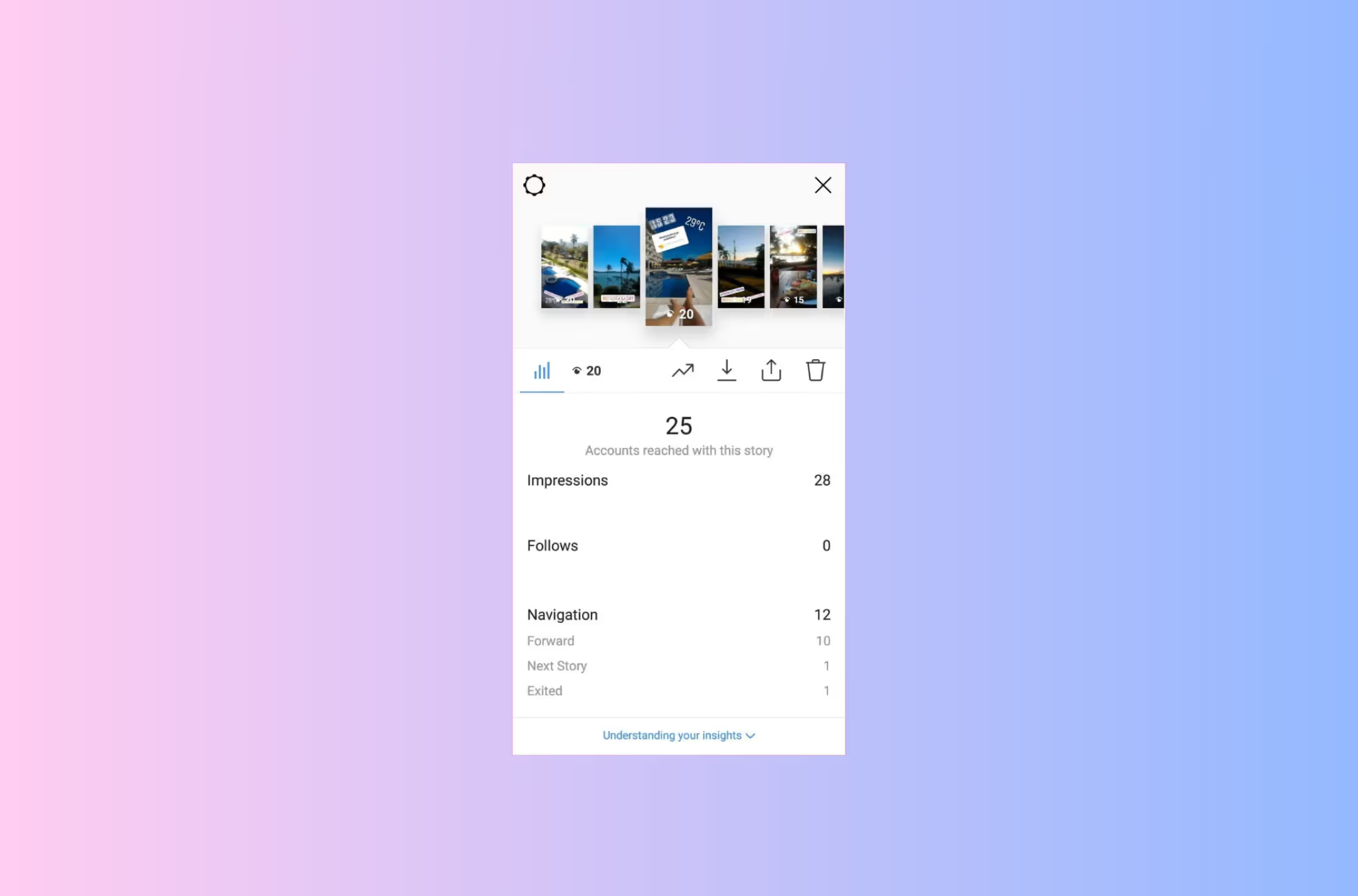
Navigation in Instagram Insights shows how people move through your Stories. It covers four actions: forward taps to skip ahead, back taps to rewatch, next story swipes to jump to a different account, and exit taps to leave Stories entirely. Read together they tell you which slides hold attention and which lose it, and which of your Stories are worth putting a call to action on.
Forward taps count people tapping ahead to your next slide before the current one finishes. Some of this is always going to happen, and a high number on its own is not a failure. What matters is where it happens. Forward taps on slide four of six are normal impatience. Forward taps on slide one mean your opening did not give anyone a reason to stay.
Back taps count people tapping left to watch something again. This is the strongest positive signal in the set, because going back takes deliberate effort. Somebody missed a detail, wanted to reread something, or liked what they saw enough to replay it. When one slide collects back taps, study it and work out what earned the second look.
Next story swipes count people swiping away to a different account's Stories. This is the one to take most seriously. The viewer was already in Stories mode and actively chose someone else over you, which is a sharper judgement than simply leaving.
Exit taps count people closing Stories altogether. This is the most neutral of the four, because everybody exits eventually and someone finishing your last slide and leaving is not a problem. What matters is clustering. A spike in exits on slide four of six means that slide is breaking the sequence.
Individual numbers say less than the shape they form across a sequence.
High forward taps early combined with high exits at the end means you are losing people at both ends, so the hook and the closer both need work. High back taps in the middle of otherwise flat slides means you have one strong piece surrounded by weaker ones, and that slide is your template for the rest. Consistent next story swipes on a particular kind of content, product Stories for example, while another kind gets rewatched, is your audience telling you plainly what they came for.
Instagram does not publish benchmark figures for any of these, and rates vary so much by account size, audience and content type that borrowed averages are not much use. Compare your Stories against your own Stories instead. The useful comparison is this week against last week, and your product slides against your behind the scenes ones.
Knowing which slides hold attention is only worth something if you act on it. Navigation data tells you exactly where to put your call to action.
Your high back tap slides are the obvious place. These viewers re-engaged deliberately, which makes them the most likely to respond to a prompt. Adding a reply instruction to a slide people already rewatch converts better than adding one to a slide they skim.
Your exit spike slides are the less obvious opportunity. If people consistently leave at a particular slide, testing a reply prompt there can recover some of them before they go. It is a better use of the slide than the transition that is currently failing.
The reason this matters is timing. A Story reply opens a DM thread, and Stories only run for 24 hours, so the replies arrive in a compressed window while attention is still on your content. Answering hours later usually means the moment has passed. That is the argument for automating the response rather than working through them by hand, and the full setup is on the Story replies use case page.
This is where people get caught out, because not every interaction shown in your Insights can be acted on. Meta's official API only exposes some of them, and the difference matters when you are choosing what to build a flow around.
The last two rows are worth remembering when you are comparing tools. Automation can only respond to someone who actively engaged, so any tool advertising automatic DMs to everyone who viewed or liked your Story is not working through official access, and that is the kind of shortcut that puts an account at risk. The wider explanation is in is Instagram automation safe, and the general mechanics are in setting up an Instagram auto DM.
One prerequisite people miss: none of this works if replies are switched off. Check Settings, then Privacy, then Story, then Allow Message Replies, and make sure it is not set to Off or restricted to people you follow.
Your best slides tell you where attention is. Turn those into Story reply automations that capture the lead instantly. Free plan, no card.


It shows how viewers move through your Stories, broken into four actions: forward taps to the next slide, back taps to rewatch, next story swipes to another account, and exit taps to leave Stories. It is a Stories metric and does not apply to feed posts.
Not by itself. Some tapping ahead is normal in any multi slide sequence. What matters is where it happens. Forward taps on your opening slide suggest the hook is not landing fast enough, while forward taps deeper into a sequence are much less concerning.
It is the best signal in the set. Going back is a deliberate action, so it means someone wanted a second look. Find the slide collecting them and work out what made it worth replaying, then apply that to the slides around it.
Next story swipes. A viewer who swipes to another account was still in Stories and chose someone else's content over yours. An exit often just means they finished, or that they had to put the phone down.
Instagram does not publish one, and figures vary too much by account size, audience and content type for third party averages to be reliable. Track your own Stories over time and compare formats against each other rather than against a number you found online.
No. Navigation is specific to Stories. Reels are measured with plays, likes, comments, shares and saves instead.
Yes. Text replies, emoji reactions, Story mentions and question sticker responses can all trigger an automatic DM through Meta's official API. Poll votes, Story likes and Story views cannot, so anything promising to message your viewers is not using official access.
Join automations strategies and Instagram Insights weekly
By entering your email address above and clicking Subscribe, you consent to receive marketing communications (such as newsletters, blog posts, event invitations and new product updates), and targeted advertising from Inrō from time to time. You can unsubscribe from our marketing emails at anytime by clinking on the "Unsubscribe" link at the bottom of our emails. For more information about how we process personal information and what right you have on this respect, please see our Privacy Policy.
Connect your Instagram account and build your first automation in minutes. No code required.
.avif)

.avif)