
Auto-scroll on Instagram Reels lets you watch hands-free. How to enable it, turn it off, and what to do if you can't find it in your app.
.avif)
Automate Comments and DMs in 5 Minutes
Someone comments on your IG post. They get a DM instantly. You do nothing.

Trusted by 10K+ creators and SMBs


TL;DR
TL;DR
Get More From Every Reel You Post
Someone comments on your Reel. They get a DM automatically with your link, offer, or freebie. You set it up once and it runs itself.
Instagram is rolling out a new auto-scroll feature for Reels that lets you binge videos hands-free.
Instead of swiping up after every Reel, you can now toggle “Auto-scroll” from the Reels menu. Once enabled, Instagram automatically moves you to the next Reel when the current one ends.
It’s a small UX change on the surface… but it could mean more views for creators, more passive doomscrolling for users, and a new way to think about Reels hooks and CTAs.
The Reels auto-scroll feature is exactly what it sounds like:
Instagram has tested similar behaviour via third-party tools and browser extensions in the past, but this is now a native feature inside the app on mobile.
This is rolling out gradually:
So don’t panic if it’s not in your app yet — you’re probably just not in the test or rollout group yet.
Instagram will now automatically advance to the next Reel when the current one ends. You can watch hands-free without swiping.
If you don't see Auto-scroll in the menu: the feature may not have rolled out to your account yet. Update Instagram to the latest version and check again. If it still does not appear, the rollout has not reached your region — Instagram is enabling this gradually.
The setting can reset after approximately 30 days, so you may need to re-enable it periodically.
If the Auto-scroll option is not appearing in your three-dot Reels menu, there are three likely reasons:
Your app is not updated. Auto-scroll requires the latest version of Instagram. Open the App Store or Google Play, search for Instagram, and tap Update if available.
The feature has not rolled out to your account yet. Instagram releases new features gradually, meaning some accounts and regions get access weeks before others. If you cannot find Auto-scroll after updating, your account is likely still in the queue. There is no way to force the rollout — it will appear automatically when Instagram enables it for your account.
Instagram removed or paused the feature in your region. In some cases Instagram has temporarily pulled a feature mid-rollout. If you previously had Auto-scroll and it has disappeared, check the Instagram Help Centre or recent app update notes for any announcements. Try logging out and back in, or uninstalling and reinstalling the app.
This might feel like a pure UX tweak, but it affects how people consume your content—and how you should design Reels going forward.
When Reels auto-scroll, viewers are more likely to:
For you, that can mean:
It’s not guaranteed growth, but it’s another way for the algorithm to keep feeding your content to people who are in binge mode.
Auto-scroll also means people are touching the screen less. They’re not swiping, reading captions, or making deliberate choices as often.
So:
Think of auto-scroll as the algorithm pitching your Reel to a distracted user: your hook has to do 90% of the work.
Even in an auto-scroll world, people still:
So while auto-scroll boosts passive views, there’s still a significant slice of viewers who:
That’s where your DM strategy matters more than the feature itself.
Short answer: it can, but not in the way most people expect.
Auto-scroll does not give your Reels a direct algorithmic boost. Instagram is not rewarding you just because someone watched your Reel in auto-scroll mode instead of swiping to it manually. What changes is the context around viewing.
When auto-scroll is on, viewers watch more Reels per session. That means your content gets more chances to appear in someone's feed, even if they never actively searched for you. If your Reel plays during an auto-scroll session and holds attention long enough to trigger a like, comment, save, or share, the algorithm treats that exactly the same as any other engagement. The signal that matters is still engagement quality, not the viewing mode.
What auto-scroll does change is the competitive pressure on your first two seconds. In a normal swipe session, a viewer made a micro-decision to move to your Reel. In auto-scroll, they just ended up there. That means your hook has to work harder to stop a more passive viewer. If the opening does not immediately give a reason to keep watching, the Reel finishes in the background while they are already mentally somewhere else.
For creators focused on reach, this means: auto-scroll is a reason to sharpen your hooks, not a reason to change anything else about your strategy.
Here’s how to play smart with this update.
Your Reel should:
For example:
“Comment ‘PLAN’ and I’ll DM you the step-by-step”
“Reply ‘MENU’ if you want our full cocktail list”
“DM me ‘CHECKLIST’ and I’ll send you the free PDF”
These CTAs work whether someone is actively engaged or half-zoned in auto-scroll mode.
Turn Reel comments into DM conversations automatically
Here is what actually happens when auto-scroll sends you more views: most of those viewers will not click your link, visit your profile, or do anything deliberate. But a portion of them will drop a comment, reply to your Reel, or DM you directly.
That is where Inrō comes in. Instead of manually following up with every person who comments a keyword on your Reel, you can set up an automatic DM response. Someone comments "PLAN" on your Reel, they get a DM with your step-by-step guide within seconds. You never had to touch your phone.
You can also tag contacts based on which Reel or keyword triggered the DM, so you can follow up later with targeted DM campaigns to people who already showed interest. That turns a passive auto-scroll view into a lead in your pipeline, without any extra manual work.
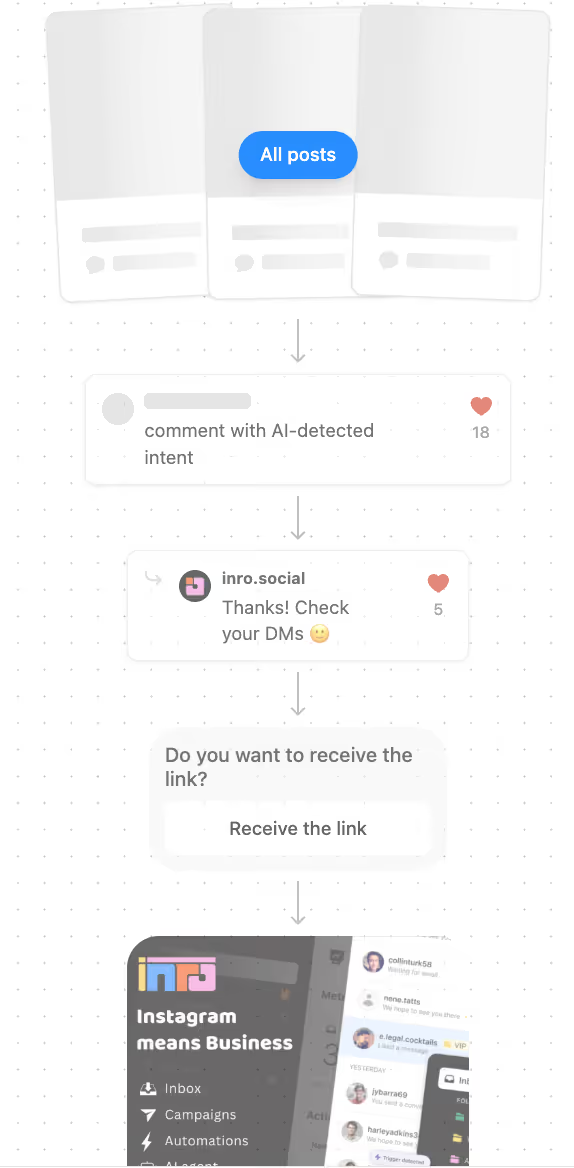
Auto-scroll sends you more views. Inrō makes sure you capture every comment and reply before it disappears into your notifications.


Instagram Reels auto-scroll is a feature that automatically moves you to the next Reel when the current one finishes, so you can watch Reels hands-free without manually swiping each time.
If you don’t see the option, the feature may not have rolled out to your account yet; make sure your app is updated.
Follow the same steps and toggle “Auto-scroll” off in the three-dots menu on a Reel. You can switch it on or off at any time.
Probably not. Instagram’s Reels auto-scroll feature is still being tested and gradually rolled out. Some users and regions have it, others don’t yet. Updating your app can help, but in many cases you just need to wait for the rollout.
Instagram doesn’t share exact details, but auto-scroll is designed to increase watch time and the number of Reels watched per session. That likely benefits creators whose content hooks viewers quickly and keeps them watching, as those are the videos the algorithm will be more inclined to serve next.
Instagram has not permanently removed auto-scroll, but the feature has been paused or re-rolled in some regions during gradual testing phases. If you previously had it and it disappeared, try updating the app, logging out and back in, or checking Instagram's latest app update notes. If you never had it, your account may not be in the rollout group yet, it will appear automatically when Instagram enables it for your region.
Yes, browser extensions and third-party apps for auto-scrolling Instagram Reels have existed for years. However, Instagram's new native auto-scroll feature makes these unnecessary for most users, and third-party tools that interact with Instagram outside the official app can violate Instagram's terms of service. Use the native toggle in the Reels menu instead
Auto-scroll can increase your total view count because viewers watch more Reels per session and are more likely to let a Reel finish rather than swiping past it. But the algorithm still prioritizes engagement signals like likes, comments, saves, and shares. More views from passive auto-scroll watching does not automatically mean better reachthe hook and content quality still determine whether those views lead to anything.
Auto-scroll is a mobile-only feature within the Instagram app. On desktop, Instagram Reels do not have the same auto-advance behavior. If you are watching Reels in a browser, you will still need to click or scroll manually
Yes. Instagram's auto-scroll setting can reset after approximately 30 days, so you may need to re-enable it periodically if you use it regularly.
Join automations strategies and Instagram Insights weekly
By entering your email address above and clicking Subcribe, you consent to receive marketing communications (such as newsletters, blog posts, event invitations and new product updates), and targeted advertising from Inrō from time to time. You can unsubscribe from our marketing emails at anytime by clinking on the "Unsubscribe" link at the bottom of our emails. For more information about how we process personal information and what right you have on this respect, please see our Privacy Policy.
Attract more leads, target them with DM marketing, and automate your interactions on Instagram!
.avif)
.avif)
.avif)